Static Analysis Java Layer Examples
2014 tinyCTF Ooooooh! What does this button do
Determine the File Type
Using the Linux file command, we can see that the file is a compressed archive. After extracting it, we find that it is actually an APK file.
Install the APK
After installing the file, let's take a look:
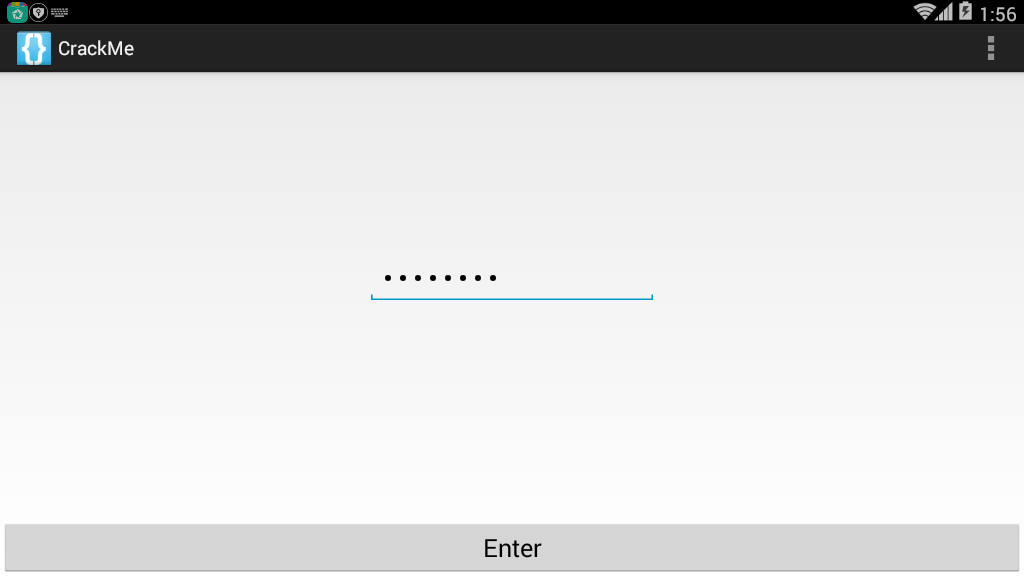
We can see that it simply takes a string as input, and then should pop up the result.
Examine the Program
    class C00721 implements OnClickListener {
        C00721() {
        }

        public void onClick(View view) {
            if (((EditText) MainActivity.this.findViewById(C0073R.id.passwordField)).getText().toString().compareTo("EYG3QMCS") == 0) {
                MainActivity.this.startActivity(new Intent(MainActivity.this, FlagActivity.class));
            }
        }
    }
In the main program, we can see that if the input string is EYG3QMCS, it will execute flagActivity.class. So let's enter it and get the following result:
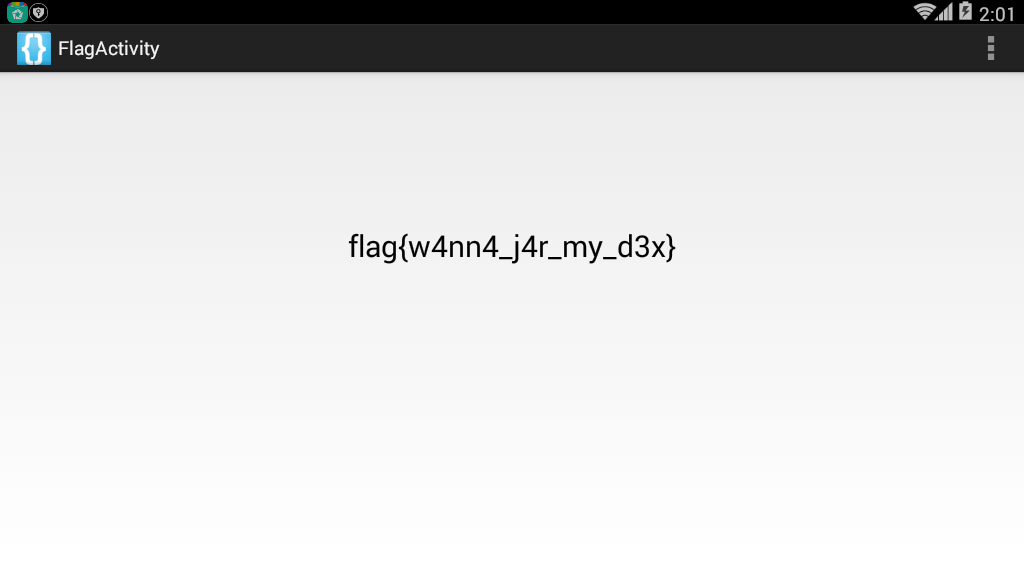
And we obtain the flag.
2014 ASIS Cyber Security Contest Finals Numdroid
Determine the File Type
First, we use file to check the file type. We find it's a compressed archive. After extracting it, we get the corresponding files, and upon further examination, we discover it's an APK file.
Install the Program
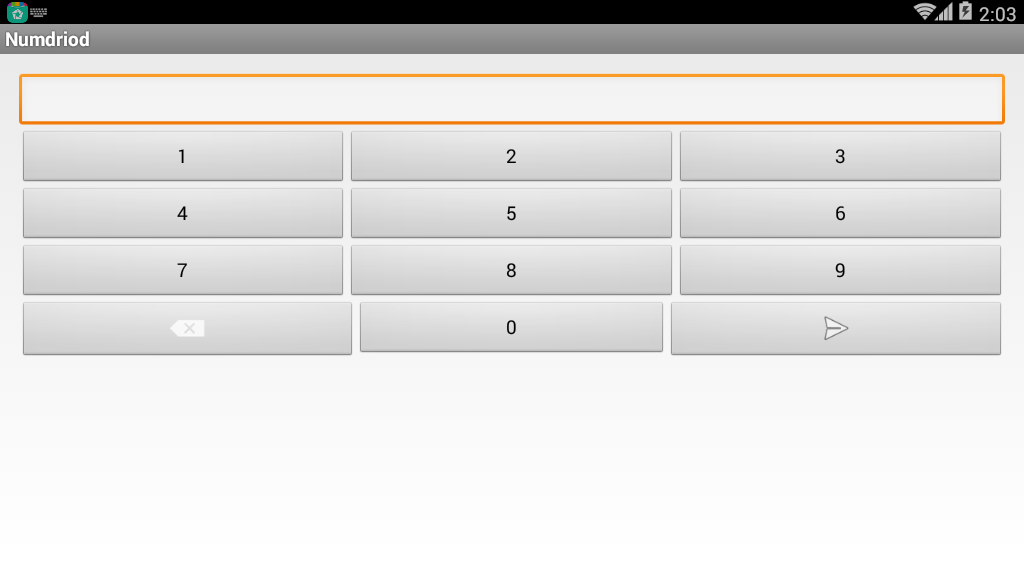
Let's install the program. Taking a quick look at the interface, we can see that the program mainly requires entering a password and then logging in. If the wrong password is entered, a "Wrong Password" message will pop up.
Analyze the Program
We can locate the key function in the source program based on the relevant strings. From strings.xml, we can find that the variable name for this string is "wrong", which leads us to the following code:
    protected void ok_clicked() {
        DebugTools.log("clicked password: " + this.mScreen.getText());
        boolean result = Verify.isOk(this, this.mScreen.getText().toString());
        DebugTools.log("password is Ok? : " + result);
        if (result) {
            Intent i = new Intent(this, LipSum.class);
            Bundle b = new Bundle();
            b.putString("flag", this.mScreen.getText().toString().substring(0, 7));
            i.putExtras(b);
            startActivity(i);
            return;
        }
        Toast.makeText(this, R.string.wrong, 1).show();
        this.mScreen.setText("");
    }
We then continue to locate Verify.isOk, as shown below:
    public static boolean isOk(Context c, String _password) {
        String password = _password;
        if (_password.length() > 7) {
            password = _password.substring(0, 7);
        }
        String r = OneWayFunction(password);
        DebugTools.log("digest: " + password + " => " + r);
        if (r.equals("be790d865f2cea9645b3f79c0342df7e")) {
            return true;
        }
        return false;
    }
We can see that the program takes the first 7 characters of the password, encrypts them using OneWayFunction, and then compares the result with be790d865f2cea9645b3f79c0342df7e. If they are equal, it returns true. Let's also look at the OneWayFunction:
    private static String OneWayFunction(String password) {
        List<byte[]> bytes = ArrayTools.map(ArrayTools.select(ArrayTools.map(new String[]{"MD2", "MD5", "SHA-1", "SHA-256", "SHA-384", "SHA-512"}, new AnonymousClass1(password)), new SelectAction<byte[]>() {
            public boolean action(byte[] element) {
                return element != null;
            }
        }), new MapAction<byte[], byte[]>() {
            public byte[] action(byte[] element) {
                int i;
                byte[] b = new byte[8];
                for (i = 0; i < b.length / 2; i++) {
                    b[i] = element[i];
                }
                for (i = 0; i < b.length / 2; i++) {
                    b[(b.length / 2) + i] = element[(element.length - i) - 2];
                }
                return b;
            }
        });
        byte[] b2 = new byte[(bytes.size() * 8)];
        for (int i = 0; i < b2.length; i++) {
            b2[i] = ((byte[]) bytes.get(i % bytes.size()))[i / bytes.size()];
        }
        try {
            MessageDigest digest = MessageDigest.getInstance("MD5");
            digest.update(b2);
            byte[] messageDigest = digest.digest();
            StringBuilder hexString = new StringBuilder();
            for (byte aMessageDigest : messageDigest) {
                String h = Integer.toHexString(aMessageDigest & MotionEventCompat.ACTION_MASK);
                while (h.length() < 2) {
                    h = "0" + h;
                }
                hexString.append(h);
            }
            return hexString.toString();
        } catch (NoSuchAlgorithmException e) {
            return "";
        }
    }
The function essentially computes several hash values, but analyzing it manually would be overly complex. Since the answer space for this challenge (10^7) is relatively small, we can extract the methods from the Verify class and brute-force the answer ourselves.
Construct the Program
After extracting the Java program, we add a main function to the Verify class and fix some errors to obtain the answer.
The corresponding code is placed in the example folder.
It's worth noting that if a hash function doesn't exist, the original program will skip that function. Running all of them directly didn't yield a result, but after removing the uncommon MD2 algorithm, we got the answer. This indicates that Android likely does not have the MD2 algorithm.
After entering the result, we get the following:
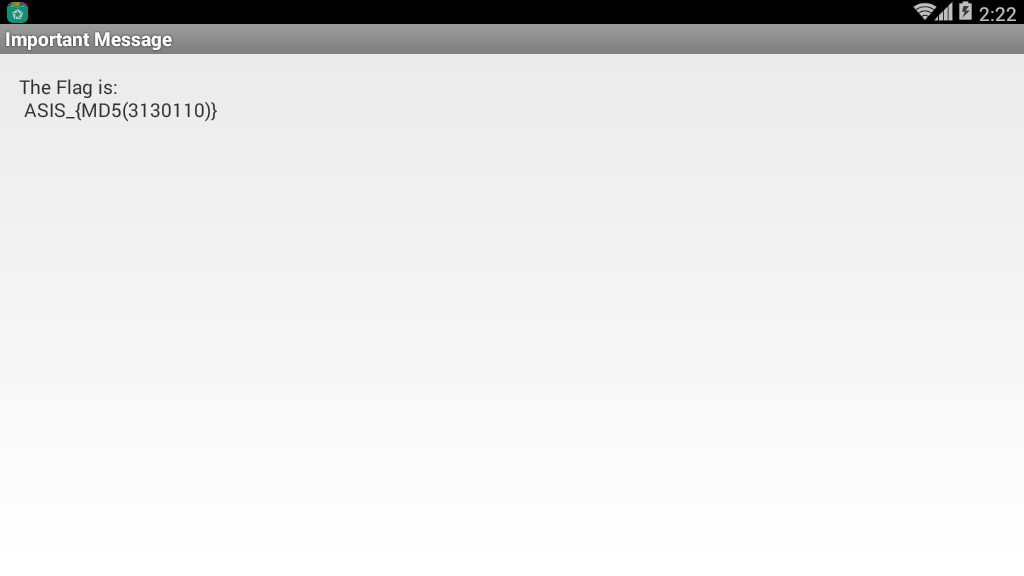
Then we compute the corresponding MD value, obtaining the flag: ASIS_3c56e1ed0597056fef0006c6d1c52463.
2014 Sharif University Quals CTF Commercial Application
Install the Program
First, we install the program and casually tap some buttons. Clicking the button in the upper right corner prompts us to enter a key:
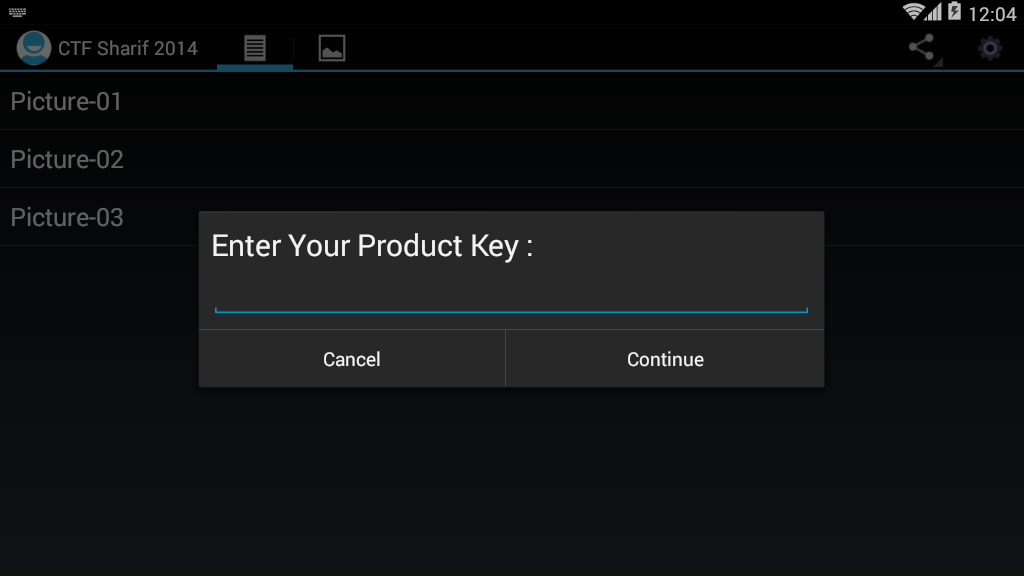
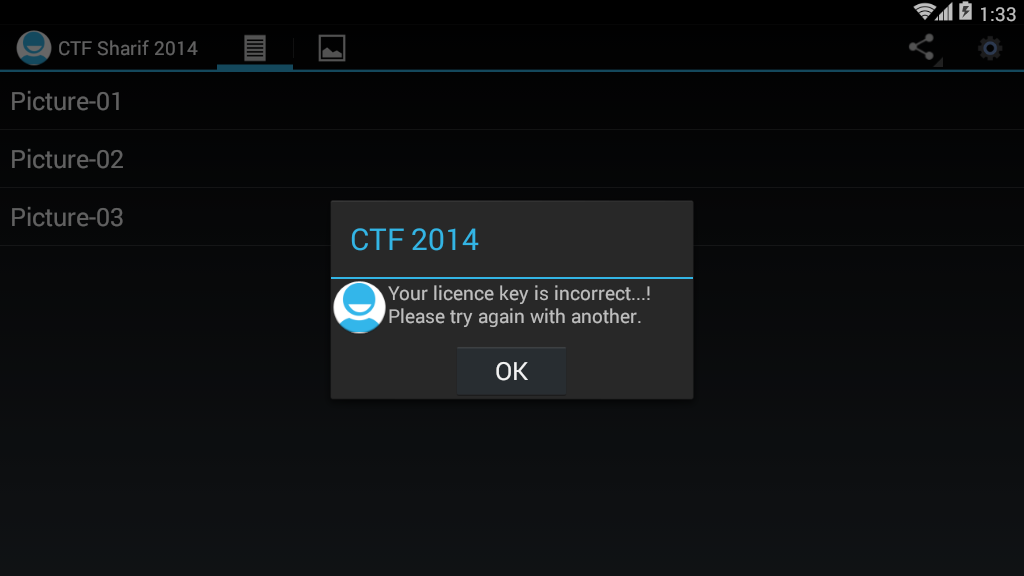
After entering a random value, the program immediately shows an error, telling us it's incorrect. We can use this information to locate the key code.
Locate the Key Code
    public static final String NOK_LICENCE_MSG = "Your licence key is incorrect...! Please try again with another.";
    public static final String OK_LICENCE_MSG = "Thank you, Your application has full licence. Enjoy it...!";

    private void checkLicenceKey(final Context context) {
        if (this.app.getDataHelper().getConfig().hasLicence()) {
            showAlertDialog(context, OK_LICENCE_MSG);
            return;
        }
        View inflate = LayoutInflater.from(context).inflate(C0080R.layout.propmt, null);
        Builder builder = new Builder(context);
        builder.setView(inflate);
        final EditText editText = (EditText) inflate.findViewById(C0080R.id.editTextDialogUserInput);
        builder.setCancelable(false).setPositiveButton("Continue", new OnClickListener() {
            public void onClick(DialogInterface dialogInterface, int i) {
                if (KeyVerifier.isValidLicenceKey(editText.getText().toString(), MainActivity.this.app.getDataHelper().getConfig().getSecurityKey(), MainActivity.this.app.getDataHelper().getConfig().getSecurityIv())) {
                    MainActivity.this.app.getDataHelper().updateLicence(2014);
                    MainActivity.isRegisterd = true;
                    MainActivity.this.showAlertDialog(context, MainActivity.OK_LICENCE_MSG);
                    return;
                }
                MainActivity.this.showAlertDialog(context, MainActivity.NOK_LICENCE_MSG);
            }
        }).setNegativeButton("Cancel", new C00855());
        builder.create().show();
    }
We can see that MainActivity.NOK_LICENCE_MSG stores the error message string. Reading further, we find that the program uses:
KeyVerifier.isValidLicenceKey(editText.getText().toString(), MainActivity.this.app.getDataHelper().getConfig().getSecurityKey(), MainActivity.this.app.getDataHelper().getConfig().getSecurityIv())
for verification. If the verification passes, it will display a success message.
Detailed Analysis
Let's carefully analyze the three parameters.
Parameter 1
Parameter 1 is simply the string we input.
Parameter 2
It uses a function to get the SecurityKey. After a quick read, we can see that the program sets the SecurityKey in the getConfig function:
    public AppConfig getConfig() {
        boolean z = false;
        AppConfig appConfig = new AppConfig();
        Cursor rawQuery = this.myDataBase.rawQuery(SELECT_QUERY, null);
        if (rawQuery.moveToFirst()) {
            appConfig.setId(rawQuery.getInt(0));
            appConfig.setName(rawQuery.getString(1));
            appConfig.setInstallDate(rawQuery.getString(2));
            if (rawQuery.getInt(3) > 0) {
                z = true;
            }
            appConfig.setValidLicence(z);
            appConfig.setSecurityIv(rawQuery.getString(4));
            appConfig.setSecurityKey(rawQuery.getString(5));
            appConfig.setDesc(rawQuery.getString(7));
        }
        return appConfig;
    }
Here, the function first performs a database query. The SELECT_QUERY is as follows:
    private static String DB_NAME = "db.db";
    private static String DB_PATH = "/data/data/edu.sharif.ctf/databases/";
    public static final String SELECT_QUERY = ("SELECT  * FROM " + TABLE_NAME + " WHERE a=1");
    private static String TABLE_NAME = "config";
We can also determine the database path from this.
Upon further analysis, we can see that the program first retrieves the first row from the config table, then sets the IV to the value of the 4th column and the key to the value of the 5th column.
            appConfig.setSecurityIv(rawQuery.getString(4));
            appConfig.setSecurityKey(rawQuery.getString(5));
Parameter 3
Parameter 3 is actually similar to Parameter 2, so we won't elaborate on it here.
Obtain the Database File
First, we need to install the APK on a phone, then use the following command to retrieve the database:
adb pull /data/data/edu.sharif.ctf/databases/db.db
Then we can use a SQLite viewer on our computer to examine it. Here I'm using http://sqlitebrowser.org/. The result is as follows:

From this, we can directly obtain:
SecurityIv=a5efdbd57b84ca36
SecurityKey=37eaae0141f1a3adf8a1dee655853714
Analyze the Encryption Code
public class KeyVerifier {
    public static final String CIPHER_ALGORITHM = "AES/CBC/PKCS5Padding";
    public static final String VALID_LICENCE = "29a002d9340fc4bd54492f327269f3e051619b889dc8da723e135ce486965d84";

    public static String bytesToHexString(byte[] bArr) {
        StringBuilder stringBuilder = new StringBuilder();
        int length = bArr.length;
        for (int i = 0; i < length; i++) {
            stringBuilder.append(String.format("%02x", new Object[]{Integer.valueOf(bArr[i] & 255)}));
        }
        return stringBuilder.toString();
    }

    public static String encrypt(String str, String str2, String str3) {
        String str4 = "";
        try {
            Key secretKeySpec = new SecretKeySpec(hexStringToBytes(str2), "AES");
            Cipher instance = Cipher.getInstance(CIPHER_ALGORITHM);
            instance.init(1, secretKeySpec, new IvParameterSpec(str3.getBytes()));
            str4 = bytesToHexString(instance.doFinal(str.getBytes()));
        } catch (Exception e) {
            e.printStackTrace();
        }
        return str4;
    }

    public static byte[] hexStringToBytes(String str) {
        int length = str.length();
        byte[] bArr = new byte[(length / 2)];
        for (int i = 0; i < length; i += 2) {
            bArr[i / 2] = (byte) ((Character.digit(str.charAt(i), 16) << 4) + Character.digit(str.charAt(i + 1), 16));
        }
        return bArr;
    }

    public static boolean isValidLicenceKey(String str, String str2, String str3) {
        return encrypt(str, str2, str3).equals(VALID_LICENCE);
    }
}
We can see that the program first uses the encrypt function to encrypt three strings. It essentially uses the AES/CBC/PKCS5Padding method mentioned above, with str2 as the key and str3 as the initialization vector. We can easily add a decryption function as follows:
    public static String decrypt(String input, String secretKey, String iv) {
        String encryptedText = "";
        try {
            SecretKeySpec secretKeySpec = new SecretKeySpec(hexStringToBytes(secretKey), "AES");
            Cipher cipher = Cipher.getInstance(CIPHER_ALGORITHM);
            cipher.init(2, secretKeySpec, new IvParameterSpec(iv.getBytes()));
            encryptedText = bytesToHexString(cipher.doFinal(hexStringToBytes(userInput)));
        } catch (Exception e) {
            e.printStackTrace();
        }
        return encryptedText;
    }
Running this, we get the valid product key:
fl-ag-IS-se-ri-al-NU-MB-ER
2015-0CTF-vezel
Analysis
First, let's analyze the code:
public void confirm(View v) {
    if("0CTF{" + String.valueOf(this.getSig(this.getPackageName())) + this.getCrc() + "}".equals(
            this.et.getText().toString())) {
        Toast.makeText(((Context)this), "Yes!", 0).show();
    }
    else {
        Toast.makeText(((Context)this), "0ops!", 0).show();
    }
}

private String getCrc() {
    String v1;
    try {
        v1 = String.valueOf(new ZipFile(this.getApplicationContext().getPackageCodePath()).getEntry(
                "classes.dex").getCrc());
    }
    catch(Exception v0) {
        v0.printStackTrace();
    }

    return v1;
}

private int getSig(String packageName) {
    int v4;
    PackageManager v2 = this.getPackageManager();
    int v5 = 64;
    try {
        v4 = v2.getPackageInfo(packageName, v5).signatures[0].toCharsString().hashCode();
    }
    catch(Exception v0) {
        v0.printStackTrace();
    }

    return v4;
}
We can see that the flag we want consists of two parts:
- String.valueOf(this.getSig(this.getPackageName()))
- this.getCrc()
For the first part, we can write our own app to obtain the corresponding value. For the second part, we can extract the dex file directly and calculate it using online tools.
hashcode
Here's a simple one we found (placed in the corresponding example folder):
package com.iromise.getsignature;

import android.content.pm.PackageInfo;
import android.content.pm.PackageManager;
import android.content.pm.Signature;
import android.support.v7.app.AppCompatActivity;
import android.os.Bundle;
import android.text.TextUtils;
import android.util.Log;
import android.widget.Toast;

public class MainActivity extends AppCompatActivity {

    private StringBuilder builder;

    public void onCreate(Bundle savedInstanceState) {
        super.onCreate(savedInstanceState);
        setContentView(R.layout.activity_main);
        PackageManager manager = getPackageManager();
        builder = new StringBuilder();
        String pkgname = "com.ctf.vezel";
        boolean isEmpty = TextUtils.isEmpty(pkgname);
        if (isEmpty) {
            Toast.makeText(this, "The application package name cannot be empty!", Toast.LENGTH_SHORT);
        } else {
            try {
                PackageInfo packageInfo = manager.getPackageInfo(pkgname, PackageManager.GET_SIGNATURES);
                Signature[] signatures = packageInfo.signatures;
                Log.i("hashcode", String.valueOf(signatures[0].toCharsString().hashCode()));
            } catch (PackageManager.NameNotFoundException e) {
                e.printStackTrace();
            }
        }
    }
}
Then filter for "hashcode" in DDMS:
07-18 11:05:11.895 16124-16124/? I/hashcode: -183971537
Note: This program can actually be written as a small app, as many programs compute signatures.
classes.dex crc32
Use any online website to get the CRC32 value of classes.dex:
CRC-32  46e26557
MD5 Hash    3217b0ad6c769233ea2a49d17885b5ba
SHA1 Hash   ec3b4730654248a02b016d00c9ae2425379bf78f
SHA256 Hash 6fb1df4dacc95312ec72d8b79d22529e1720a573971f866bbf8963b01499ecf8
Note that the value needs to be converted to decimal:
>>> print int("46E26557", 16)
1189242199
flag
Combining both parts gives us the flag:
Flag: 0ctf{-1839715371189242199}
2017 XMAN HelloSmali2
We are given a smali file. We can approach it as follows:
Use smali.jar to assemble the smali into a dex file:
java -jar smali.jar assemble src.smali -o src.dex
Use jadx to decompile the dex, as shown below:
package com.example.hellosmali.hellosmali;

public class Digest {
    public static boolean check(String input) {
        String str = "+/abcdefghijklmnopqrstuvwxyzABCDEFGHIJKLMNOPQRSTUVWXYZ0123456789";
        if (input == null || input.length() == 0) {
            return false;
        }
        int i;
        char[] charinput = input.toCharArray();
        StringBuilder v2 = new StringBuilder();
        for (char toBinaryString : charinput) {
            String intinput = Integer.toBinaryString(toBinaryString);
            while (intinput.length() < 8) {
                intinput = "0" + intinput;
            }
            v2.append(intinput);
        }
        while (v2.length() % 6 != 0) {
            v2.append("0");
        }
        String v1 = String.valueOf(v2);
        char[] v4 = new char[(v1.length() / 6)];
        for (i = 0; i < v4.length; i++) {
            int v6 = Integer.parseInt(v1.substring(0, 6), 2);
            v1 = v1.substring(6);
            v4[i] = str.charAt(v6);
        }
        StringBuilder v3 = new StringBuilder(String.valueOf(v4));
        if (input.length() % 3 == 1) {
            v3.append("!?");
        } else if (input.length() % 3 == 2) {
            v3.append("!");
        }
        if (String.valueOf(v3).equals("xsZDluYYreJDyrpDpucZCo!?")) {
            return true;
        }
        return false;
    }
}
Upon quick examination, this is essentially a variant of base64 encoding. We can find a base64 implementation online and configure it accordingly. The script used here is from http://www.cnblogs.com/crazyrunning/p/7382693.html.
#coding=utf8
import string

base64_charset = '+/abcdefghijklmnopqrstuvwxyzABCDEFGHIJKLMNOPQRSTUVWXYZ0123456789'


def decode(base64_str):
    """
    Decode a base64 string
    :param base64_str: base64 string
    :return: decoded bytearray; returns empty bytearray if input is not a valid base64 string
    """
    # Get the index of each base64 character and convert to a 6-bit binary string
    base64_bytes = ['{:0>6}'.format(str(bin(base64_charset.index(s))).replace('0b', '')) for s in base64_str if
                    s != '=']
    resp = bytearray()
    nums = len(base64_bytes) // 4
    remain = len(base64_bytes) % 4
    integral_part = base64_bytes[0:4 * nums]

    while integral_part:
        # Take 4 6-bit base64 characters as 3 bytes
        tmp_unit = ''.join(integral_part[0:4])
        tmp_unit = [int(tmp_unit[x: x + 8], 2) for x in [0, 8, 16]]
        for i in tmp_unit:
            resp.append(i)
        integral_part = integral_part[4:]

    if remain:
        remain_part = ''.join(base64_bytes[nums * 4:])
        tmp_unit = [int(remain_part[i * 8:(i + 1) * 8], 2) for i in range(remain - 1)]
        for i in tmp_unit:
            resp.append(i)

    return resp

if __name__=="__main__":
    print decode('A0NDlKJLv0hTA1lDAuZRgo==')
The result is:
➜  tmp python test.py
eM_5m4Li_i4_Ea5y
Challenges
- GCTF 2017 Android1
- GCTF 2017 Android2
- ISG 2017 Crackme
- XMAN 2017 mobile3 rev1