Other Types of Encryption
Bacon's Cipher
Principle
Bacon's cipher uses two different typefaces to represent A and B, combined with an encryption table for encoding and decoding.
| a | AAAAA | g | AABBA | n | ABBAA | t | BAABA |
|---|---|---|---|---|---|---|---|
| b | AAAAB | h | AABBB | o | ABBAB | u-v | BAABB |
| c | AAABA | i-j | ABAAA | p | ABBBA | w | BABAA |
| d | AAABB | k | ABAAB | q | ABBBB | x | BABAB |
| e | AABAA | l | ABABA | r | BAAAA | y | BABBA |
| f | AABAB | m | ABABB | s | BAAAB | z | BABBB |
The above is the commonly used encryption table. There is also another encryption table, which can be thought of as ordering the 26 letters from 0 to 25 in binary, with A representing 0 and B representing 1.
The following passage contains the plaintext "steganography" encrypted, where normal font represents A and bold represents B:
To encode a message each letter of the plaintext is replaced by a group of five of the letters 'A' or 'B'.
As we can see, Bacon's cipher has the following characteristics:
- Only two types of characters
- Each segment has a length of 5
- The encrypted content is distinguished by special typefaces, or by uppercase and lowercase differences.
Tools
Rail Fence Cipher
Principle
The Rail Fence cipher divides the plaintext into groups of N, then concatenates the 1st character of each group together to form an irregular string. Here is an example:
Plaintext: THERE IS A CIPHER
After removing spaces:
THEREISACIPHER
Dividing into two rails, grouping in pairs:
TH ER EI SA CI PH ER
First take out the first letter of each pair, then the second letter:
TEESCPE
HRIAIHR
Concatenated together:
TEESCPEHRIAIHR
The above plaintext can also be divided into 2 rails as follows:
THEREIS ACIPHER
Combining to get the ciphertext:
TAHCEIRPEHIESR
Tools
Curve Cipher
Principle
The Curve Cipher is a transposition cipher that requires both parties to agree on a key (i.e., the curve path) in advance. Here is an example:
Plaintext: The quick brown fox jumps over the lazy dog
Fill into a 5-row, 7-column table (the number of rows and columns is agreed upon in advance):
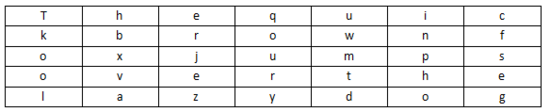
The encryption route (the number of rows and columns is agreed upon in advance):
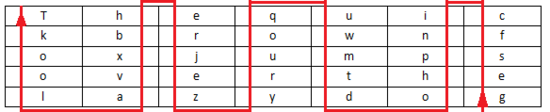
Ciphertext: gesfc inpho dtmwu qoury zejre hbxva lookT
Columnar Transposition Cipher
Principle
The Columnar Transposition Cipher is a relatively simple and easy-to-implement transposition cipher that scrambles plaintext into ciphertext through a simple rule. Here is an example.
Using the plaintext The quick brown fox jumps over the lazy dog and the key how are u:
Fill the plaintext into a 5-row, 7-column table (the number of rows and columns is agreed upon in advance; if the plaintext cannot fill the table completely, a specific letter can be used for padding):
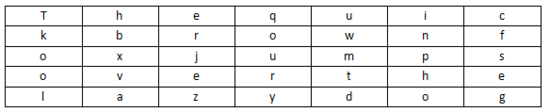
Key: how are u. Number the letters according to their order of appearance in the alphabet: a is 1, e is 2, h is 3, o is 4, r is 5, u is 6, w is 7. So we first write out the a column, then the e column, and so on — the result is the ciphertext:
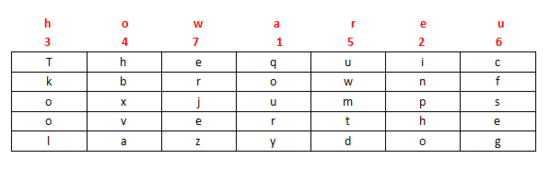
Ciphertext: qoury inpho Tkool hbxva uwmtd cfseg erjez
Tools
- http://www.practicalcryptography.com/ciphers/classical-era/columnar-transposition/ (requires equal number of rows and columns)
01248 Cipher
Principle
This cipher is also known as the Cloud Shadow Cipher. It uses the digits 0, 1, 2, 4, and 8, where 0 represents a separator and the other digits are added together. For example: 28=10, 124=7, 18=9. Then 1→26 maps to A→Z.
This cipher has the following characteristics:
- Only contains 0, 1, 2, 4, 8
Example
Here we use CFF 2016 Shadow Cipher as an example. The challenge:
8842101220480224404014224202480122
We split by 0 as follows:
| Content | Number | Character |
|---|---|---|
| 88421 | 8+8+4+2+1=23 | W |
| 122 | 1+2+2=5 | E |
| 48 | 4+8=12 | L |
| 2244 | 2+2+4+4=12 | L |
| 4 | 4 | D |
| 142242 | 1+4+2+2+4+2=15 | O |
| 248 | 2+4+8=14 | N |
| 122 | 1+2+2=5 | E |
So the final flag is WELLDONE.
JSFuck
Principle
JSFuck can write JavaScript programs using only 6 characters: []()!+. For example, if we want to implement alert(1) using JSFuck, the code is as follows:
[][(![]+[])[+[[+[]]]]+([][[]]+[])[+[[!+[]+!+[]+!+[]+!+[]+!+[]]]]+(![]+[])[+[[!+[]+!+[]]]]+(!![]+[])[+[[+[]]]]+(!![]+[])[+[[!+[]+!+[]+!+[]]]]+(!![]+[])[+[[+!+[]]]]][([][(![]+[])[+[[+[]]]]+([][[]]+[])[+[[!+[]+!+[]+!+[]+!+[]+!+[]]]]+(![]+[])[+[[!+[]+!+[]]]]+(!![]+[])[+[[+[]]]]+(!![]+[])[+[[!+[]+!+[]+!+[]]]]+(!![]+[])[+[[+!+[]]]]]+[])[+[[!+[]+!+[]+!+[]]]]+([][(![]+[])[+[[+[]]]]+([][[]]+[])[+[[!+[]+!+[]+!+[]+!+[]+!+[]]]]+(![]+[])[+[[!+[]+!+[]]]]+(!![]+[])[+[[+[]]]]+(!![]+[])[+[[!+[]+!+[]+!+[]]]]+(!![]+[])[+[[+!+[]]]]]+[])[+[[!+[]+!+[]+!+[]+!+[]+!+[]+!+[]]]]+([][[]]+[])[+[[+!+[]]]]+(![]+[])[+[[!+[]+!+[]+!+[]]]]+(!![]+[])[+[[+[]]]]+(!![]+[])[+[[+!+[]]]]+([][[]]+[])[+[[+[]]]]+([][(![]+[])[+[[+[]]]]+([][[]]+[])[+[[!+[]+!+[]+!+[]+!+[]+!+[]]]]+(![]+[])[+[[!+[]+!+[]]]]+(!![]+[])[+[[+[]]]]+(!![]+[])[+[[!+[]+!+[]+!+[]]]]+(!![]+[])[+[[+!+[]]]]]+[])[+[[!+[]+!+[]+!+[]]]]+(!![]+[])[+[[+[]]]]+([][(![]+[])[+[[+[]]]]+([][[]]+[])[+[[!+[]+!+[]+!+[]+!+[]+!+[]]]]+(![]+[])[+[[!+[]+!+[]]]]+(!![]+[])[+[[+[]]]]+(!![]+[])[+[[!+[]+!+[]+!+[]]]]+(!![]+[])[+[[+!+[]]]]]+[])[+[[!+[]+!+[]+!+[]+!+[]+!+[]+!+[]]]]+(!![]+[])[+[[+!+[]]]]]((![]+[])[+[[+!+[]]]]+(![]+[])[+[[!+[]+!+[]]]]+(!![]+[])[+[[!+[]+!+[]+!+[]]]]+(!![]+[])[+[[+!+[]]]]+(!![]+[])[+[[+[]]]]+([][(![]+[])[+[[+[]]]]+([][[]]+[])[+[[!+[]+!+[]+!+[]+!+[]+!+[]]]]+(![]+[])[+[[!+[]+!+[]]]]+(!![]+[])[+[[+[]]]]+(!![]+[])[+[[!+[]+!+[]+!+[]]]]+(!![]+[])[+[[+!+[]]]]]+[])[+[[+!+[]]]+[[!+[]+!+[]+!+[]+!+[]+!+[]]]]+[+!+[]]+([][(![]+[])[+[[+[]]]]+([][[]]+[])[+[[!+[]+!+[]+!+[]+!+[]+!+[]]]]+(![]+[])[+[[!+[]+!+[]]]]+(!![]+[])[+[[+[]]]]+(!![]+[])[+[[!+[]+!+[]+!+[]]]]+(!![]+[])[+[[+!+[]]]]]+[])[+[[+!+[]]]+[[!+[]+!+[]+!+[]+!+[]+!+[]+!+[]]]])()
Some other basic expressions:
false       =>  ![]
true        =>  !![]
undefined   =>  [][[]]
NaN         =>  +[![]]
0           =>  +[]
1           =>  +!+[]
2           =>  !+[]+!+[]
10          =>  [+!+[]]+[+[]]
Array       =>  []
Number      =>  +[]
String      =>  []+[]
Boolean     =>  ![]
Function    =>  []["filter"]
eval        =>  []["filter"]["constructor"]( CODE )()
window      =>  []["filter"]["constructor"]("return this")()
Tools
BrainFuck
Principle
Brainfuck is a minimalist programming language created by Urban Müller in 1993. For example, if we want to print "Hello World!" on the screen, the corresponding program is as follows. For those interested in the underlying principles, feel free to search online.
++++++++++[>+++++++>++++++++++>+++>+<<<<-]
>++.>+.+++++++..+++.>++.<<+++++++++++++++.
>.+++.------.--------.>+.>.
A related language is Ook.
Tools
Pigpen Cipher
Principle
The Pigpen cipher is a simple substitution cipher based on grids. The grids are as follows:

Here is an example. If the plaintext is X marks the spot, the ciphertext is:

Tools
Dancing Men Cipher
Principle
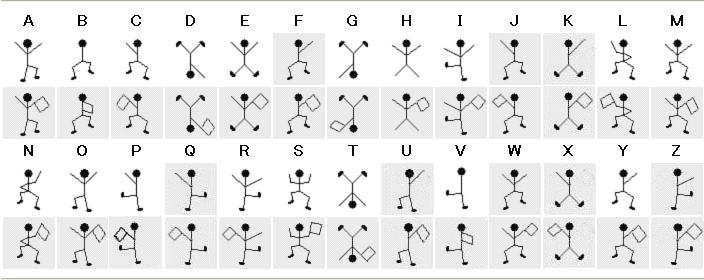
This cipher originates from the Sherlock Holmes stories. Each dancing man figure corresponds to one of the 26 English letters, and a flag held by the figure indicates that the letter is the last letter of a word. If there is only a single word rather than a sentence, or if it is the last word in a sentence, the last letter of the word does not need a flag.
Keyboard Cipher
Keyboard ciphers use mobile phone keyboards or computer keyboards for encryption.
Mobile Keyboard Cipher
The mobile keyboard encryption method uses the 3–4 letters on each number key, represented by two-digit numbers. For example: "ru" represented using a mobile keyboard is 7382. From this we can see that mobile keyboard encryption cannot start with 1, and the second digit cannot exceed 4. Keep this in mind when decrypting.
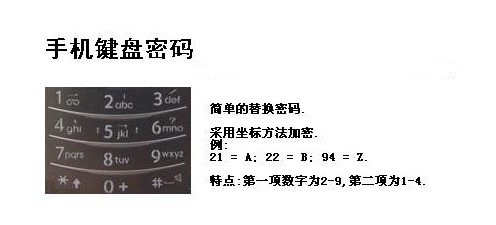
There is also another method for mobile keyboard encryption, which is the "phonetic" method (this may vary depending on the phone). Refer to the phone keyboard to type. For example: the Chinese word "数字" (digits) would be represented as 748 94. Pressing these numbers on the phone keyboard produces the pinyin for "数字".
Computer Keyboard Chessboard
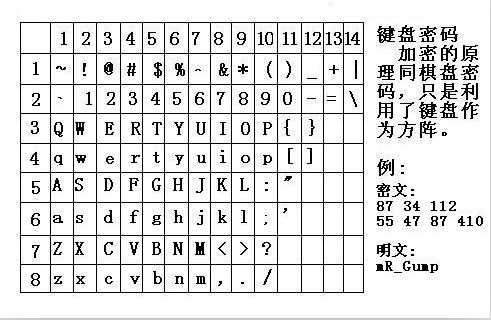
Computer keyboard chessboard encryption makes use of the chessboard matrix of a computer keyboard.
Computer Keyboard Coordinates
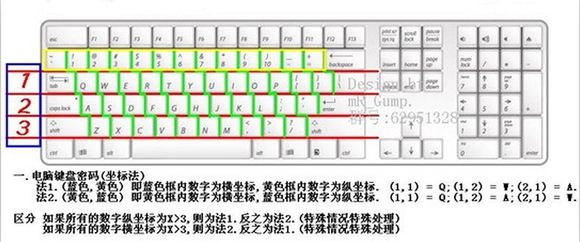
Computer keyboard coordinate encryption uses the letter rows and number rows on the keyboard for encryption. For example: "bye" represented using computer keyboard XY coordinates is 351613.
Computer Keyboard QWE
The computer keyboard QWE encryption method replaces the keyboard layout order with the alphabetical order.
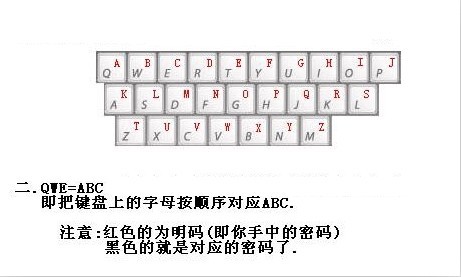
Keyboard Layout Cipher
Simply put, encryption is based on the shape formed by the given characters on the keyboard.
0CTF 2014 classic
Xiao Dingding finds himself in a strange room with only a door engraved with strange characters. He discovers a combination lock next to the door — it seems he needs to enter a password to open it... 4esxcft5 rdcvgt 6tfc78uhg 098ukmnb
Since it looks so jumbled and contains both numbers and letters, we can guess this might be a keyboard cipher. Trying to trace the characters on the keyboard in order, we can make out the pattern "0ops", which is likely the flag.
2017 xman Selection — One Two Three, Freeze
I'm counting 1-2-3 freeze, act now or lose points.
23731263111628163518122316391715262121
Password format: xman{flag}
The challenge has an obvious hint of "123", which naturally leads us to think of computer keyboard coordinate cipher. We can observe that the second digit of the first few numbers is within the range 1–3, which confirms our guess. So:
23-x
73-m
12-a
63-n
11-q
Wait, that's not right — the password format is xman{, and the fourth character should be {. Looking at the position of { on the keyboard, it doesn't have a corresponding row coordinate, but if we manually treat it as 11, then 111 would be {. Continuing from there, this approach works, and finally treating 121 as } gives us the flag.
xman{hintisenough}
From this we can see that we need to stay flexible and not rigidly apply existing knowledge.
Challenges
- Shiyanbar: Strange SMS