ELF Files
The content of this section is derived from the ELF 1.2 standard, with some modifications and reorganization. The main references are as follows:
- ELF File Format Analysis, Peking University, Teng Qiming
- ELF - Destroying Christmas
Introduction
ELF (Executable and Linkable Format) files, also known as object files in Linux, mainly have the following three types:
- Relocatable File: Contains code and data generated by the compiler. The linker will link it with other object files to create executable files or shared object files. In Linux systems, such files generally have the
.osuffix. -
Executable File: The programs we typically execute in Linux.
-
Shared Object File: Contains code and data; these files are what we call library files, generally ending with
.so. Generally, there are two usage scenarios:- The linker (Link eDitor, ld) may process it along with other relocatable files and shared object files to generate another object file.
- The Dynamic Linker combines it with an executable file and other shared objects to create a process image.
Regarding the naming of Link eDitor, https://en.wikipedia.org/wiki/GNU_linker
Object files are created by the assembler and linker. They are the binary form of text programs and can run directly on a processor. Programs that require a virtual machine to execute (such as Java) do not fall within this scope.
Here, we mainly focus on the ELF file format.
File Format
Object files participate in both program linking and program execution. For convenience and efficiency, depending on the process, the object file format provides two parallel views of its content, as shown below:
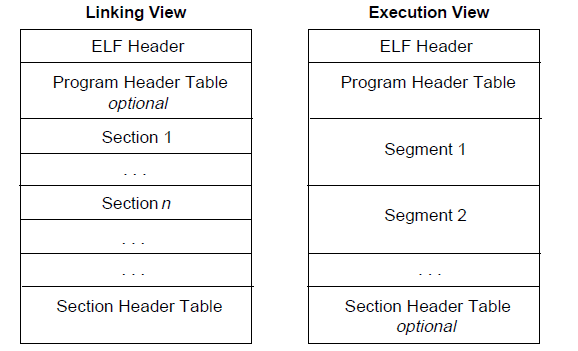
First, let's focus on the linking view.
At the beginning of the file is the ELF Header, which provides the overall organization of the entire file.
If a Program Header Table exists, it tells the system how to create a process. Object files used to generate a process must have a program header table, but relocatable files do not need this table.
The section part contains most of the information used in the linking view: instructions, data, symbol tables, relocation information, and so on.
The Section Header Table contains information describing the file's sections. Each section has an entry in the table, providing the section name, section size, and other information. Object files used for linking must have a section header table; other object files may or may not have one.
Here is a more visual representation of the linking view:
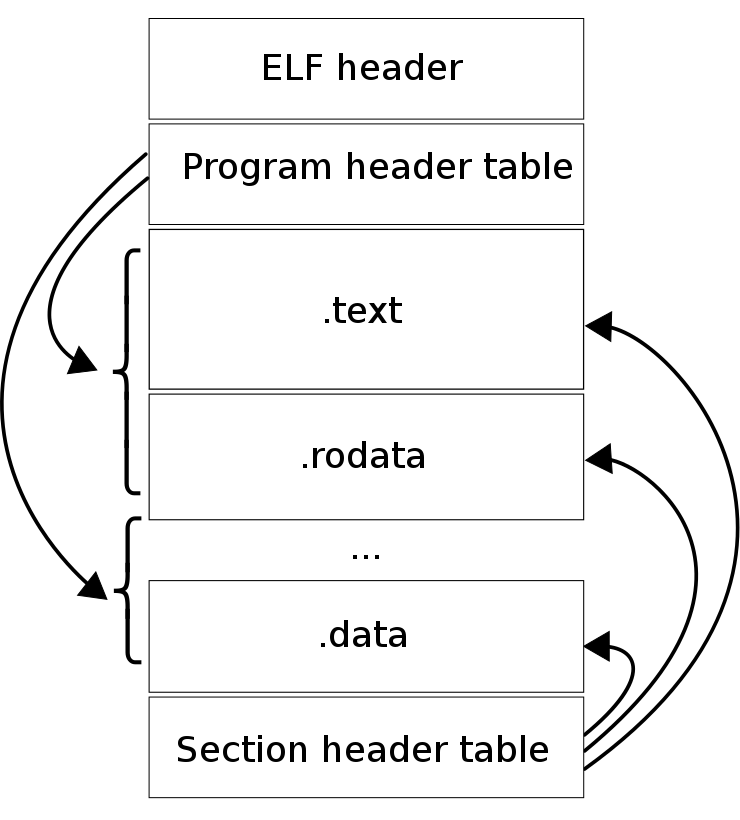
For the execution view, the main difference is that there are no sections, but rather multiple segments. In fact, these segments mostly originate from sections in the linking view.
Note:
Although the diagram arranges things in the order of ELF header, program header table, sections, and section header table, in reality, except for the ELF header, the other parts do not have a strict order.
Data Representation
The ELF file format supports 8-bit/32-bit architectures. Of course, this format is extensible and can also support processors with smaller or larger bit widths. Therefore, object files contain some control data that indicates the architecture used by the object file, allowing it to be identified and interpreted in a generic way. Other data in the object file is encoded in the format of the target processor, regardless of the machine on which it was created. What this essentially means is that object files can be cross-compiled — we can generate ARM platform executable code on an x86 platform.
All data structures in an object file follow "natural" size and alignment rules, as shown below:
| Name | Size | Alignment | Purpose |
|---|---|---|---|
| Elf32_Addr | 4 | 4 | Unsigned program address |
| Elf32_Half | 2 | 2 | Unsigned half integer |
| Elf32_Off | 4 | 4 | Unsigned file offset |
| Elf32_Sword | 4 | 4 | Signed large integer |
| Elf32_Word | 4 | 4 | Unsigned large integer |
| unsigned char | 1 | 1 | Unsigned small integer |
If necessary, data structures can contain explicit padding to ensure that 4-byte objects are 4-byte aligned, to force the size of data structures to be a multiple of 4, and so on. Data is also aligned accordingly. Thus, a structure containing an Elf32_Addr member will be aligned on a 4-byte boundary in the file.
For portability, ELF files do not use bit fields.
Character Representation
To be determined.
Note: In the following discussion, we primarily focus on 32-bit as our basis for explanation.
ELF Header
The ELF Header describes the overview of the ELF file. Using this data structure, all information in the ELF file can be indexed. The data structure is as follows:
#define EI_NIDENT   16

typedef struct {
    unsigned char   e_ident[EI_NIDENT];
    ELF32_Half      e_type;
    ELF32_Half      e_machine;
    ELF32_Word      e_version;
    ELF32_Addr      e_entry;
    ELF32_Off       e_phoff;
    ELF32_Off       e_shoff;
    ELF32_Word      e_flags;
    ELF32_Half      e_ehsize;
    ELF32_Half      e_phentsize;
    ELF32_Half      e_phnum;
    ELF32_Half      e_shentsize;
    ELF32_Half      e_shnum;
    ELF32_Half      e_shstrndx;
} Elf32_Ehdr;
Each member starts with the prefix e, which should stand for ELF. The specific description of each member is as follows.
e_ident
As mentioned earlier, ELF provides an object file framework to support multiple processors and multiple encoding formats. This variable specifies how to decode and interpret the machine-independent data in the file. The meanings of different indices in this array are as follows:
| Macro Name | Index | Purpose |
|---|---|---|
| EI_MAG0 | 0 | File identification |
| EI_MAG1 | 1 | File identification |
| EI_MAG2 | 2 | File identification |
| EI_MAG3 | 3 | File identification |
| EI_CLASS | 4 | File class |
| EI_DATA | 5 | Data encoding |
| EI_VERSION | 6 | File version |
| EI_PAD | 7 | Start of padding bytes |
Among these,
e_ident[EI_MAG0] through e_ident[EI_MAG3], the first 4 bytes of the file, are called the "magic number" and identify the file as an ELF object file. As for why it starts with 0x7f, that has not been specifically researched.
| Name | Value | Position |
|---|---|---|
| ELFMAG0 | 0x7f | e_ident[EI_MAG0] |
| ELFMAG1 | 'E' | e_ident[EI_MAG1] |
| ELFMAG2 | 'L' | e_ident[EI_MAG2] |
| ELFMAG3 | 'F' | e_ident[EI_MAG3] |
e_ident[EI_CLASS] is the byte following e_ident[EI_MAG3] and identifies the file's class or capacity.
| Name | Value | Meaning |
|---|---|---|
| ELFCLASSNONE | 0 | Invalid class |
| ELFCLASS32 | 1 | 32-bit file |
| ELFCLASS64 | 2 | 64-bit file |
The ELF file is designed to be portable among machines with different byte lengths, without imposing the maximum or minimum byte length of the machine. ELFCLASS32 supports machines with file sizes and virtual address spaces up to 4GB; it uses the basic types defined above.
ELFCLASS64 is used for 64-bit architectures.
The e_ident[EI_DATA] byte specifies the encoding of processor-specific data in the object file. The currently defined encodings are:
| Name | Value | Meaning |
|---|---|---|
| ELFDATANONE | 0 | Invalid data encoding |
| ELFDATA2LSB | 1 | Little-endian |
| ELFDATA2MSB | 2 | Big-endian |
Other values are reserved and will be assigned to new encodings as necessary in the future.
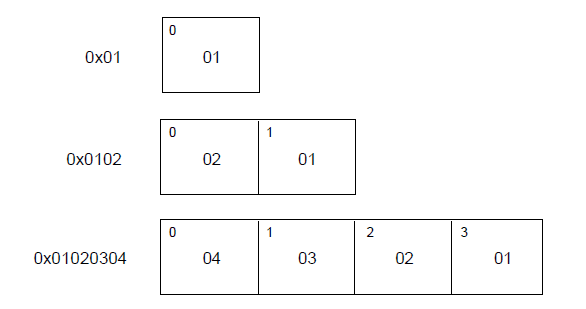
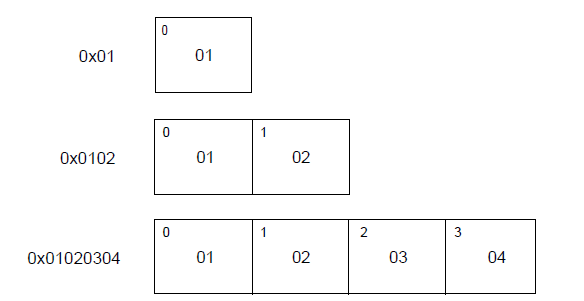
The file data encoding indicates how the file contents should be parsed. As mentioned earlier, ELFCLASS32 files use variable types of 1, 2, and 4 bytes. For the different defined encodings, their representations are shown below, with the byte number in the upper-left corner.
ELFDATA2LSB encoding uses two's complement, with the Least Significant Byte occupying the lowest address.
ELFDATA2MSB encoding uses two's complement, with the Most Significant Byte occupying the lowest address.
e_ident[EI_DATA] specifies the version number of the ELF header. Currently, this value must be EV_CURRENT, which is the previously mentioned e_version.
e_ident[EI_PAD] specifies the starting address of unused bytes in e_ident. These bytes are reserved and set to 0; programs that process object files should ignore them. If these bytes are used in the future, the value of EI_PAD will change.
e_type
e_type identifies the object file type.
| Name | Value | Meaning |
|---|---|---|
| ET_NONE | 0 | No file type |
| ET_REL | 1 | Relocatable file |
| ET_EXEC | 2 | Executable file |
| ET_DYN | 3 | Shared object file |
| ET_CORE | 4 | Core dump file |
| ET_LOPROC | 0xff00 | Processor-specific lower bound |
| ET_HIPROC | 0xffff | Processor-specific upper bound |
Although the content of core dump files is not specified in detail, ET_CORE is still reserved to mark such files. From ET_LOPROC to ET_HIPROC (inclusive) is reserved for processor-specific scenarios. Other values may be assigned to new object file types as necessary in the future.
e_machine
This field specifies the machine architecture on which the current file can run.
| Name | Value | Meaning |
|---|---|---|
| EM_NONE | 0 | No machine type |
| EM_M32 | 1 | AT&T WE 32100 |
| EM_SPARC | 2 | SPARC |
| EM_386 | 3 | Intel 80386 |
| EM_68K | 4 | Motorola 68000 |
| EM_88K | 5 | Motorola 88000 |
| EM_860 | 7 | Intel 80860 |
| EM_MIPS | 8 | MIPS RS3000 |
Here, EM should be an abbreviation for ELF Machine.
Other values are reserved for new machines as necessary in the future. Additionally, processor-specific ELF names use the machine name for differentiation, and flags generally have a prefix of EF_ (ELF Flag). For example, a flag called WIDGET on the EM_XYZ machine would be called EF_XYZ_WIDGET.
e_version
Identifies the version of the object file.
| Name | Value | Meaning |
|---|---|---|
| EV_NONE | 0 | Invalid version |
| EV_CURRENT | 1 | Current version |
1 indicates the initial file format; future extensions will use larger numbers. Although the value of EV_CURRENT is 1 above, it may change to reflect the current version number — for example, ELF is still only at version 1.2 to this day.
e_entry
This field specifies the virtual address where the system transfers control to the corresponding code in the ELF file. If there is no associated entry point, this field is 0.
e_phoff
This field gives the byte offset of the Program Header Table from the beginning of the file (Program Header table OFFset). If the file has no program header table, this value is 0.
e_shoff
This field gives the byte offset of the Section Header Table from the beginning of the file (Section Header table OFFset). If the file has no section header table, this value is 0.
e_flags
This field gives processor-specific flags associated with the file. These flags are named in the format EF_machine_flag.
e_ehsize
This field gives the byte size of the ELF file header (ELF Header Size).
e_phentsize
This field gives the byte size of each entry in the program header table (Program Header ENTry SIZE). All entries are the same size.
e_phnum
This field gives the number of entries in the program header table (Program Header entry NUMber). Therefore, the product of e_phnum and e_phentsize gives the total byte size of the program header table. If the file has no program header table, this value is 0.
e_shentsize
This field gives the byte size of a section header (Section Header ENTry SIZE). A section header is one entry in the section header table; all entries in the section header table occupy the same amount of space.
e_shnum
This field gives the number of entries in the section header table (Section Header NUMber). Therefore, the product of e_shnum and e_shentsize gives the total byte size of the section header table. If the file has no section header table, this value is 0.
e_shstrndx
This field gives the index of the section header table entry associated with the section name string table (Section Header table InDeX related with section name STRing table). If the file has no section name string table, this value is SHN_UNDEF. For more details, please refer to the "Sections" and "String Table" sections later.
Program Header Table
Overview
The Program Header Table is an array of structures, where each element is of type Elf32_Phdr, describing a segment or other information the system needs when preparing the program for execution. In the ELF header, e_phentsize and e_phnum specify the size of each element and the number of elements in this array. A segment in an object file contains one or more sections. Program headers are only meaningful for executable files and shared object files.
In other words, the Program Header Table is specifically designed for the segments used during ELF file runtime.
The data structure of Elf32_Phdr is as follows:
typedef struct {
    ELF32_Word  p_type;
    ELF32_Off   p_offset;
    ELF32_Addr  p_vaddr;
    ELF32_Addr  p_paddr;
    ELF32_Word  p_filesz;
    ELF32_Word  p_memsz;
    ELF32_Word  p_flags;
    ELF32_Word  p_align;
} Elf32_Phdr;
The description of each field is as follows:
| Field | Description |
|---|---|
| p_type | This field indicates the type of the segment, or provides related information about the structure. |
| p_offset | This field gives the offset from the beginning of the file to the first byte of the segment. |
| p_vaddr | This field gives the virtual address of the first byte of the segment in memory. |
| p_paddr | This field is only used in systems related to physical address addressing. Since "System V" ignores physical addressing for applications, the content of this field is not constrained for executable files and shared object files. |
| p_filesz | This field gives the size of the segment in the file image, which may be 0. |
| p_memsz | This field gives the size of the segment in the memory image, which may be 0. |
| p_flags | This field gives flags associated with the segment. |
| p_align | The p_vaddr and p_offset of loadable program segments must be integer multiples of the page size. This member gives the alignment for the segment in both the file and memory. If this value is 0 or 1, no alignment is required. Otherwise, p_align should be a positive integral power of 2, and p_vaddr should equal p_offset modulo p_align. |
Segment Types
The segment types in an executable file are as follows:
| Name | Value | Description |
|---|---|---|
| PT_NULL | 0 | Indicates the segment is unused, and other members of the structure are undefined. |
| PT_LOAD | 1 | This type of segment is a loadable segment, with its size described by p_filesz and p_memsz. Bytes from the file are mapped to the beginning of the corresponding memory segment. If p_memsz is greater than p_filesz, the "remaining" bytes are all set to 0. p_filesz cannot be greater than p_memsz. Loadable segments are sorted in ascending order by p_vaddr in the program header. |
| PT_DYNAMIC | 2 | This type of segment provides dynamic linking information. |
| PT_INTERP | 3 | This type of segment gives the location and length of a NULL-terminated string that will be invoked as the interpreter. This segment type is meaningful only for executable files (though it may also appear in shared object files). Furthermore, this segment may appear at most once in a file. If present, it must precede all loadable segment entries. |
| PT_NOTE | 4 | This type of segment gives the location and size of auxiliary information. |
| PT_SHLIB | 5 | This segment type is reserved, but its semantics are unspecified. Programs containing this type of segment do not conform to the ABI standard. |
| PT_PHDR | 6 | This segment type, if present, specifies the size and location of the program header table itself, both in the file and in memory. This type of segment may appear at most once in a file. Furthermore, it only appears if the program header table is part of the program's memory image. If present, it must precede all loadable segment entries. |
| PT_LOPROC~PT_HIPROC | 0x70000000 ~0x7fffffff | This range of types is reserved for processor-specific semantics. |
Base Address
The virtual addresses in the program header may not be the actual virtual addresses in the program's memory image. Typically, executable programs contain code with absolute addresses. For the program to execute correctly, segments must reside at the corresponding virtual addresses. On the other hand, shared object files usually contain position-independent code. This allows shared object files to be loaded by multiple processes while maintaining correct program execution. Although the system selects different virtual addresses for different processes, it still preserves the relative addresses between segments, because position-independent code uses relative addresses between segments for addressing, and the differences between virtual addresses in memory must match the differences between virtual addresses in the file. The difference between the virtual address of any segment in memory and the corresponding virtual address in the file is a single constant value for any given executable or shared object. This difference is the base address, and one use of the base address is to relocate the program during dynamic linking.
The base address of an executable or shared object file is computed during execution from the following three values:
- The virtual memory load address
- The maximum page size
- The lowest virtual address of the program's loadable segments
To compute the base address, first determine the smallest virtual memory address among the loadable segments' p_vaddr values, then round down that memory virtual address to the nearest multiple of the maximum page size — this is the base address. Depending on the type of file being loaded into memory, the memory address may or may not be the same as p_vaddr.
Segment Permissions - p_flags
A program loaded into memory has at least one loadable segment. When the system creates the memory image for a loadable segment, it sets the segment permissions according to p_flags. The possible segment permission bits are:
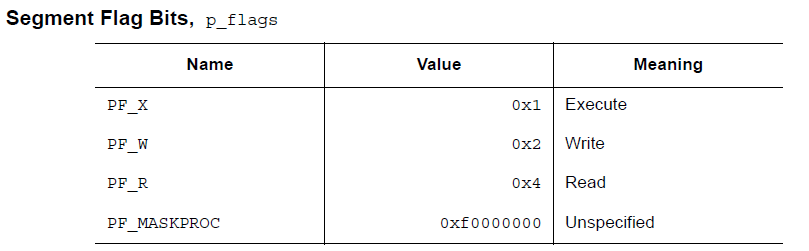
Among these, all bits in PF_MASKPROC are reserved for processor-specific semantic information.
If a permission bit is set to 0, that type of segment is not accessible. The actual memory permissions depend on the corresponding memory management unit, and different systems may operate differently. Although all permission combinations are possible, the system generally grants more permissions than requested. In any case, unless explicitly stated otherwise, a segment will not have write permission. Below are all possible combinations.
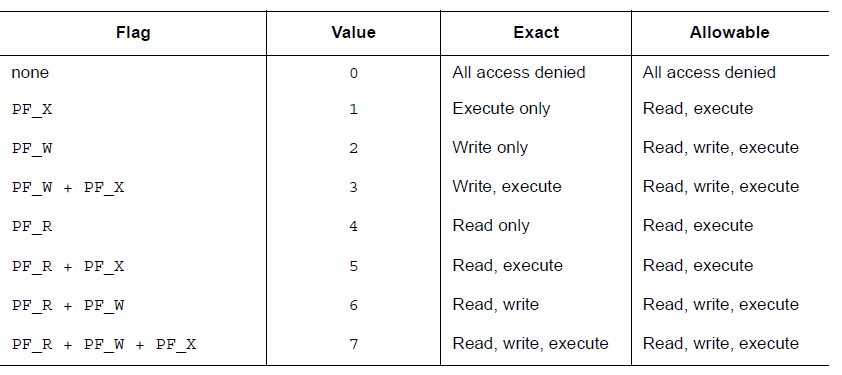
For example, generally speaking, the .text segment usually has read and execute permissions, but not write permission. The data segment typically has write, read, and execute permissions.
Segment Contents
A segment may contain one or more sections, but this does not affect program loading. Nevertheless, we still need various data to enable program execution, dynamic linking, and so on. Below we describe the typical contents of segments. For different segments, the order of sections and the number of sections they contain may differ. Additionally, processor-related constraints may alter the structure of the corresponding segment.
As shown below, the code segment contains only read-only instructions and data. Of course, this example does not cover all possible segments.
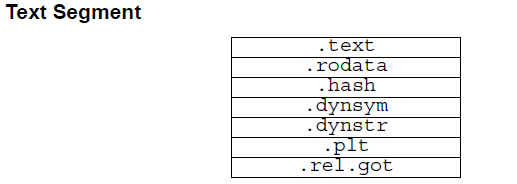
The data segment contains writable data and instructions. Typically, it includes the following:
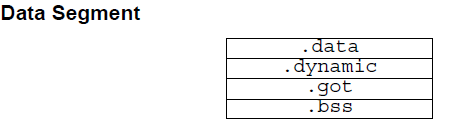
The PT_DYNAMIC type element in the program header points to the .dynamic section. The GOT (Global Offset Table) and PLT (Procedure Linkage Table) contain information related to position-independent code. Although in the example given here the PLT section appears in the code segment, this may vary for different processors.
The .bss section has the type SHT_NOBITS, which means it does not occupy space in the ELF file, but it does occupy space in the executable file's memory image. Typically, uninitialized data is at the end of the segment, which is why p_memsz is larger than p_filesz.
Note:
- Different segments may overlap, meaning different segments can contain the same sections.
Section Header Table
This data structure is actually located at the end of the ELF file (Why is it placed at the end of the file?), but for the convenience of explanation, we discuss this table here.
This structure is used to locate the specific position of each section in the ELF file.
First, the e_shoff field in the ELF header gives the byte offset from the beginning of the file to the section header table's location. e_shnum tells us the number of entries in the section header table; e_shentsize gives the byte size of each entry.
Second, the section header table is an array where each element is of type ELF32_Shdr, and each element describes an overview of a section.
ELF32_Shdr
Each section header can be described using the following data structure:
typedef struct {
    ELF32_Word      sh_name;
    ELF32_Word      sh_type;
    ELF32_Word      sh_flags;
    ELF32_Addr      sh_addr;
    ELF32_Off       sh_offset;
    ELF32_Word      sh_size;
    ELF32_Word      sh_link;
    ELF32_Word      sh_info;
    ELF32_Word      sh_addralign;
    ELF32_Word      sh_entsize;
} Elf32_Shdr;
The meaning of each field is as follows:
| Member | Description |
|---|---|
| sh_name | Section name. This is an index into the Section Header String Table Section, so this field is actually a numeric value. The actual content in the string table is a NULL-terminated string. |
| sh_type | Categorizes the section based on its content and semantics. The specific types are described below. |
| sh_flags | Each bit represents a different flag, describing whether the section is writable, executable, requires memory allocation, and other attributes. |
| sh_addr | If the section will appear in the process's memory image, this member gives the address where the section's first byte should reside in the process image. Otherwise, this field is 0. |
| sh_offset | Gives the offset from the beginning of the file to the first byte of the section. Sections of type SHT_NOBITS do not occupy file space, so their sh_offset member gives a conceptual offset. |
| sh_size | This member gives the byte size of the section. Unless the section type is SHT_NOBITS, the section occupies sh_size bytes in the file. A section of type SHT_NOBITS may have a non-zero length but does not occupy space in the file. |
| sh_link | This member gives a section header table index link, whose specific interpretation depends on the section type. |
| sh_info | This member gives additional information, whose interpretation depends on the section type. |
| sh_addralign | Some sections have address alignment requirements. For example, if a section contains a doubleword variable, the system must ensure the entire section is doubleword aligned. In other words, sh\_addr \% sh\_addralign=0. Currently, only values of 0 and positive integral powers of 2 are allowed. Values of 0 and 1 indicate no alignment constraints. |
| sh_entsize | Some sections contain tables of fixed-size entries, such as the symbol table. For such sections, this member gives the byte size of each entry. Otherwise, this member is 0. |
As mentioned earlier, the section header at index zero (SHN_UNDEF) also exists and marks undefined section references. The information for this entry is as follows:
| Field Name | Value | Description |
|---|---|---|
| sh_name | 0 | No name |
| sh_type | SHT_NULL | Inactive |
| sh_flags | 0 | No flags |
| sh_addr | 0 | No address |
| sh_offset | 0 | No file offset |
| sh_size | 0 | No size |
| sh_link | SHN_UNDEF | No link information |
| sh_info | 0 | No auxiliary info |
| sh_addralign | 0 | No alignment requirement |
| sh_entsize | 0 | No entries |
Special Indices
Several special indices in the section header table are as follows:
| Name | Value | Meaning |
|---|---|---|
| SHN_UNDEF | 0 | Marks undefined, missing, irrelevant, or otherwise meaningless section references. For example, a "defined" symbol associated with section number SHN_UNDEF is an undefined symbol. Note: Although index 0 is reserved for undefined values, the section header table still contains an entry for index 0. That is, if the ELF header's e_shnum is 6, the indices should be 0 through 5. More details will be explained later. |
| SHN_LORESERVE | 0xff00 | Lower bound of the reserved index value range. |
| SHN_LOPROC | 0xff00 | Processor-specific lower bound |
| SHN_HIPROC | 0xff1f | Processor-specific upper bound |
| SHN_ABS | 0xfff1 | Absolute value for the associated reference. For example, symbols associated with section number SHN_ABS have absolute values and are not affected by relocation. |
| SHN_COMMON | 0xfff2 | Symbols defined relative to this section are common symbols, such as FORTRAN COMMON or unallocated external variables in C. |
| SHN_HIRESERVE | 0xffff | Upper bound of the reserved index value range. |
The system reserves index values between SHN_LORESERVE and SHN_HIRESERVE (inclusive), and these values are not referenced in the section header table. That is, the section header table does not contain entries for reserved indices. This is not entirely clear.
Selected Section Header Fields
sh_type
Section types currently have the following possible range. SHT is an abbreviation for Section Header Table.
| Name | Value | Description |
|---|---|---|
| SHT_NULL | 0 | This section type is inactive; other members in this section header have undefined values. |
| SHT_PROGBITS | 1 | This section type contains program-defined information; its format and meaning are determined entirely by the program. |
| SHT_SYMTAB | 2 | This section type contains a symbol table (SYMbol TABle). Currently, an object file may only contain one section of each type, though this restriction may be relaxed in the future. Generally, SHT_SYMTAB sections provide symbols for link editing (i.e., ld), although they can also be used for dynamic linking. |
| SHT_STRTAB | 3 | This section type contains a string table (STRing TABle). |
| SHT_RELA | 4 | This section type contains relocation entries with explicit addends (RELocation entry with Addends), such as Elf32_Rela for 32-bit object files. An object file may have multiple relocation sections. |
| SHT_HASH | 5 | This section type contains a symbol hash table (HASH table). |
| SHT_DYNAMIC | 6 | This section type contains dynamic linking information (DYNAMIC linking). |
| SHT_NOTE | 7 | This section type contains information that marks the file in some way (NOTE). |
| SHT_NOBITS | 8 | This section type does not occupy file space but is otherwise similar to SHT_PROGBITS. Although this section type contains no bytes, its corresponding section header's sh_offset member still contains a conceptual file offset. |
| SHT_REL | 9 | This section type contains relocation entries without explicit addends (RELocation entry without Addends). For example, the Elf32_rel type for 32-bit object files. An object file may have multiple relocation sections. |
| SHT_SHLIB | 10 | This section type is reserved, but its semantics are not yet defined. |
| SHT_DYNSYM | 11 | As a complete symbol table, it may contain many symbols unnecessary for dynamic linking. Therefore, an object file may also contain an SHT_DYNSYM section that holds a minimal set of dynamic linking symbols to save space. |
| SHT_LOPROC | 0X70000000 | This value specifies the lower bound reserved for processor-specific semantics (LOw PROCessor-specific semantics). |
| SHT_HIPROC | OX7FFFFFFF | This value specifies the upper bound reserved for processor-specific semantics (HIgh PROCessor-specific semantics). |
| SHT_LOUSER | 0X80000000 | This value specifies the lower bound of indices reserved for applications. |
| SHT_HIUSER | 0X8FFFFFFF | This value specifies the upper bound of indices reserved for applications. |
sh_flags
Each bit in the sh_flags field of a section header provides corresponding flag information, defining whether the content of the corresponding section can be modified, executed, and so on. If a flag bit is set, its value is 1; undefined bits are all 0. The currently defined values are as follows; other values are reserved.
| Name | Value | Description |
|---|---|---|
| SHF_WRITE | 0x1 | This section contains data that is writable during process execution. |
| SHF_ALLOC | 0x2 | This section occupies memory during process execution. For certain control sections that do not occupy space in the object file's memory image, this attribute is off. |
| SHF_EXECINSTR | 0x4 | This section contains executable machine instructions (EXECutable INSTRuction). |
| SHF_MASKPROC | 0xf0000000 | All bits in this mask are reserved for processor-specific semantics. |
sh_link & sh_info
When the section type differs, sh_link and sh_info will have different meanings.
| sh_type | sh_link | sh_info |
|---|---|---|
| SHT_DYNAMIC | Section header index of the string table used by the section | 0 |
| SHT_HASH | Section header index of the symbol table used by this hash table | 0 |
| SHT_REL/SHT_RELA | Section header index of the associated symbol table | Section header index of the section to which relocation applies |
| SHT_SYMTAB/SHT_DYNSYM | OS-specific information. In ELF files on Linux, this points to the offset in the Section Header Table of the string section corresponding to the symbols in the symbol table. | OS-specific information |
| other | SHN_UNDEF | 0 |
Example
Here is a classic example of an ELF file.
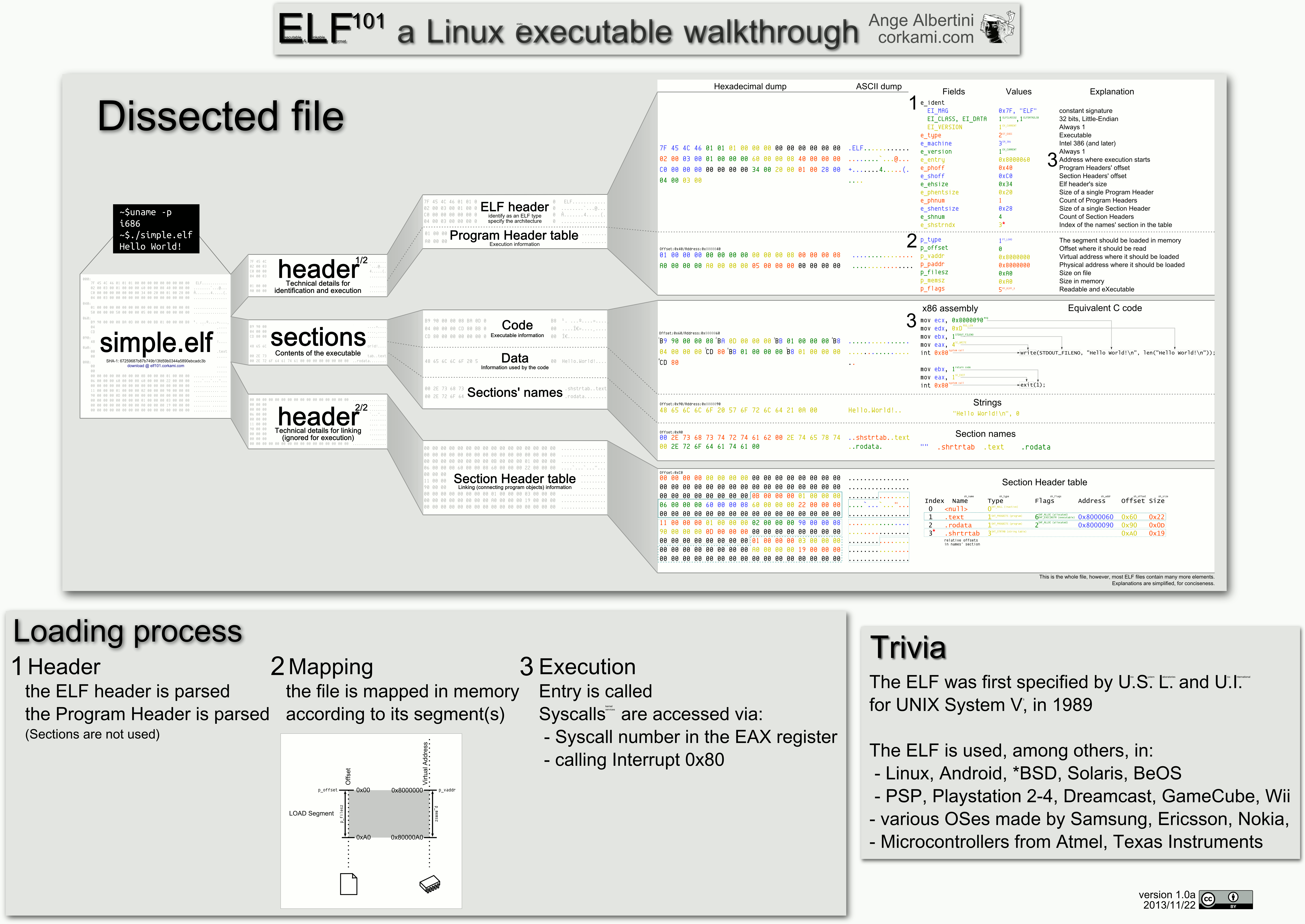
When time permits, a better example will be provided with a concrete program.