RAR Format
File Format
A RAR file mainly consists of a marker block, an archive header block, file header blocks, and a terminator block.
Each block roughly contains the following fields:
| Name | Size | Description |
|---|---|---|
| HEAD_CRC | 2 | CRC of entire block or block part |
| HEAD_TYPE | 1 | Block type |
| HEAD_FLAGS | 2 | Block flags |
| HEAD_SIZE | 2 | Block size |
| ADD_SIZE | 4 | Optional field - additional block size |
The file header of a RAR archive is 0x 52 61 72 21 1A 07 00.
Following the file header (0x526172211A0700) is the marker block (MARK_HEAD), followed by the File Header.
| Name | Size | Description |
|---|---|---|
| HEAD_CRC | 2 | CRC of fields from HEAD_TYPE to FILEATTR and file name |
| HEAD_TYPE | 1 | Header Type: 0x74 |
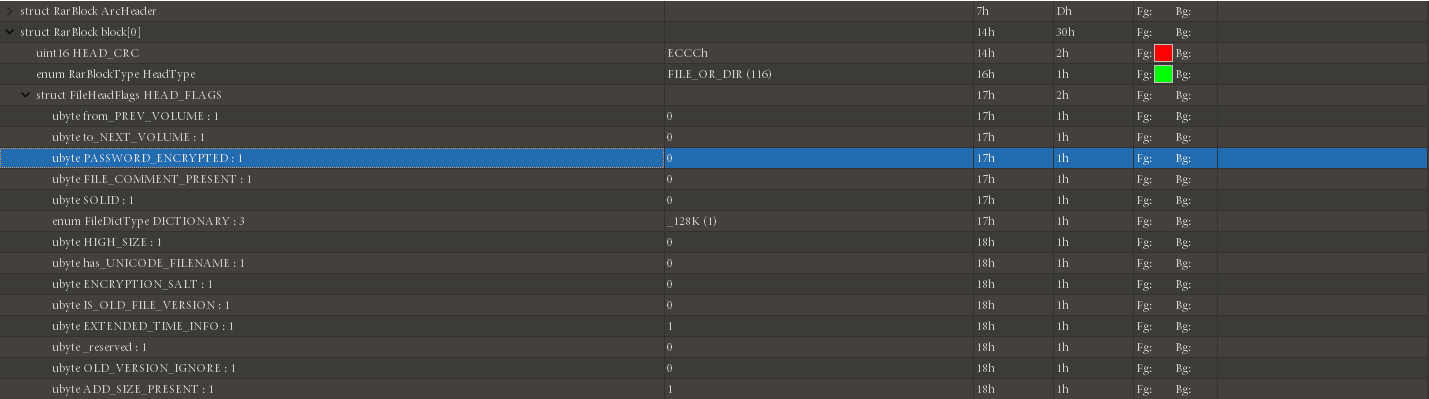
| HEAD_FLAGS | 2 | Bit Flags (Please see 'Bit Flags for File in Archive' table for all possibilities) (fake encryption) |
| HEAD_SIZE | 2 | File header full size including file name and comments |
| PACK_SIZE | 4 | Compressed file size |
| UNP_SIZE | 4 | Uncompressed file size |
| HOST_OS | 1 | Operating system used for archiving (See the 'Operating System Indicators' table for the flags used) |
| FILE_CRC | 4 | File CRC |
| FTIME | 4 | Date and time in standard MS DOS format |
| UNP_VER | 1 | RAR version needed to extract file (Version number is encoded as 10 * Major version + minor version.) |
| METHOD | 1 | Packing method (Please see 'Packing Method' table for all possibilities |
| NAME_SIZE | 2 | File name size |
| ATTR | 4 | File attributes |
| HIGH_PACK_SIZ | 4 | High 4 bytes of 64-bit value of compressed file size. Optional value, presents only if bit 0x100 in HEAD_FLAGS is set. |
| HIGH_UNP_SIZE | 4 | High 4 bytes of 64-bit value of uncompressed file size. Optional value, presents only if bit 0x100 in HEAD_FLAGS is set. |
| FILE_NAME | NAME_SIZE bytes | File name - string of NAME_SIZE bytes size |
| SALT | 8 | present if (HEAD_FLAGS & 0x400) != 0 |
| EXT_TIME | variable size | present if (HEAD_FLAGS & 0x1000) != 0 |
The terminator block at the end of every RAR file is fixed.
| Field Name | Size (bytes) | Possibilities |
|---|---|---|
| HEAD_CRC | 2 | Always 0x3DC4 |
| HEAD_TYPE | 1 | Header type: 0x7b |
| HEAD_FLAGS | 2 | Always 0x4000 |
| HEAD_SIZE | 2 | Block size = 0x0007 |
For more details, see Rar - Forensics Wiki
Main Attacks
Brute Force
- RarCrack on Linux
Fake Encryption
The fake encryption of RAR files is in the bit flag field of the file header. Using 010 Editor, this bit can be clearly seen. Modifying this bit can create fake encryption.
Other techniques such as plaintext attacks are the same as those introduced in the ZIP section.