ZIP Format
File Structure
A ZIP file mainly consists of three parts:
| Compressed source file data area | Central directory | End of central directory |
|---|---|---|
| local file header + file data + data descriptor | central directory | end of central directory record |
- Each compressed source file or directory in the compressed source file data area is a record, where:
local file header: The file header is used to identify the beginning of the file and records the information of the compressed file. The file header identifier starts with the fixed value50 4B 03 04, which is also an important signature ofZIPfiles.file data: The file data records the data of the corresponding compressed file.data descriptor: The data descriptor is used to identify the end of file compression. This structure only appears when bit3of the general purpose bit flag in the correspondinglocal file headeris set to1, and it immediately follows the compressed file source data.
-
Central directory -
Records the directory information of compressed files. Each record in this data area corresponds to a record in the compressed source file data area.
Offset Bytes Description Translation 0 4 Central directory file header signature = 0x02014b50 Central directory file header signature = (0x02014b50) 4 2 Version made by pkware version used for compression 6 2 Version needed to extract (minimum) Minimum pkware version needed for extraction 8 2 General purpose bit flag General purpose bit flag (fake encryption) 10 2 Compression method Compression method 12 2 File last modification time File last modification time 14 2 File last modification date File last modification date 16 4 CRC-32 CRC-32 checksum 20 4 Compressed size Compressed size 24 4 Uncompressed size Uncompressed size 28 2 File name length (n) File name length 30 2 Extra field length (m) Extra field length 32 2 File comment length (k) File comment length 34 2 Disk number where file starts Disk number where file starts 36 2 Internal file attributes Internal file attributes 38 4 External file attributes External file attributes 42 4 relative offset of local header Relative offset of local file header 46 n File name File name 46+n m Extra field Extra field 46+n+m k File comment File comment -
End of central directory record (EOCD) -
The end of central directory record exists at the end of the entire archive and is used to mark the end of the compressed directory data. Each ZIP file must have exactly one
EOCDrecord.
For more details, see the official documentation.
Main Attacks
Brute Force
Here we mainly introduce two tools used for brute force attacks:
-
The Windows tool ARCHPR
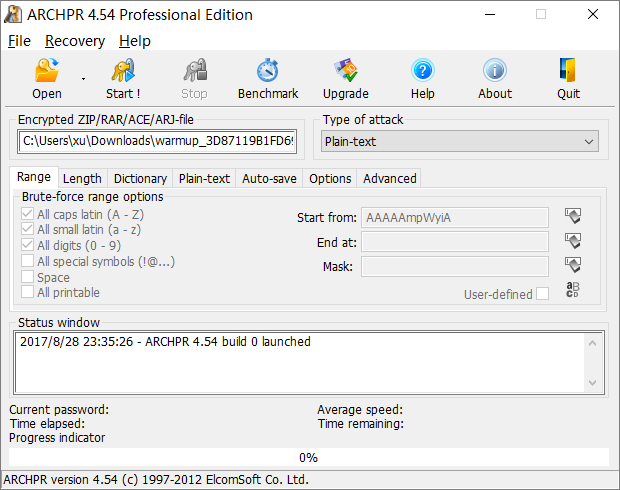
Brute force enumeration, dictionary attacks, plaintext attacks — it has everything.
-
The Linux command-line tool fcrackzip
# -b specifies brute force mode, -c1 specifies password type as pure digits, other types can be found in the manual, -u is very important otherwise the cracked password won't be displayed, -l 5-6 specifies the length
root@kali:fcrackzip -b -c1 -u test.zip
CRC32
Principle
CRC stands for "Cyclic Redundancy Check", and CRC32 means it produces a 32 bit (8 hexadecimal digit) checksum value. Since every bit of the source data block participates in the calculation when generating the CRC32 checksum, even a single bit change in the data block will result in a different CRC32 value.
CRC32 checksums appear in many files such as png files, and zip files also contain CRC32 checksums. It is worth noting that the CRC32 in zip files is the checksum of the unencrypted file.
This leads to CRC32-based attack techniques.
- The file content is very small (usually around
4bytes in competitions) - The encryption password is very long
Instead of brute-forcing the archive password, we directly brute-force the content of the source file (usually printable strings) to obtain the desired information.
For example, we create a flag.txt with the content 123, and encrypt it with the password !QAZXSW@#EDCVFR$.
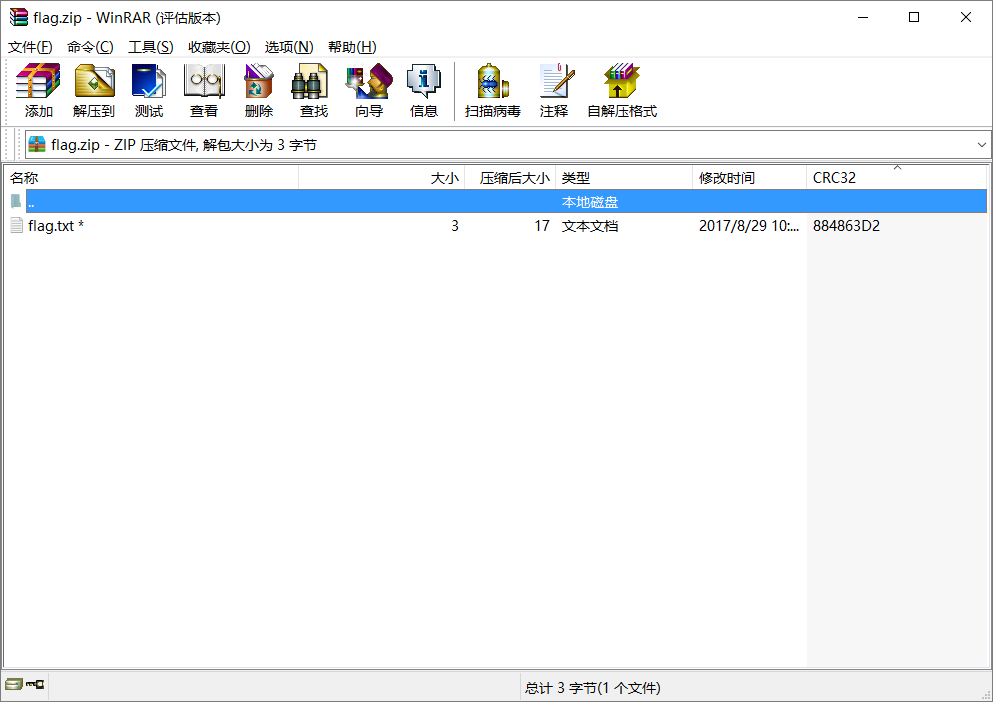
When we calculate the file's CRC32 value, we find it matches the CRC32 value shown in the image above.
File: flag.txt
Size: 3
Time: Tue, 29 Aug 2017 10:38:10 +0800
MD5: 202cb962ac59075b964b07152d234b70
SHA1: 40bd001563085fc35165329ea1ff5c5ecbdbbeef
CRC32: 884863D2
Note
When brute-forcing, the CRC32 values of all possible enumerated strings must correspond to the CRC32 value in the compressed source file data area.
# -*- coding: utf-8 -*-

import binascii
import base64
import string
import itertools
import struct

alph = 'abcdefghijklmnopqrstuvwxyzABCDEFGHIJKLMNOPQRSTUVWXYZ0123456789+/='

crcdict = {}
print "computing all possible CRCs..."
for x in itertools.product(list(alph), repeat=4):
    st = ''.join(x)
    testcrc = binascii.crc32(st)
    crcdict[struct.pack('<i', testcrc)] = st
print "Done!"

f = open('flag.zip')
data = f.read()
f.close()
crc = ''.join(data[14:18])
if crc in crcdict:
    print crcdict[crc]
else:
    print "FAILED!"
Example
Challenge:
Abctf-2016:Zippy
Based on the file size within each archive, we can deduce that the CRC32 attack technique should be used. After obtaining the content of each archive and concatenating them, Base64 decoding reveals an encrypted archive, which can be brute-forced to obtain the flag.
Plaintext Attack
Principle
- An encrypted ZIP file
- The compression tool used for the archive, such as
2345 Haozip,WinRAR,7z,zipversion number, etc. This can be determined through file properties. OnLinux, usezipinfo -vto view detailed information about aziparchive, including the encryption algorithm, etc. - Knowledge of part of the continuous content (at least
12bytes) of a file inside the archive
If you already know part of the content of an encrypted file, for example, you found its readme.txt file on a website, you can start trying to crack it.
First, pack this plaintext file into a zip archive, for example, pack readme.txt into readme.zip.
After packing, you need to confirm that both use the same compression algorithm. A simple way to check is to open the files with WinRAR and see if the compressed size of the same file is identical. If they are the same, it basically confirms that you are using the correct compression algorithm. If different, try another compression algorithm.
Tools
Note
It is recommended to use ARCHPR on Windows, as it is faster and more stable (previously encountered situations where PKCrack failed to crack when creating challenges).
Example
2015 Guangzhou Qiangwang Cup: Brute Force?
WP: https://www.cnblogs.com/ECJTUACM-873284962/p/9884416.html
First, we have a challenge with the title Brute Force?, which clearly suggests that a cracking tool is needed — quite a brute approach.
Step 1: Analyze the archive file
After downloading this archive, we see the file name ends with *.zip. We can immediately think of several common methods for cracking archives. After extracting the archive, we find two files inside: Desktop.zip and readme.txt. Let's see what readme.txt contains:
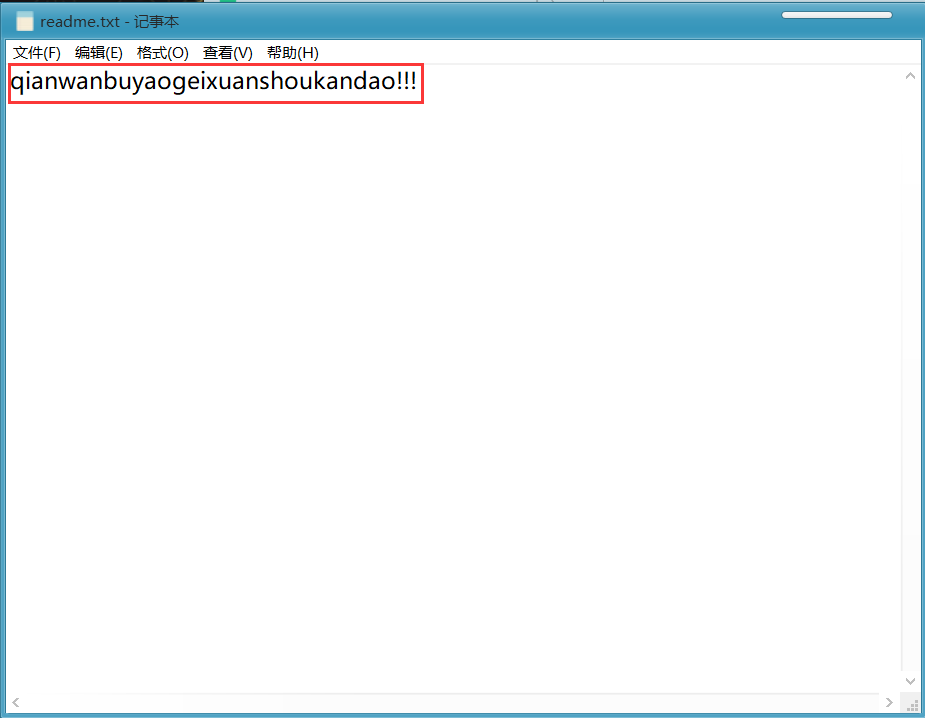
It turns out to contain qianwanbuyaogeixuanshoukandao!!! (meaning "absolutely don't let the contestants see this!!!"). The challenge author didn't want contestants to see it — quite amusing. Now let's look at Desktop.zip. We can see it contains a readme.txt file and an answer folder, with key.txt inside the answer folder. The flag should be hidden there.
Step 2: Analyze the cracking method
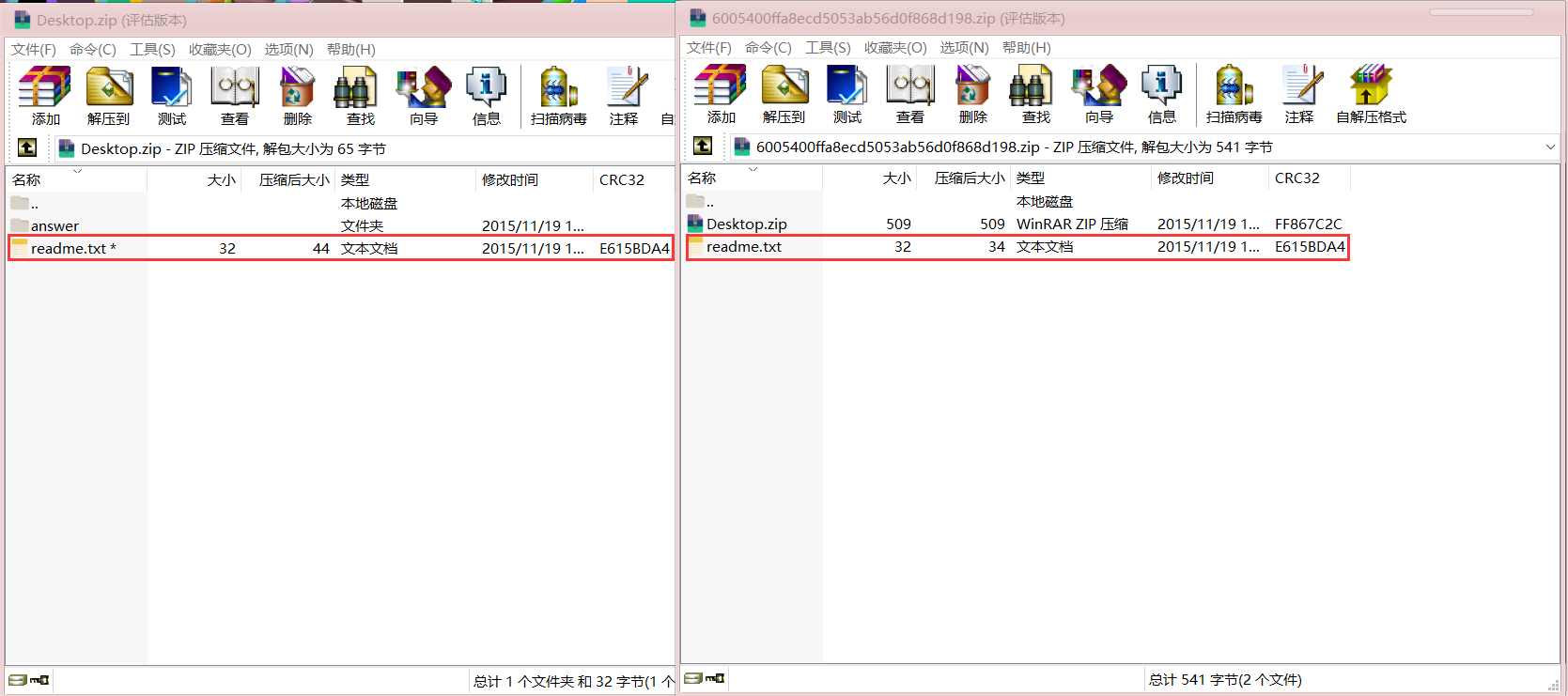
When we first look at this challenge, we notice that both the extracted files and the Desktop.zip archive contain the same file readme.txt, and no other related information is provided, and the file size is greater than 12 Bytes. We then compare the CRC32 values of the readme.txt in the archive and the readme.txt from the original archive, and find that the two values are the same. This means the extracted readme.txt is the plaintext of the readme.txt inside the encrypted archive. So we can boldly guess that this is very likely a plaintext attack.
Step 3: Attempt plaintext attack
Since we already know it's a plaintext attack, we will crack the archive. Since the extracted readme.txt is the plaintext of the readme.txt inside the encrypted archive, compress readme.txt into a .zip file, then fill in the corresponding paths in the software to start the plaintext attack. Here we will introduce different methods for plaintext attacks on Windows and Ubuntu.
Method 1: Plaintext attack using pkcrack
pkcrack download link: https://www.unix-ag.uni-kl.de/~conrad/krypto/pkcrack.html
We can directly write a shell script to download it:
#!/bin/bash -ex

wget https://www.unix-ag.uni-kl.de/~conrad/krypto/pkcrack/pkcrack-1.2.2.tar.gz
tar xzf pkcrack-1.2.2.tar.gz
cd pkcrack-1.2.2/src
make

mkdir -p ../../bin
cp extract findkey makekey pkcrack zipdecrypt ../../bin
cd ../../
Save the file as pkcrack-install.sh, then navigate to the current directory and give it execute permission x.
chmod 777 install.sh
Or simply:
chmod u+x install.sh
Then run ./pkcrack-install.sh
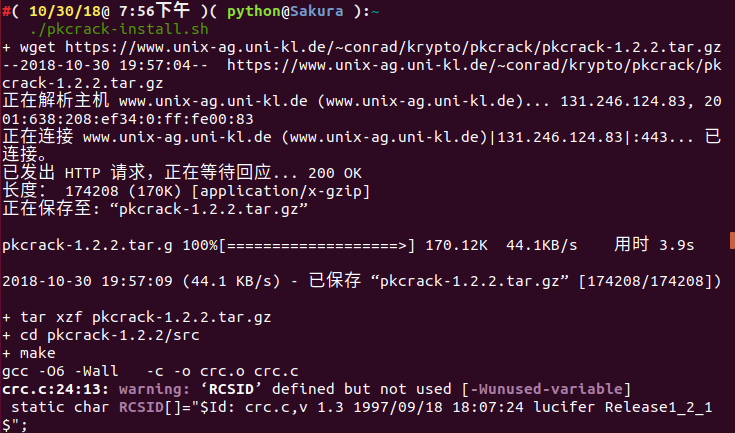
A bin folder will be generated in the current directory. Enter the bin folder, find the pkcrack file, and directly perform the plaintext attack on the file.
./pkcrack -c "readme.txt" -p readme.txt -C ~/下载/misc/Desktop.zip -P ~/下载/misc/readme.zip -d ~/decrypt.zip
The parameter options we use are as follows:
-C: The target file to crack (with path)

-c: The name of the plaintext file in the file to crack (the path does not include the system path, starting from the first level of the zip file)

-P: The compressed plaintext file

-p: The name of the plaintext file in the compressed plaintext file (i.e., the location of readme.txt in readme.zip)
-d: Specify the file name and absolute path to output the decrypted zip file
For other options, see ./pkcrack --help
The decryption results are as follows:
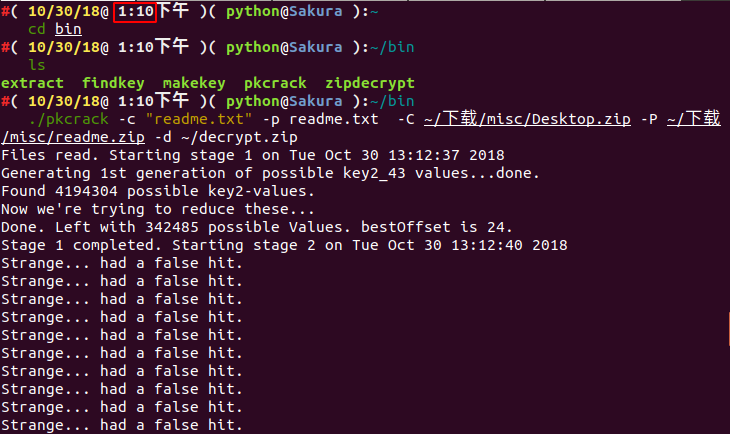
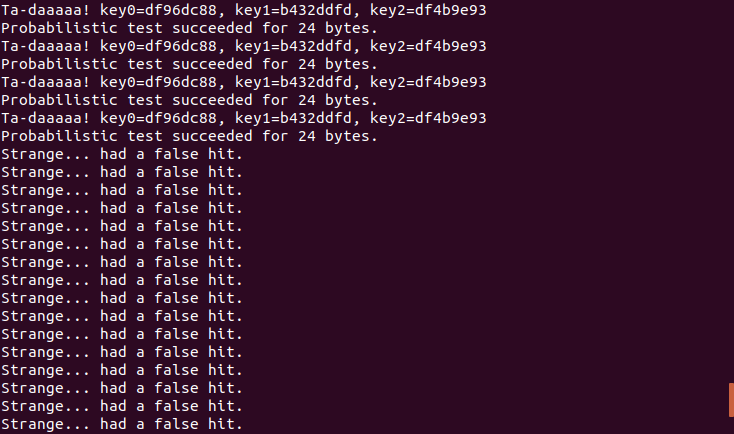
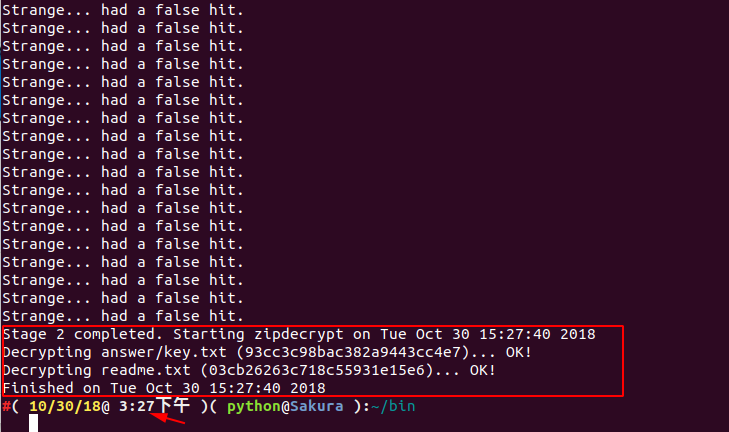
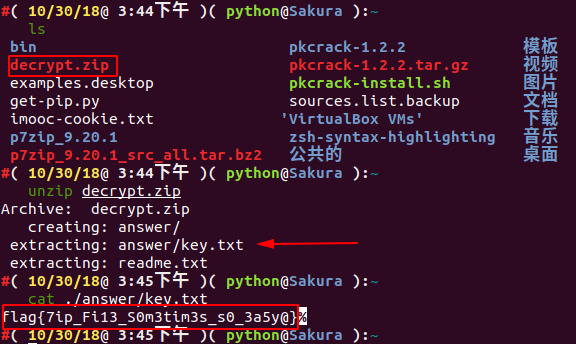
We can see that we started running at 1:10 PM and the key was solved at 3:27 PM.
The final flag is: flag{7ip_Fi13_S0m3tim3s_s0_3a5y@}
Here comes the pitfall
Everything seems to go smoothly, and it also took over two hours. So why did I write on my blog that I ran for two hours without getting a result? Or maybe some friends encountered the same problem — why can't I get a result when I did the same thing?
You may have overlooked some details. Has anyone thought about what method was used to compress the original archive? And how should we generate our readme.zip? I was stuck on this problem for a full three months. If you don't believe it, let's look at the second method: using ARCHPR for plaintext attack on Windows.
Method 2: Plaintext attack using ARCHPR
For this challenge, I recommend downloading ARCHPR 4.53. I tested successfully on this version. The success screenshot is as follows:
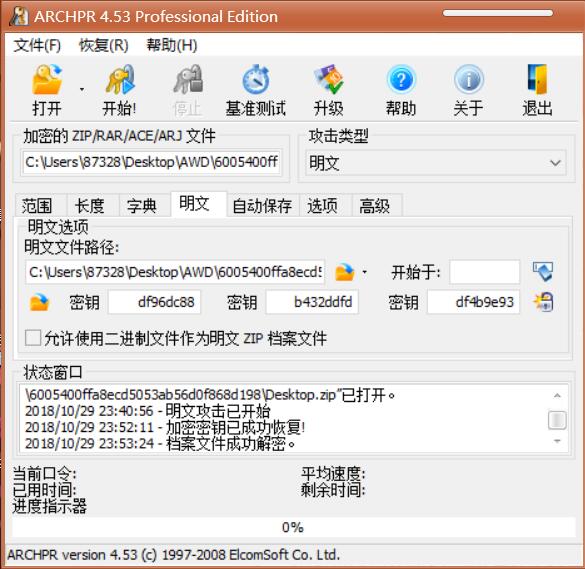
I believe many friends encountered the following situation when using ARCHPR:
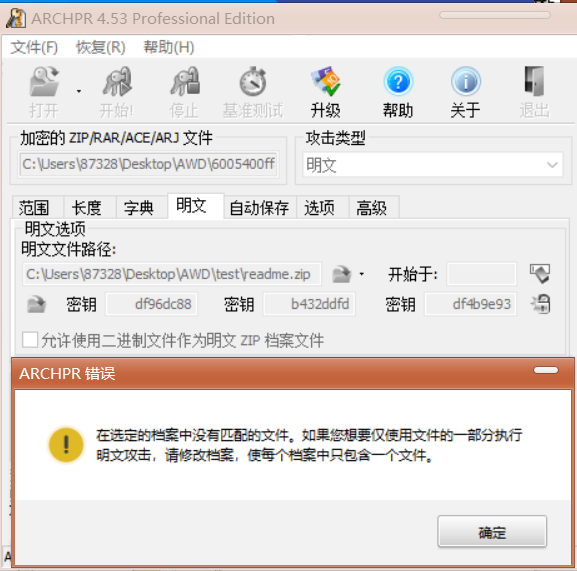
I was devastated at the time — why did this happen?
In later learning, I discovered that files compressed with 7z must be decompressed with 7z. 7z is an archive format that uses multiple compression algorithms for data compression. Compared to traditional zip and rar, it has a higher compression ratio and uses different compression algorithms, which naturally may cause mismatches. Therefore, when decompressing the original archive and encrypting files, we must first analyze what method the challenge author used for compression/decompression. So the problem with this challenge is obvious — after verification, I found that the challenge author used 7z for compression.
Try again
Now that we've identified this problem, let's download 7zip from the official website: https://www.7-zip.org/
Then we decompress the original archive using 7z, and compress readme.txt using 7z. After that, we can use ARCHPR for the plaintext attack.
The result is as follows:
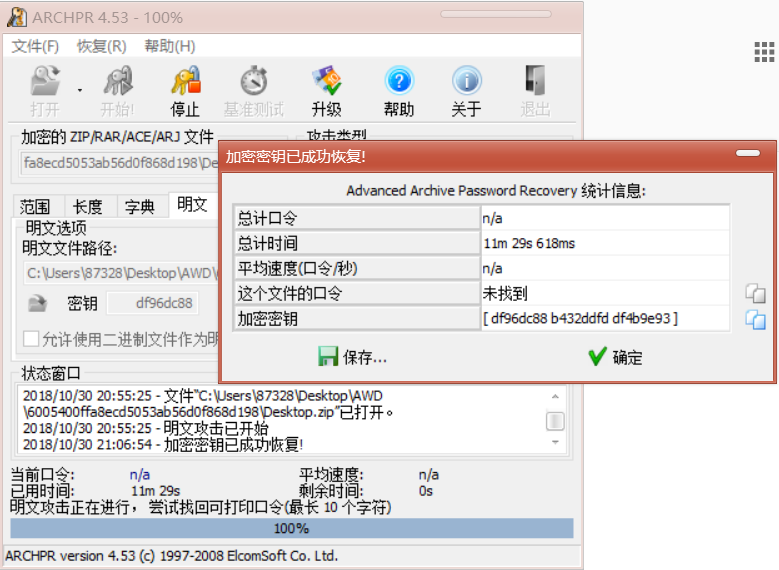
Extract Desktop_decrypted.zip and check key.txt in the answer directory.
So the final flag is: flag{7ip_Fi13_S0m3tim3s_s0_3a5y@}
Fake Encryption
Principle
In the Central directory of the ZIP format described above, we emphasized a 2-byte field called the General purpose bit flag. Different bits have different meanings.
Bit 0: If set, indicates that the file is encrypted.

(For Method 6 - Imploding)
Bit 1: If the compression method used was type 6,
     Imploding, then this bit, if set, indicates
     an 8K sliding dictionary was used.  If clear,
     then a 4K sliding dictionary was used.
...
Bit 6: Strong encryption.  If this bit is set, you should
     set the version needed to extract value to at least
     50 and you must also set bit 0.  If AES encryption
     is used, the version needed to extract value must
     be at least 51.
...
In 010Editor, we try to modify this 1 bit from 0 --> 1.
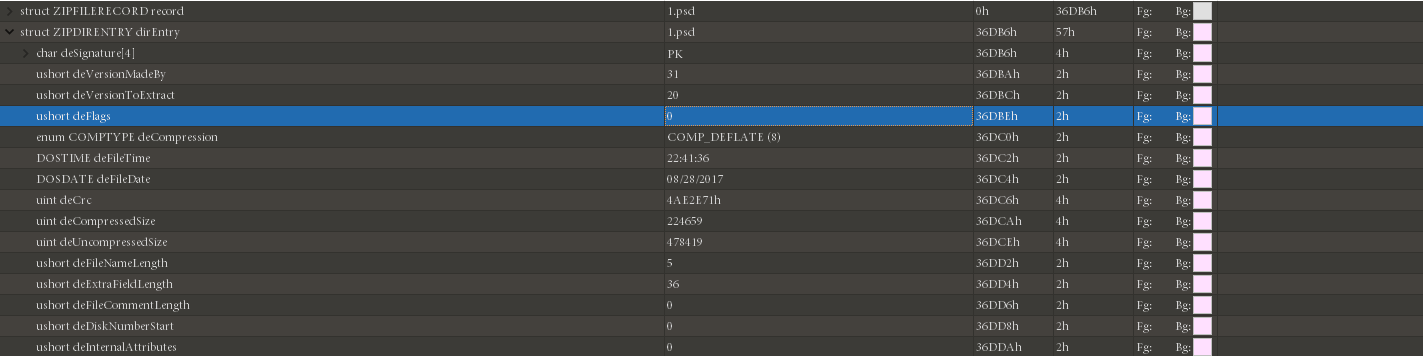
Opening the file again, we find it now requires a password.

Methods to fix fake encryption:
- Modify the general purpose bit flag in hexadecimal
binwalk -eignores fake encryption- On
Mac OSand someLinuxsystems (such asKali), you can directly open fake-encryptedZIParchives - The small tool
ZipCenOp.jarfor detecting fake encryption - Sometimes
WinRar's repair function works (this method sometimes has miraculous effects, not limited to fake encryption)
Example
SSCTF-2017: Our Secret is Green
We obtain two readme.txt files — one encrypted and one known — which easily suggests a plaintext attack approach.
Pay attention to the operations when using the plaintext attack.
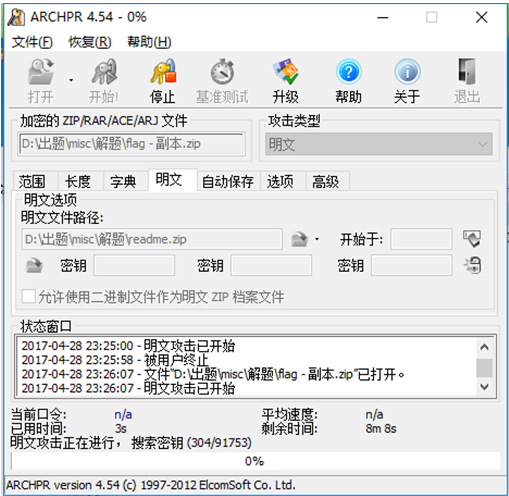
After obtaining the password Y29mZmVl, extract the file to get another archive.
Observe the general purpose bit flag, suspect fake encryption, modify it, and extract to get the flag.
This challenge basically covers the common ZIP examination techniques in competitions: brute force, fake encryption, plaintext attack, etc., all appearing in this single challenge.