pyc Files
code object
When we import a Python script, a corresponding pyc file is generated in the directory. It is the persisted storage form of the Python code object, used to speed up the next loading.
File Structure
A pyc file consists of two major parts:
- Part 1: Header section: Stores basic information of the
.pycfile, with a size of 16 bytes. - The first 4 bytes are the Magic Number, used to identify the version information of this
.pycfile. - The next 4 bytes are the Bit Field. For its specific purpose, see PEP 552.
- The next 4 bytes are the timestamp of when the
.pycfile was generated. - The last 4 bytes are the size of the
.pycfile. - Part 2: CodeObject section: The serialized PyCodeObject. For its structure, see include/code.h. For the specific serialization method, see python/marshal.
Note that in older versions of Python, the
Bit Fieldandfile sizefields did not exist in the.pycfile, meaning the Header size was only 8 bytes.
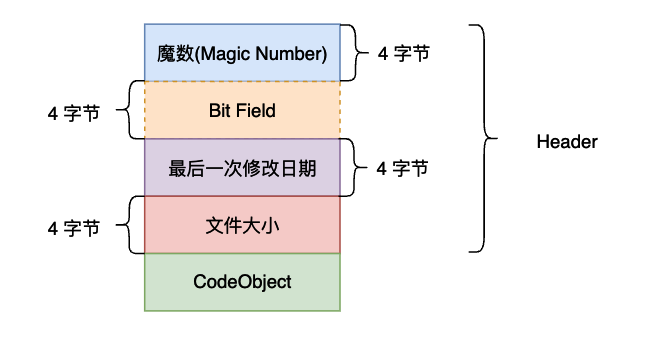
For a complete analysis of
.pycfiles, refer to the following resources:
About co_code
A binary stream representing the instruction sequence, with specific definitions in include/opcode.h. You can also refer to python opcodes.
It consists of:
-
Instructions (opcode), divided into two types: with arguments and without arguments, separated at https://github.com/python/cpython/blob/fc7df0e664198cb05cafd972f190a18ca422989c/Include/opcode.h#L69
-
Arguments (oparg)
In Python 3.6 and above, arguments always occupy 1 byte. If an instruction has no arguments, it is replaced with 0x00, which is ignored by the interpreter during execution — this is the technical principle behind Stegosaurus. In versions below Python 3.5, instructions without arguments do not have 0x00 padding.
Example Challenge
First, we attempt to decompile with pycdc, but it fails:
# Source Generated with Decompyle++
# File: imgenc.pyc (Python 2.7)

import sys
import numpy as np
from scipy.misc import imread, imsave

def doit(input_file, output_file, f):
Unsupported opcode: STOP_CODE
    img = imread(input_file, flatten = True)
    img /= 255
    size = img.shape[0]
# WARNING: Decompyle incomplete
Note that this is Python 2.7, meaning the instruction sequence occupies either 1 byte or 3 bytes (with or without arguments).
Using pcads we get:
imgenc.pyc (Python 2.7)
...
                67      STOP_CODE
                68      STOP_CODE
                69      BINARY_DIVIDE
                70      JUMP_IF_TRUE_OR_POP     5
                73      LOAD_CONST              3: 0
                76      LOAD_CONST              3: 0
                79      BINARY_DIVIDE
We locate the error and observe that LOAD_CONST LOAD_CONST BINARY_DIVIDE STORE_FAST opcodes (64 03 00 64 03 00 15 7d 05 00) were corrupted. After repairing based on contextual clues:
00000120  64 04 00 6b 00 00 72 ce  00 64 03 00 64 03 00 15  |d..k..r..d..d...|
00000130  7d 05 00 64 03 00 64 03  00 15 7d 05 00 64 03 00  |}..d..d...}..d..|
00000140  64 03 00 15 7d 05 00 64  03 00 64 03 00 15 7d 05  |d...}..d..d...}.|
00000150  00 64 03 00 64 03 00 15  7d 05 00 64 03 00 64 03  |.d..d...}..d..d.|
00000160  00 15 7d 05 00 64 03 00  64 03 00 15 7d 05 00 64  |..}..d..d...}..d|
00000170  03 00 64 03 00 15 7d 05  00 64 03 00 64 03 00 15  |..d...}..d..d...|
00000180  7d 05 00 64 03 00 64 03  00 15 7d 05 00 64 03 00  |}..d..d...}..d..|
00000190  64 03 00 15 7d 05 00 64  03 00 64 03 00 15 7d 05  |d...}..d..d...}.|
000001a0  00 64 03 00 64 03 00 15  7d 05 00 64 03 00 64 03  |.d..d...}..d..d.|
000001b0  00 15 7d 05 00 64 03 00  64 03 00 15 7d 05 00 6e  |..}..d..d...}..n|
Next, we obtain the flag based on the repaired Python source code.
Further Reading:
- Challenge: 0ctf-2017:py
- Writeup: Manually Disassembling CPython Bytecode
Tools
pycdc
Converts Python bytecode to readable Python source code. Includes two tools: a disassembler (pycads) and a decompiler (pycdc).
Stegosaurus
Stegosaurus is a steganography tool that allows us to embed arbitrary Payloads in Python bytecode files (pyc or pyo). Due to the low encoding density, the process of embedding a Payload neither changes the runtime behavior of the source code nor changes the file size of the source file. The Payload code is scattered throughout the bytecode, so tools like strings cannot find the actual Payload. Python's dis module returns the bytecode of the source file, and then we can use Stegosaurus to embed the Payload.
The principle is to utilize the redundant space in Python bytecode files to scatter and hide the complete payload code in these fragmented spaces.
For specific usage, refer to ctf-tools.
Example Challenge
Bugku QAQ
The challenge links are as follows:
http://ctf.bugku.com/files/447e4b626f2d2481809b8690613c1613/QAQ
http://ctf.bugku.com/files/5c02892cd05a9dcd1c5a34ef22dd9c5e/cipher.txt
First, when we get this challenge, using 010Editor we can see some characteristic information at a glance:
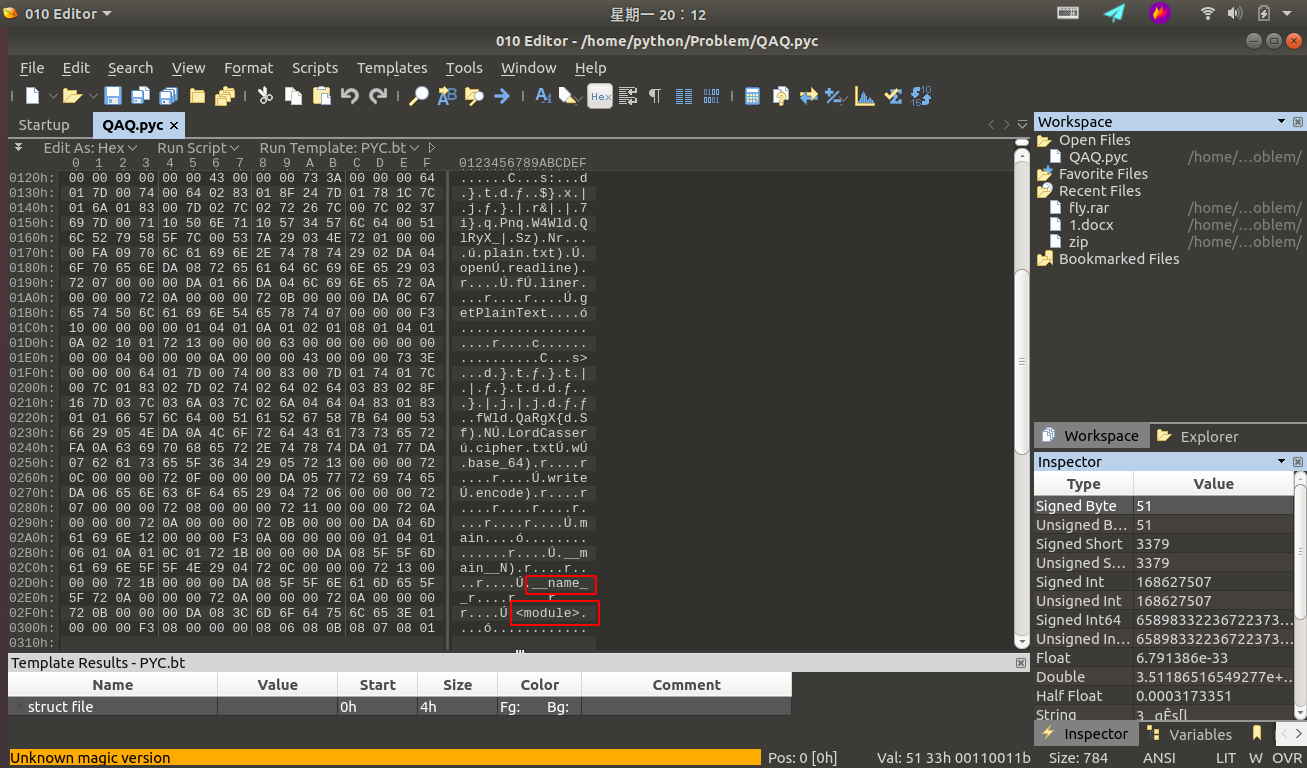
We can determine that this is related to python. Through consulting relevant materials, we can determine this is a pyc file compiled from python. Many of you may not understand — what is a pyc file? Why are pyc files generated? When are pyc files generated? Below I will answer each of these questions.
Simply put, a pyc file is a Python bytecode file, a binary file. We all know that Python is a cross-platform interpreted language. "Cross-platform" means that the pyc file generated after the Python file is processed by the interpreter (or compiled) can run on multiple platforms, which also helps hide the source code. In fact, Python is a fully object-oriented language. After a Python file is processed by the interpreter, it generates a bytecode object PyCodeObject. A pyc file can be understood as the persisted storage form of the PyCodeObject object. A pyc file is only generated when the file is imported as a module. In other words, the Python interpreter considers that only modules imported via import need to be reused. The benefit of generating pyc files is obvious — when we run the program multiple times, we don't need to re-interpret that module. The main file usually only needs to be loaded once and won't be imported by other modules, so the main file generally doesn't generate a pyc file.
Let's use an example to illustrate this:
For convenience, we create a test folder as the testing directory for this experiment:
mkdir test && cd test/
Suppose we now have a test.py file with the following content:
def print_test():
    print('Hello,Kitty!')

print_test()
We execute the following command:
python3 test.py
Needless to say, everyone knows the printed result is:
Hello,Kitty!
We use the following command to check what files are in the current folder:
ls -alh
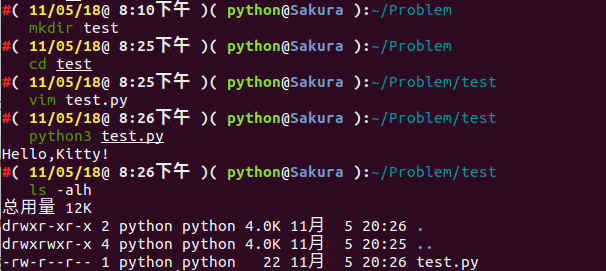
We can see that no pyc file was generated.
Now let's create another file called import_test.py with the following content:
Note:
test.pyandimport_test.pyshould be placed in the same folder
import test

test.print_test()
We execute the following command:
python3 import_test.py
The result is:
Hello,Kitty!
Hello,Kitty!
Wait, why are two identical lines printed? Let's continue — we use the following command to check what files are in the current folder:
ls -alh
The result is:
总用量 20K
drwxr-xr-x 3 python python 4.0K 11月  5 20:38 .
drwxrwxr-x 4 python python 4.0K 11月  5 20:25 ..
-rw-r--r-- 1 python python   31 11月  5 20:38 import_test.py
drwxr-xr-x 2 python python 4.0K 11月  5 20:38 __pycache__
-rw-r--r-- 1 python python   58 11月  5 20:28 test.py
There's a new __pycache__ folder. Let's go inside and see what's there:
cd __pycache__ && ls
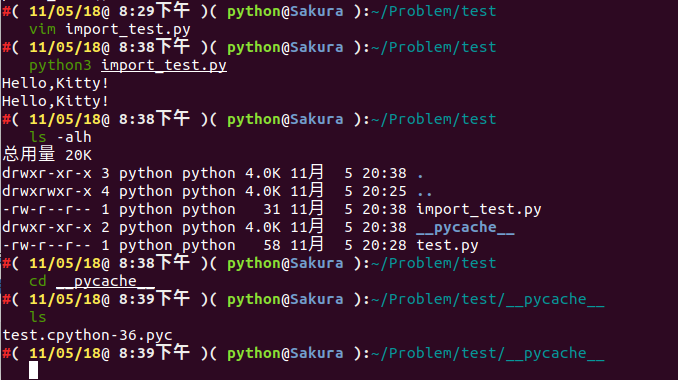
We can see that a test.cpython-36.pyc was generated. Why is this the case?
We can see that when executing python3 import_test.py, the first thing executed is import test, which imports the test module. When a module is imported, PVM (Python Virtual Machine) searches for the module in the background from a series of paths. The search process is as follows:
- Search for the module in the current directory
- Search in the path list specified by the environment variable
PYTHONPATH - Search in the Python installation path
In fact, PVM searches through the paths contained in the sys.path variable, which includes the path information mentioned above.
The module search paths are all stored in the sys.path list. If the default sys.path doesn't contain the path to your module or package, you can dynamically add it with sys.path.append.
In fact, all modules loaded into memory in Python are stored in sys.modules. When importing a module, it first checks this list to see if the module has already been loaded. If it has been loaded, the module name is simply added to the Local namespace of the module calling import. If it hasn't been loaded, the module file is searched in the sys.path directories by module name. The module file can be py, pyc, or pyd. Once found, the module is loaded into memory, added to sys.modules, and the name is imported into the current Local namespace.
As you can see, a module will not be loaded twice. Multiple different modules can use import to bring the same module into their own Local namespace, but behind the scenes there is only one PyModuleObject object.
Here, I also want to clarify one point: import can only import modules, not objects within modules (classes, functions, variables, etc.). For example, in the above case, I defined a function print_test() in test.py. In another module file import_test.py, I cannot directly use import test.print_test to import print_test into the current module file — I can only use import test. If I want to import only specific classes, functions, or variables, I can use from test import print_test.

Since we've mentioned the import mechanism, let's also discuss nested imports and Package imports.
import Nested Import
Nesting is not hard to understand — it's one thing inside another. As children, we've all played with Russian nesting dolls, where a big doll contains a smaller doll, which contains an even smaller doll. Nested import works the same way. Suppose we have a module and we want to import module A, but module A also contains other modules that need to be imported, such as module B, and module B contains module C, and so on. This is what we call import nested import.
This type of nesting is relatively easy to understand. The key point to note is that each module's Local namespace is independent. So in the above example, after the current module does import A, it can only access module A, not B or any other module. Even though module B has been loaded into memory, if you want to access it, you must explicitly import it in the current module with import B.
So what should we do if we have the following nested situation?
For example, suppose we have a module A:
# A.py
from B import D
class C:
    pass
And a module B:
# B.py
from A import C
class D:
    pass
Let's briefly analyze the program — if the program runs, it should call object D from module B.
Let's try executing python A.py:
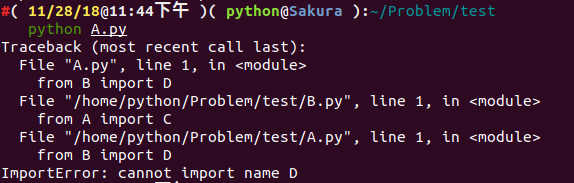
We get an ImportError, seemingly because object D was not loaded. But if we change from B import D to import B, we can execute successfully.
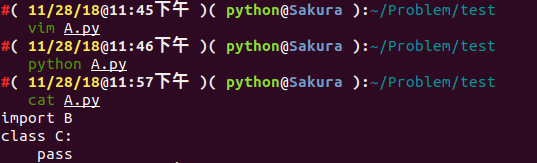
What's going on? This is actually related to Python's internal import mechanism. Specifically for from B import D, Python internally follows these steps:
- Look up symbol
Binsys.modules - If symbol
Bexists, get themoduleobject<module B>corresponding to symbolB. Get the object corresponding to symbolDfrom<module B>'s__dict__. IfDdoesn't exist, raise an exception. - If symbol
Bdoesn't exist, create a newmoduleobject<module B>. Note that at this point, themoduleobject's__dict__is empty. Execute the expressions inB.pyto populate<module B>'s__dict__. Get the object corresponding toDfrom<module B>'s__dict__. IfDdoesn't exist, raise an exception.
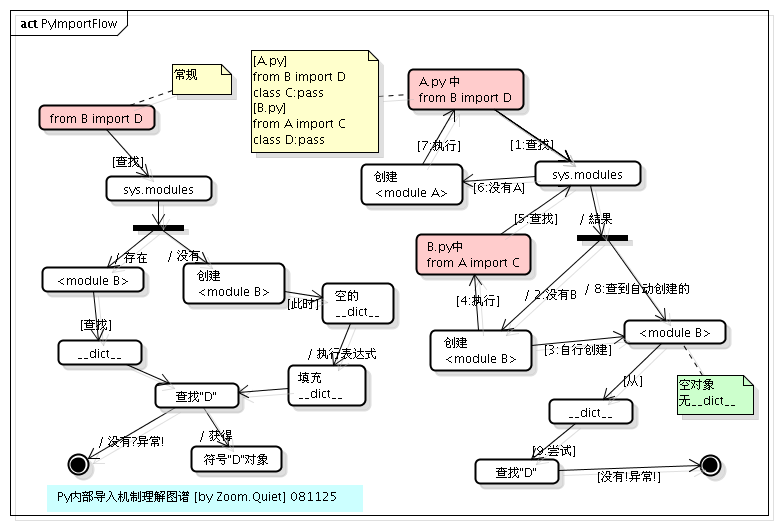
So the execution order of this example is:
- Execute
from B import DinA.py
Note: Since we're executing
python A.py,<module B>doesn't exist insys.modules. First, amoduleobject (<module B>) is created forB.py. Note that thismoduleobject created at this point is empty — it contains nothing. After Python internally creates thismoduleobject, it will parse and executeB.pywith the goal of populating thisdictof<module B>.
- Execute
from A import CinB.py
Note: During the execution of
B.py, this statement is encountered. First, it checks whether<module A>already exists in thesys.modulesmodule cache. Since<module A>hasn't been cached yet, similarly, Python internally creates amoduleobject (<module A>) forA.py, then executes the statements inA.py.
- Execute
from B import DinA.pyagain
Note: At this point, the
<module B>object created in step 1 has already been cached insys.modules, so<module B>is obtained directly. However, note that looking at the entire process, we know that<module B>is still an empty object at this point — it contains nothing. So the operation of getting symbolDfrom thismodulewill raise an exception. If this were justimport B, since the symbolBalready exists insys.modules, no exception would be raised.
We can clearly see the import nested import process from the diagram below:
Package Import
A Package can be thought of as a collection of modules. As long as a folder contains an __init__.py file, that folder can be considered a package. Folders within the package can also become packages (sub-packages). Furthermore, multiple smaller packages can be aggregated into a larger package. Through the package structure, we can conveniently manage and maintain classes, and it's also convenient for users. For example, SQLAlchemy and others are distributed to users in package form.
Packages and modules are actually very similar things. If you check the type of a package: import SQLAlchemy type(SQLAlchemy), you'll see it's actually <type 'module'>. The search path when importing packages is also sys.path.
The package import process is basically the same as for modules, except that when importing a package, the __init__.py in the package directory is executed instead of the statements in a module. Additionally, if you simply import a package and the package's __init__.py doesn't have explicit initialization operations, the modules under this package will not be automatically imported.
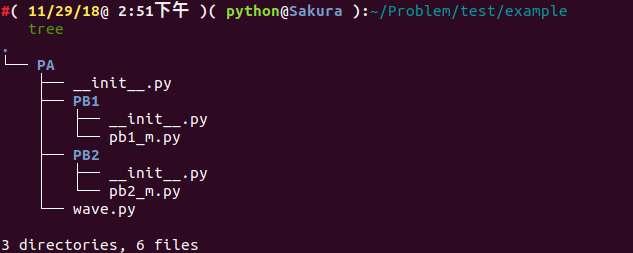
Suppose we have the following file structure:
.
└── PA
    ├── __init__.py
    ├── PB1
    │   ├── __init__.py
    │   └── pb1_m.py
    ├── PB2
    │   ├── __init__.py
    │   └── pb2_m.py
    └── wave.py
In wave.py, pb1_m.py, and pb2_m.py, we define the following function:
def getName():
    pass
The __init__.py files are all empty.
We create a new test.py with the following content:
import sys
import PA.wave #1
import PA.PB1 #2
import PA.PB1.pb1_m as m1 #3
import PA.PB2.pb2_m #4
PA.wave.getName() #5
m1.getName() #6
PA.PB2.pb2_m.getName() #7
After running, we can see it executes successfully. Let's look at the directory structure:
.
├── PA
│   ├── __init__.py
│   ├── __init__.pyc
│   ├── PB1
│   │   ├── __init__.py
│   │   ├── __init__.pyc
│   │   ├── pb1_m.py
│   │   └── pb1_m.pyc
│   ├── PB2
│   │   ├── __init__.py
│   │   ├── __init__.pyc
│   │   ├── pb2_m.py
│   │   └── pb2_m.pyc
│   ├── wave.py
│   └── wave.pyc
└── test.py
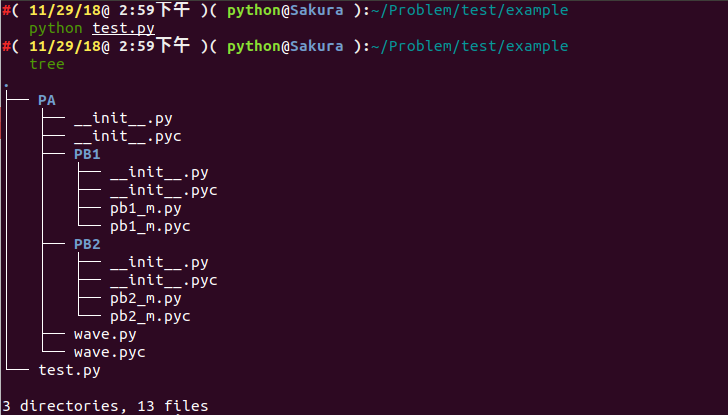
Let's analyze this process:
- After executing
#1,sys.moduleswill contain bothPAandPA.wavemodules. At this point, you can call any class or function inPA.wave, but you cannot call any module underPA.PB1(2). The currentLocalnamespace now has thePAname. - After executing
#2, onlyPA.PB1is loaded into memory.sys.moduleswill have three modules:PA,PA.wave, andPA.PB1. However, no modules underPA.PB1are automatically loaded into memory. If you directly executePA.PB1.pb1_m.getName()at this point, an error will occur becausePA.PB1doesn't containpb1_m. The currentLocalnamespace still only has thePAname, notPA.PB1. - After executing
#3,pb1_munderPA.PB1is loaded into memory.sys.moduleswill have four modules:PA,PA.wave,PA.PB1, andPA.PB1.pb1_m. Now you can executePA.PB1.pb1_m.getName(). Sinceaswas used, the currentLocalnamespace hasm1added as an alias forPA.PB1.pb1_min addition toPA. - After executing
#4,PA.PB2andPA.PB2.pb2_mare loaded into memory.sys.moduleswill have six modules:PA,PA.wave,PA.PB1,PA.PB1.pb1_m,PA.PB2, andPA.PB2.pb2_m. The currentLocalnamespace still only hasPAandm1. - The subsequent
#5,#6, and#7can all run correctly.
Note: It's important to note that if
PA.PB2.pb2_mwants to importPA.PB1.pb1_morPA.wave, it can succeed directly. It's best to use explicit import paths — using../..relative import paths is not recommended.
Now that we understand how pyc files are generated, let's return to the challenge. We try to decompile the pyc file back to Python source code. We use an online open-source tool to attempt this:
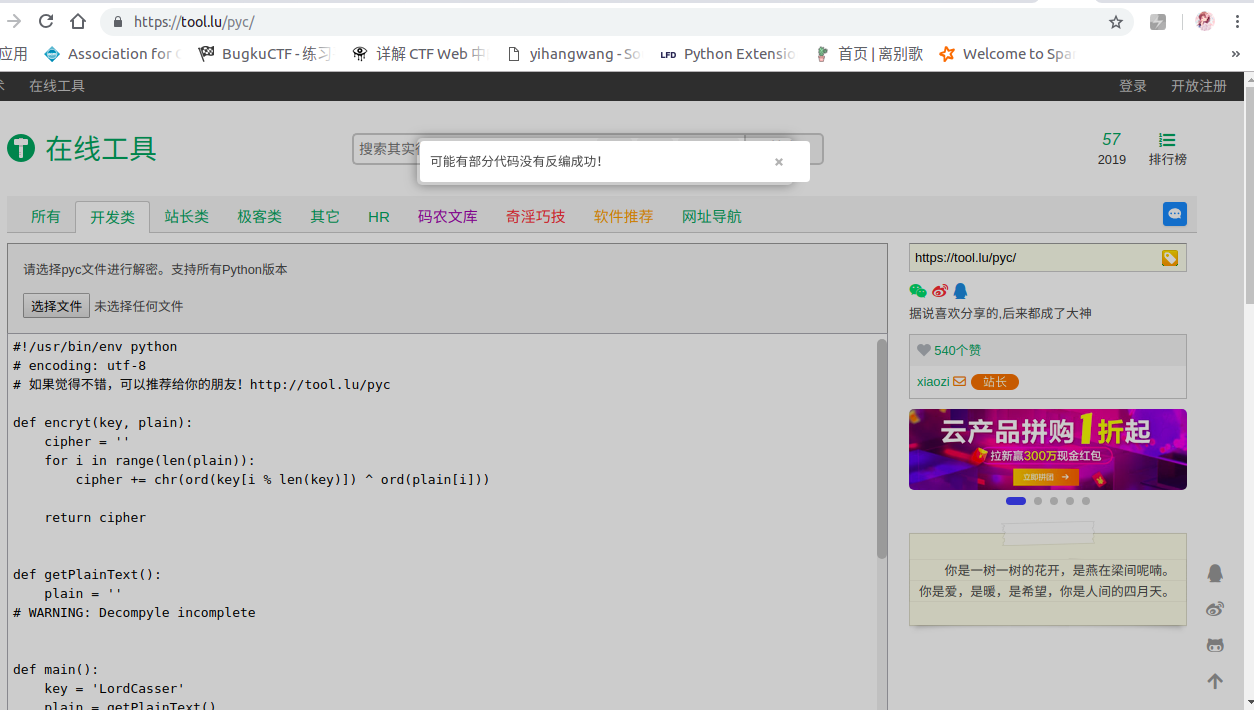
Some code wasn't decompiled successfully??? Let's try to analyze it. The general idea is that it reads the cipher.txt file, whose content is Base64 encoded. Our goal is to decode the file content. Given the known key, encryption is done through the encryt function. We can try to complete the code:
def encryt(key, plain):
    cipher = ''
    for i in range(len(plain)):
        cipher += chr(ord(key[i % len(key)]) ^ ord(plain[i]))
    return cipher


def getPlainText():
    plain = ''
    with open('cipher.txt') as (f):
        while True:
            line = f.readline()
            if line:
                plain += line
            else:
                break

    return plain.decode('base_64')


def main():
    key = 'LordCasser'
    plain = getPlainText()
    cipher = encryt(key, plain)
    with open('xxx.txt', 'w') as (f):
        f.write(cipher)


if __name__ == '__main__':
    main()
The result is:
YOU ARE FOOLED
THIS IS NOT THAT YOU WANT
GO ON DUDE
CATCH THAT STEGOSAURUS
The hint tells us to use the STEGOSAURUS steganography tool. We directly extract the hidden payload.
python3 stegosaurus.py -x QAQ.pyc

We obtain the final flag: flag{fin4lly_z3r0_d34d}
Since we've come this far, let's analyze how we embed a Payload using Stegosaurus.
We'll continue using the code above as our example, setting the script name to encode.py.
Step one: we use Stegosaurus to check how many bytes of data our Payload can carry without changing the source file (Carrier) size:
python3 -m stegosaurus encode.py -r

Now we can safely embed a Payload of up to 24 bytes. If you don't want to overwrite the source file, you can use the -s parameter to generate a separate py file with the embedded Payload:
python3 -m stegosaurus encode.py -s --payload "flag{fin4lly_z3r0_d34d}"

Now we can use the ls command to check the disk directory. The file with the embedded Payload (the carrier file) and the original bytecode file are exactly the same size:

Note: If the
-sparameter is not used, the original bytecode file will be overwritten.
We can extract the Payload by passing the -x parameter to Stegosaurus:
python3 -m stegosaurus __pycache__/encode.cpython-36-stegosaurus.pyc -x

The Payload we construct doesn't have to be an ASCII string — shellcode works too:

We write a new example.py module with the following code:
import sys
import os
import math
def add(a,b):
    return int(a)+int(b)
def sum1(result):
    return int(result)*3

def sum2(result):
    return int(result)/3

def sum3(result):
    return int(result)-3

def main():
    a = 1
    b = 2
    result = add(a,b)
    print(sum1(result))
    print(sum2(result))
    print(sum3(result))

if __name__ == "__main__":
    main()
We set the Payload to be flag_is_here.
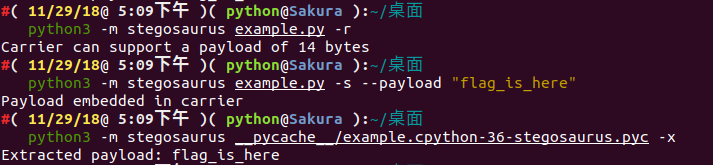
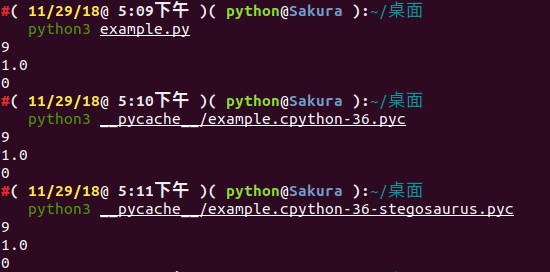
We can check the Python code execution before and after embedding the Payload:
Using strings to view the file output after Stegosaurus has embedded the Payload (the payload is not displayed):
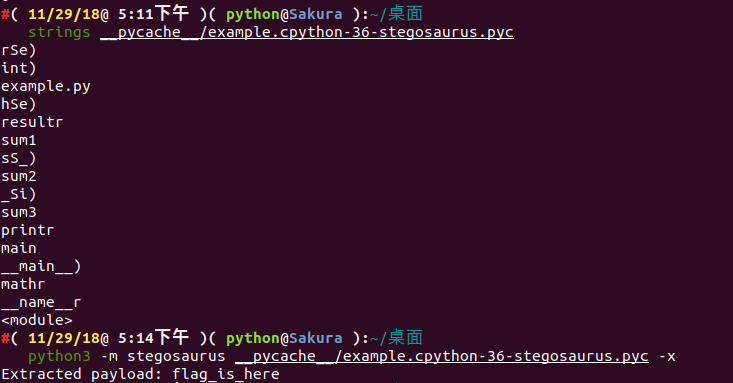
Next, we use Python's dis module to view the bytecode changes before and after Stegosaurus embeds the Payload:
Before embedding the payload:
#( 11/29/18@ 5:14下午 )( python@Sakura ):~/桌面
   python3 -m dis example.py
  1           0 LOAD_CONST               0 (0)
              2 LOAD_CONST               1 (None)
              4 IMPORT_NAME              0 (sys)
              6 STORE_NAME               0 (sys)

  2           8 LOAD_CONST               0 (0)
             10 LOAD_CONST               1 (None)
             12 IMPORT_NAME              1 (os)
             14 STORE_NAME               1 (os)

  3          16 LOAD_CONST               0 (0)
             18 LOAD_CONST               1 (None)
             20 IMPORT_NAME              2 (math)
             22 STORE_NAME               2 (math)

  4          24 LOAD_CONST               2 (<code object add at 0x7f90479778a0, file "example.py", line 4>)
             26 LOAD_CONST               3 ('add')
             28 MAKE_FUNCTION            0
             30 STORE_NAME               3 (add)

  6          32 LOAD_CONST               4 (<code object sum1 at 0x7f9047977810, file "example.py", line 6>)
             34 LOAD_CONST               5 ('sum1')
             36 MAKE_FUNCTION            0
             38 STORE_NAME               4 (sum1)

  9          40 LOAD_CONST               6 (<code object sum2 at 0x7f9047977ae0, file "example.py", line 9>)
             42 LOAD_CONST               7 ('sum2')
             44 MAKE_FUNCTION            0
             46 STORE_NAME               5 (sum2)

 12          48 LOAD_CONST               8 (<code object sum3 at 0x7f9047977f60, file "example.py", line 12>)
             50 LOAD_CONST               9 ('sum3')
             52 MAKE_FUNCTION            0
             54 STORE_NAME               6 (sum3)

 15          56 LOAD_CONST              10 (<code object main at 0x7f904798c300, file "example.py", line 15>)
             58 LOAD_CONST              11 ('main')
             60 MAKE_FUNCTION            0
             62 STORE_NAME               7 (main)

 23          64 LOAD_NAME                8 (__name__)
             66 LOAD_CONST              12 ('__main__')
             68 COMPARE_OP               2 (==)
             70 POP_JUMP_IF_FALSE       78

 24          72 LOAD_NAME                7 (main)
             74 CALL_FUNCTION            0
             76 POP_TOP
        >>   78 LOAD_CONST               1 (None)
             80 RETURN_VALUE
After embedding the payload:
#( 11/29/18@ 5:31下午 )( python@Sakura ):~/桌面
   python3 -m dis example.py
  1           0 LOAD_CONST               0 (0)
              2 LOAD_CONST               1 (None)
              4 IMPORT_NAME              0 (sys)
              6 STORE_NAME               0 (sys)

  2           8 LOAD_CONST               0 (0)
             10 LOAD_CONST               1 (None)
             12 IMPORT_NAME              1 (os)
             14 STORE_NAME               1 (os)

  3          16 LOAD_CONST               0 (0)
             18 LOAD_CONST               1 (None)
             20 IMPORT_NAME              2 (math)
             22 STORE_NAME               2 (math)

  4          24 LOAD_CONST               2 (<code object add at 0x7f146e7038a0, file "example.py", line 4>)
             26 LOAD_CONST               3 ('add')
             28 MAKE_FUNCTION            0
             30 STORE_NAME               3 (add)

  6          32 LOAD_CONST               4 (<code object sum1 at 0x7f146e703810, file "example.py", line 6>)
             34 LOAD_CONST               5 ('sum1')
             36 MAKE_FUNCTION            0
             38 STORE_NAME               4 (sum1)

  9          40 LOAD_CONST               6 (<code object sum2 at 0x7f146e703ae0, file "example.py", line 9>)
             42 LOAD_CONST               7 ('sum2')
             44 MAKE_FUNCTION            0
             46 STORE_NAME               5 (sum2)

 12          48 LOAD_CONST               8 (<code object sum3 at 0x7f146e703f60, file "example.py", line 12>)
             50 LOAD_CONST               9 ('sum3')
             52 MAKE_FUNCTION            0
             54 STORE_NAME               6 (sum3)

 15          56 LOAD_CONST              10 (<code object main at 0x7f146e718300, file "example.py", line 15>)
             58 LOAD_CONST              11 ('main')
             60 MAKE_FUNCTION            0
             62 STORE_NAME               7 (main)

 23          64 LOAD_NAME                8 (__name__)
             66 LOAD_CONST              12 ('__main__')
             68 COMPARE_OP               2 (==)
             70 POP_JUMP_IF_FALSE       78

 24          72 LOAD_NAME                7 (main)
             74 CALL_FUNCTION            0
             76 POP_TOP
        >>   78 LOAD_CONST               1 (None)
             80 RETURN_VALUE
Note: The method of sending and receiving the
Payloadis entirely up to the user's personal preference.Stegosaurusonly provides a method for embedding or extractingPayloadfromPythonbytecode files. However, to ensure that the embedded code file size does not change, thePayloadbyte length supported byStegosaurusis very limited. Therefore, if you need to embed a very largePayload, you may need to distribute it across multiple bytecode files.
In order to embed a Payload without changing the source file size, we need to identify the dead zones in the bytecode. The so-called dead zones refer to those byte data that, even if modified, will not change the normal behavior of the original Python script.
It should be noted that we can easily find dead zones in Python 3.6 code. Python's reference interpreter CPython has two types of opcodes: those without arguments and those with arguments. In Python versions below 3.5, depending on whether the opcode takes arguments, bytecode instructions occupy either 1 byte or 3 bytes. In Python 3.6, all instructions occupy 2 bytes, and the second byte of instructions without arguments is set to 0, which is ignored by the interpreter during execution. This means that for every instruction without arguments in the bytecode, Stegosaurus can safely embed a Payload of 1 byte in length.
We can view how the Payload is embedded into these dead zones using the -vv option of Stegosaurus:
#( 11/29/18@10:35下午 )( python@Sakura ):~/桌面
   python3 -m stegosaurus example.py -s -p "ABCDE" -vv
2018-11-29 22:36:26,795 - stegosaurus - DEBUG - Validated args
2018-11-29 22:36:26,797 - stegosaurus - INFO - Compiled example.py as __pycache__/example.cpython-36.pyc for use as carrier
2018-11-29 22:36:26,797 - stegosaurus - DEBUG - Read header and bytecode from carrier
2018-11-29 22:36:26,798 - stegosaurus - DEBUG - POP_TOP (0)
2018-11-29 22:36:26,798 - stegosaurus - DEBUG - POP_TOP (0)
2018-11-29 22:36:26,798 - stegosaurus - DEBUG - POP_TOP (0)
2018-11-29 22:36:26,798 - stegosaurus - DEBUG - RETURN_VALUE (0)
2018-11-29 22:36:26,798 - stegosaurus - DEBUG - BINARY_SUBTRACT (0)
2018-11-29 22:36:26,798 - stegosaurus - DEBUG - RETURN_VALUE (0)
2018-11-29 22:36:26,798 - stegosaurus - DEBUG - BINARY_TRUE_DIVIDE (0)
2018-11-29 22:36:26,798 - stegosaurus - DEBUG - RETURN_VALUE (0)
2018-11-29 22:36:26,798 - stegosaurus - DEBUG - BINARY_MULTIPLY (0)
2018-11-29 22:36:26,798 - stegosaurus - DEBUG - RETURN_VALUE (0)
2018-11-29 22:36:26,798 - stegosaurus - DEBUG - BINARY_ADD (0)
2018-11-29 22:36:26,798 - stegosaurus - DEBUG - RETURN_VALUE (0)
2018-11-29 22:36:26,798 - stegosaurus - DEBUG - POP_TOP (0)
2018-11-29 22:36:26,798 - stegosaurus - DEBUG - RETURN_VALUE (0)
2018-11-29 22:36:26,798 - stegosaurus - INFO - Found 14 bytes available for payload
Payload embedded in carrier
2018-11-29 22:36:26,799 - stegosaurus - DEBUG - POP_TOP (65) ----A
2018-11-29 22:36:26,799 - stegosaurus - DEBUG - POP_TOP (66) ----B
2018-11-29 22:36:26,799 - stegosaurus - DEBUG - POP_TOP (67) ----C
2018-11-29 22:36:26,799 - stegosaurus - DEBUG - RETURN_VALUE (68) ----D
2018-11-29 22:36:26,799 - stegosaurus - DEBUG - BINARY_SUBTRACT (69) ----E
2018-11-29 22:36:26,799 - stegosaurus - DEBUG - RETURN_VALUE (0)
2018-11-29 22:36:26,799 - stegosaurus - DEBUG - BINARY_TRUE_DIVIDE (0)
2018-11-29 22:36:26,799 - stegosaurus - DEBUG - RETURN_VALUE (0)
2018-11-29 22:36:26,799 - stegosaurus - DEBUG - BINARY_MULTIPLY (0)
2018-11-29 22:36:26,799 - stegosaurus - DEBUG - RETURN_VALUE (0)
2018-11-29 22:36:26,799 - stegosaurus - DEBUG - BINARY_ADD (0)
2018-11-29 22:36:26,799 - stegosaurus - DEBUG - RETURN_VALUE (0)
2018-11-29 22:36:26,799 - stegosaurus - DEBUG - POP_TOP (0)
2018-11-29 22:36:26,799 - stegosaurus - DEBUG - RETURN_VALUE (0)
2018-11-29 22:36:26,799 - stegosaurus - DEBUG - Creating new carrier file name for side-by-side install
2018-11-29 22:36:26,799 - stegosaurus - INFO - Wrote carrier file as __pycache__/example.cpython-36-stegosaurus.pyc
Challenges: WHCTF-2017:Py-Py-Py