GIF
File Structure
A GIF file structure can be divided into:
- File Header
- GIF Signature
- Version
- GIF Data Stream
- Control Identifiers
- Image Block
- Other Extension Blocks
- Trailer
The table below shows the composition structure of a GIF file:
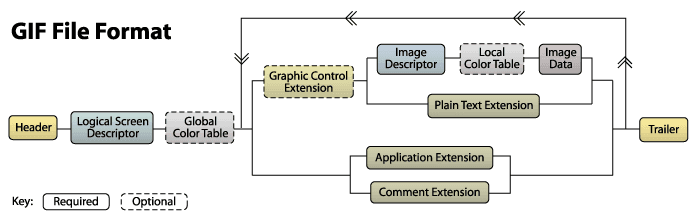
The large block in the middle can be repeated any number of times.
File Header
GIF Signature and Version. The GIF Signature is used to confirm whether a file is in GIF format. This part consists of three characters: GIF. The file version number also consists of three bytes and can be 87a or 89a.
Logical Screen Descriptor
The Logical Screen Descriptor immediately follows the header. This block tells the decoder the space the image needs to occupy. Its size is fixed at 7 bytes, starting with the canvas width and canvas height.
Global Color Table
The GIF format can have a global color table, or provide a local color table for each sub-image set. Each color table consists of a list of RGB values (like the typical (255, 0, 0) for red).
Image Descriptor
A GIF file generally contains multiple images. The previous image rendering mode was typically to draw multiple images onto a large virtual canvas, while now these image sets are generally used to implement animations.
Each image starts with an image descriptor block, which is fixed at 10 bytes.
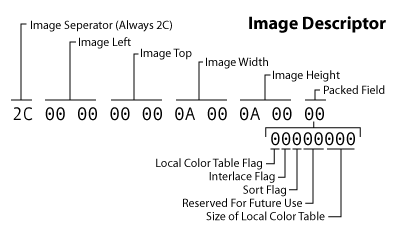
Image Data
Finally, we reach where the actual image data is stored. Image Data consists of a series of output codes that tell the decoder the color information for each pixel to be drawn on the canvas. These codes are organized as byte codes within this block.
Trailer
This block is a single-field block used to indicate the end of the data stream. It has a fixed value of 0x3b.
For more details, see Detailed Analysis of GIF Format Images
Spatial Axis
Due to the dynamic nature of GIF, which consists of frame-by-frame images, each individual frame and the combination of multiple frames become carriers for hiding information.
For GIF files that need to be separated, you can use the convert command to split each frame:
$ convert cake.gif cake.png
$ ls
cake-0.png  cake-1.png  cake-2.png  cake-3.png  cake.gif
Example Challenge
WDCTF-2017:3-2
After opening the gif, the approach is clear: separate each frame, then combine them to get a complete QR code.
from  PIL import Image


flag = Image.new("RGB",(450,450))

for i in range(2):
    for j in range(2):
        pot = "cake-{}.png".format(j+i*2)
        potImage = Image.open(pot)
        flag.paste(potImage,(j*225,i*225))
flag.save('./flag.png')
After scanning the QR code, we get a hexadecimal string:
03f30d0ab8c1aa5....74080006030908
The beginning 03f3 is the header of a pyc file. After recovering it as a python script and running it directly, we get the flag.
Time Axis
The time interval between each frame of a GIF file can also serve as a carrier for hiding information.
For example, in a challenge from the XMan selection competition:
XMAN-2017:100.gif
Using the identify command, the time interval of each frame is clearly printed:
$ identify -format "%s %T \n" 100.gif
0 66
1 66
2 20
3 10
4 20
5 10
6 10
7 20
8 20
9 20
10 20
11 10
12 20
13 20
14 10
15 10
We deduce that 20 & 10 represent 0 & 1 respectively. Extract the intervals between each frame and convert them:
$ cat flag|cut -d ' ' -f 2|tr -d '66'|tr -d '\n'|tr -d '0'|tr '2' '0'
0101100001001101010000010100111001111011001110010011011000110101001101110011010101100010011001010110010101100100001101000110010001100101011000010011000100111000011001000110010101100100001101000011011100110011001101010011011000110100001100110110000101100101011000110110011001100001001100110011010101111101#
Finally, convert the binary to ASCII to get the flag.