PNG
File Format
For a PNG file, its file header is always described by fixed bytes, and the remaining part is composed of 3 or more PNG data chunks (Chunks) arranged in a specific order.
File header 89 50 4E 47 0D 0A 1A 0A + Data chunk + Data chunk + Data chunk……
Data Chunk (Chunk)
PNG defines two types of data chunks. One is called critical chunks, which are standard data chunks, and the other is called ancillary chunks, which are optional data chunks. Critical chunks define 4 standard data chunks that every PNG file must contain, and PNG read/write software must support these data chunks.
| Chunk Symbol | Chunk Name | Multiple | Optional | Position Restriction |
|---|---|---|---|---|
| IHDR | Header Chunk | No | No | First chunk |
| cHRM | Primary Chromaticities and White Point Chunk | No | Yes | Before PLTE and IDAT |
| gAMA | Image Gamma Chunk | No | Yes | Before PLTE and IDAT |
| sBIT | Significant Bits Chunk | No | Yes | Before PLTE and IDAT |
| PLTE | Palette Chunk | No | Yes | Before IDAT |
| bKGD | Background Color Chunk | No | Yes | After PLTE and before IDAT |
| hIST | Image Histogram Chunk | No | Yes | After PLTE and before IDAT |
| tRNS | Transparency Chunk | No | Yes | After PLTE and before IDAT |
| oFFs | (Specialized Public Chunk) | No | Yes | Before IDAT |
| pHYs | Physical Pixel Dimensions Chunk | No | Yes | Before IDAT |
| sCAL | (Specialized Public Chunk) | No | Yes | Before IDAT |
| IDAT | Image Data Chunk | Yes | No | Consecutive with other IDAT chunks |
| tIME | Image Last Modification Time Chunk | No | Yes | No restriction |
| tEXt | Textual Data Chunk | Yes | Yes | No restriction |
| zTXt | Compressed Textual Data Chunk | Yes | Yes | No restriction |
| fRAc | (Specialized Public Chunk) | Yes | Yes | No restriction |
| gIFg | (Specialized Public Chunk) | Yes | Yes | No restriction |
| gIFt | (Specialized Public Chunk) | Yes | Yes | No restriction |
| gIFx | (Specialized Public Chunk) | Yes | Yes | No restriction |
| IEND | Image End Data | No | No | Last data chunk |
Each data chunk has a uniform data structure, consisting of 4 parts:
| Name | Bytes | Description |
|---|---|---|
| Length | 4 bytes | Specifies the length of the data field in the data chunk, not exceeding (231-1) bytes |
| Chunk Type Code | 4 bytes | The chunk type code consists of ASCII letters (A - Z and a - z) |
| Chunk Data | Variable length | Stores data as specified by the Chunk Type Code |
| CRC (Cyclic Redundancy Check) | 4 bytes | Stores the cyclic redundancy code used to detect errors |
The value in the CRC (Cyclic Redundancy Check) field is calculated from the data in the Chunk Type Code field and the Chunk Data field.
IHDR
The Header Chunk IHDR: It contains the basic information about the image data stored in the PNG file, consists of 13 bytes, and must appear as the first data chunk in the PNG data stream. There can only be one header chunk in a PNG data stream.
The first 8 bytes are what we focus on:
| Field Name | Bytes | Description |
|---|---|---|
| Width | 4 bytes | Image width, in pixels |
| Height | 4 bytes | Image height, in pixels |
We often modify the height or width of an image to make it display incompletely, thereby achieving the purpose of hiding information.
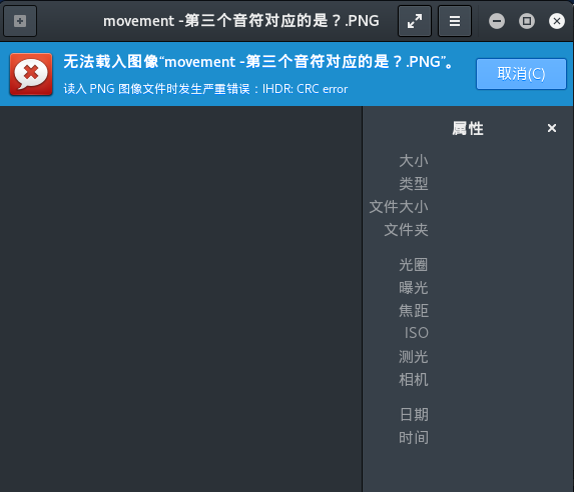
Here you can notice that this image cannot be opened in Kali, with the prompt IHDR CRC error, while the built-in image viewer in Windows 10 can open it. This reminds us that the IHDR chunk has been tampered with, and we can try modifying the image height or width to discover the hidden string.
Example
WDCTF-finals-2017
By observing the file, we can notice that the file header and width are abnormal.
00000000  80 59 4e 47 0d 0a 1a 0a  00 00 00 0d 49 48 44 52  |.YNG........IHDR|
00000010  00 00 00 00 00 00 02 f8  08 06 00 00 00 93 2f 8a  |............../.|
00000020  6b 00 00 00 04 67 41 4d  41 00 00 9c 40 20 0d e4  |k....gAMA...@ ..|
00000030  cb 00 00 00 20 63 48 52  4d 00 00 87 0f 00 00 8c  |.... cHRM.......|
00000040  0f 00 00 fd 52 00 00 81  40 00 00 7d 79 00 00 e9  |....R...@..}y...|
...
It's important to note that the file width cannot be modified arbitrarily. The width needs to be brute-forced based on the CRC value of the IHDR chunk, otherwise the image will display incorrectly and you won't be able to obtain the flag.
import os
import binascii
import struct


misc = open("misc4.png","rb").read()

for i in range(1024):
    data = misc[12:16] + struct.pack('>i',i)+ misc[20:29]
    crc32 = binascii.crc32(data) & 0xffffffff
    if crc32 == 0x932f8a6b:
        print i
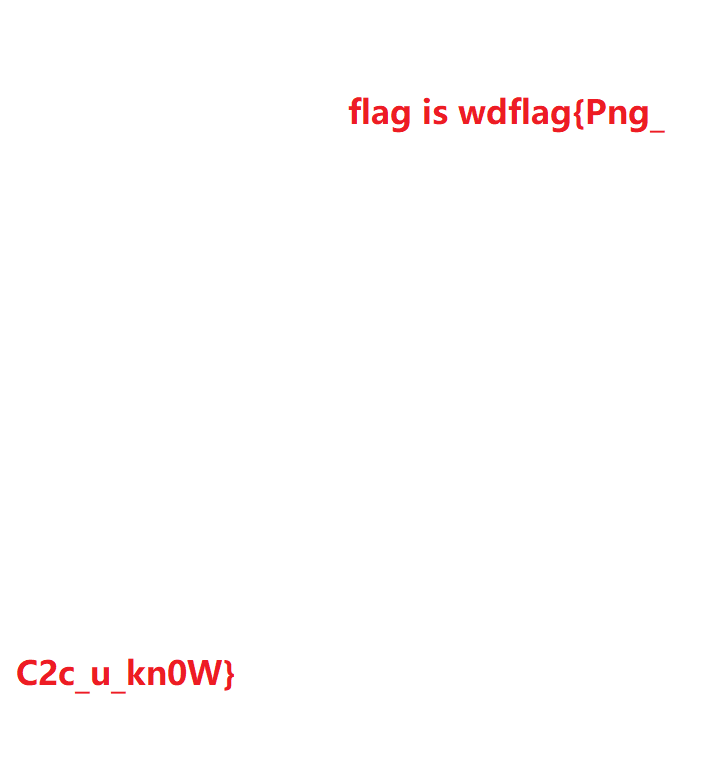
After obtaining the width value of 709, restore the image to get the flag.
PLTE
The Palette Chunk PLTE: It contains color transformation data related to indexed-color images. It is only related to indexed-color images and must be placed before the image data chunk. True color PNG data streams can also have palette chunks, the purpose being to facilitate non-true-color display programs to quantize image data and display the image.
IDAT
The Image Data Chunk IDAT: It stores the actual data and can contain multiple consecutive sequential image data chunks in the data stream.
- Stores image pixel data
- Can contain multiple consecutive sequential image data chunks in the data stream
- Compressed using a derivative algorithm of the LZ77 algorithm
- Can be decompressed with zlib
It is worth noting that an IDAT chunk will only continue to a new chunk when the previous chunk is full.
Use pngcheck to view this PNG file:
λ .\pngcheck.exe -v sctf.png
File: sctf.png (1421461 bytes)
  chunk IHDR at offset 0x0000c, length 13
    1000 x 562 image, 32-bit RGB+alpha, non-interlaced
  chunk sRGB at offset 0x00025, length 1
    rendering intent = perceptual
  chunk gAMA at offset 0x00032, length 4: 0.45455
  chunk pHYs at offset 0x00042, length 9: 3780x3780 pixels/meter (96 dpi)
  chunk IDAT at offset 0x00057, length 65445
    zlib: deflated, 32K window, fast compression
  chunk IDAT at offset 0x10008, length 65524
...
  chunk IDAT at offset 0x150008, length 45027
  chunk IDAT at offset 0x15aff7, length 138
  chunk IEND at offset 0x15b08d, length 0
No errors detected in sctf.png (28 chunks, 36.8% compression).
As we can see, normal chunks are full at a length of 65524, while the second-to-last IDAT chunk has a length of 45027, and the last one has a length of 138. It's obvious that the last IDAT chunk is problematic, because it should have been merged into the second-to-last chunk which was not full.
Use python zlib to decompress the content of the extra IDAT chunk. Note that you need to remove the length, chunk type code, and the trailing CRC checksum value.
import zlib
import binascii
IDAT = "789...667".decode('hex')
result = binascii.hexlify(zlib.decompress(IDAT))
print result
IEND
The Image Trailer Chunk IEND: It is used to mark the end of the PNG file or data stream and must be placed at the end of the file.
00 00 00 00 49 45 4E 44 AE 42 60 82
The length of the IEND data chunk is always 00 00 00 00, the data identifier is always IEND 49 45 4E 44, and therefore the CRC code is always AE 42 60 82.
Other Ancillary Data Chunks
- Background Color Chunk bKGD (background color)
- Primary Chromaticities and White Point Chunk cHRM (primary chromaticities and white point). The so-called white point refers to the white chromaticity produced on the display when
R=G=B=maximum value - Image Gamma Chunk gAMA (image gamma)
- Image Histogram Chunk hIST (image histogram)
- Physical Pixel Dimensions Chunk pHYs (physical pixel dimensions)
- Significant Bits Chunk sBIT (significant bits)
- Textual Data Chunk tEXt (textual data)
- Image Last Modification Time Chunk tIME (image last-modification time)
- Transparency Chunk tRNS (transparency)
- Compressed Textual Data Chunk zTXt (compressed textual data)
LSB
LSB stands for Least Significant Bit. The image pixels in PNG files are generally composed of three primary colors RGB (Red, Green, Blue). Each color occupies 8 bits with a value range from 0x00 to 0xFF, meaning there are 256 shades per color, containing a total of 256 to the power of 3 colors, which is 16,777,216 colors.
The human eye can distinguish approximately 10 million different colors, meaning there are about 6,777,216 colors that the human eye cannot distinguish.
LSB steganography modifies the least significant binary bit (LSB) of the RGB color components. Each color has 8 bits, and LSB steganography modifies the lowest 1 bit of a pixel. The human eye will not notice the change, and each pixel can carry 3 bits of information.
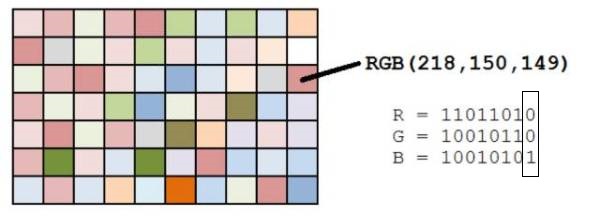
If you are looking for traces of LSB hiding, there is an essential tool called Stegsolve that can assist us in analysis.
By using the buttons at the bottom, you can observe the information in each channel. For example, viewing the information in the lowest bit plane (bit plane 8) of the R channel.
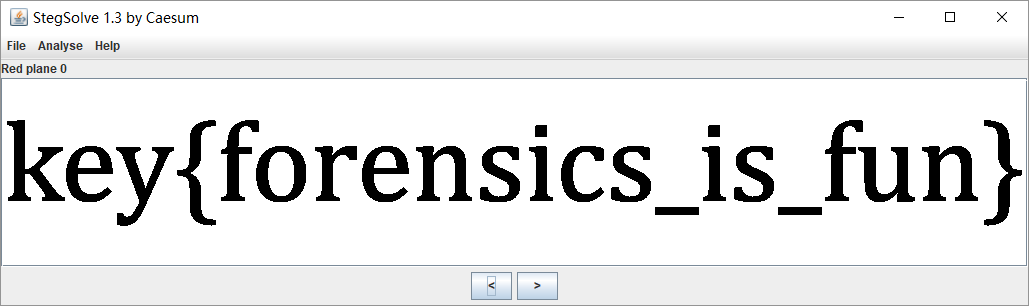
When examining each channel with Stegsolve for LSB information, you must carefully capture anomalies and look for clues of LSB steganography.
Example
HCTF - 2016 - Misc
In this challenge, the information is hidden in the least significant bits of the RGB three channels. Using Stegsolve-->Analyse-->Data Extract, you can specify channels for extraction.
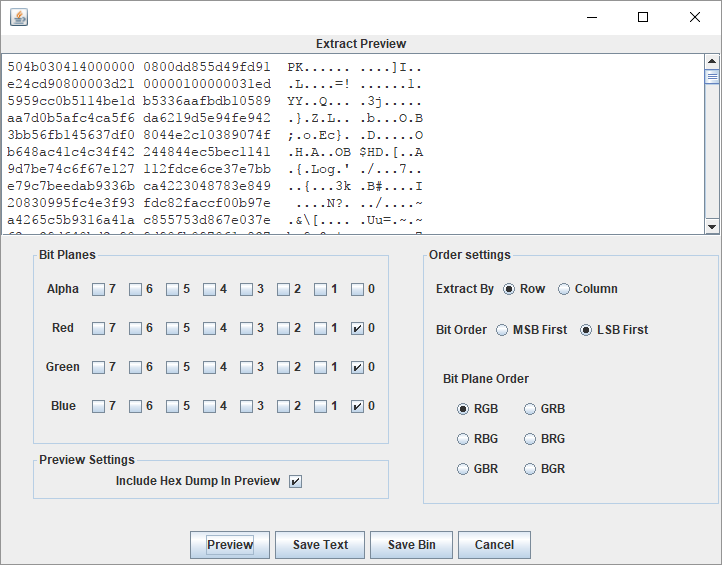
You can find a zip header. Save it as a compressed archive using save bin, then open and run the ELF file inside to obtain the final flag.
For more research on LSB, you can check here.