PCAP File Repair
PCAP File Structure
Generally speaking, PCAP file format is rarely examined, and it can usually be repaired directly using existing tools such as pcapfix. Here is a brief introduction to several common blocks. For details, refer to Here.
- Tools
General file structure:
    0                   1                   2                   3
    0 1 2 3 4 5 6 7 8 9 0 1 2 3 4 5 6 7 8 9 0 1 2 3 4 5 6 7 8 9 0 1
   +-+-+-+-+-+-+-+-+-+-+-+-+-+-+-+-+-+-+-+-+-+-+-+-+-+-+-+-+-+-+-+-+
   |                          Block Type                           |
   +-+-+-+-+-+-+-+-+-+-+-+-+-+-+-+-+-+-+-+-+-+-+-+-+-+-+-+-+-+-+-+-+
   |                      Block Total Length                       |
   +-+-+-+-+-+-+-+-+-+-+-+-+-+-+-+-+-+-+-+-+-+-+-+-+-+-+-+-+-+-+-+-+
   /                          Block Body                           /
   /          /* variable length, aligned to 32 bits */            /
   +-+-+-+-+-+-+-+-+-+-+-+-+-+-+-+-+-+-+-+-+-+-+-+-+-+-+-+-+-+-+-+-+
   |                      Block Total Length                       |
   +-+-+-+-+-+-+-+-+-+-+-+-+-+-+-+-+-+-+-+-+-+-+-+-+-+-+-+-+-+-+-+-+
Currently defined common block types:
- Section Header Block: it defines the most important characteristics of the capture file.
- Interface Description Block: it defines the most important characteristics of the interface(s) used for capturing traffic.
- Packet Block: it contains a single captured packet, or a portion of it.
- Simple Packet Block: it contains a single captured packet, or a portion of it, with only a minimal set of information about it.
- Name Resolution Block: it defines the mapping from numeric addresses present in the packet dump and the canonical name counterpart.
- Capture Statistics Block: it defines how to store some statistical data (e.g. packet dropped, etc) which can be useful to undestand the conditions in which the capture has been made.
Common Blocks
Section Header Block (File Header)
Must exist, signifying the beginning of the file.
    0                   1                   2                   3
    0 1 2 3 4 5 6 7 8 9 0 1 2 3 4 5 6 7 8 9 0 1 2 3 4 5 6 7 8 9 0 1
   +-+-+-+-+-+-+-+-+-+-+-+-+-+-+-+-+-+-+-+-+-+-+-+-+-+-+-+-+-+-+-+-+
   |                Byte-Order Magic (0x1A2B3C4D)                  |
   +-+-+-+-+-+-+-+-+-+-+-+-+-+-+-+-+-+-+-+-+-+-+-+-+-+-+-+-+-+-+-+-+
   |   Major Version               |    Minor Version              |
   +-+-+-+-+-+-+-+-+-+-+-+-+-+-+-+-+-+-+-+-+-+-+-+-+-+-+-+-+-+-+-+-+
   |                                                               |
   |                          Section Length                       |
   |                                                               |
   +-+-+-+-+-+-+-+-+-+-+-+-+-+-+-+-+-+-+-+-+-+-+-+-+-+-+-+-+-+-+-+-+
   /                                                               /
   /                      Options (variable)                       /
   /                                                               /
   +-+-+-+-+-+-+-+-+-+-+-+-+-+-+-+-+-+-+-+-+-+-+-+-+-+-+-+-+-+-+-+-+
Interface Description Block
Must exist, describing interface characteristics.
    0                   1                   2                   3
    0 1 2 3 4 5 6 7 8 9 0 1 2 3 4 5 6 7 8 9 0 1 2 3 4 5 6 7 8 9 0 1
   +-+-+-+-+-+-+-+-+-+-+-+-+-+-+-+-+-+-+-+-+-+-+-+-+-+-+-+-+-+-+-+-+
   |           LinkType            |           Reserved            |
   +-+-+-+-+-+-+-+-+-+-+-+-+-+-+-+-+-+-+-+-+-+-+-+-+-+-+-+-+-+-+-+-+
   |                  SnapLen (Maximum bytes per packet)            |
   +-+-+-+-+-+-+-+-+-+-+-+-+-+-+-+-+-+-+-+-+-+-+-+-+-+-+-+-+-+-+-+-+
   /                                                               /
   /                      Options (variable)                       /
   /                                                               /
   +-+-+-+-+-+-+-+-+-+-+-+-+-+-+-+-+-+-+-+-+-+-+-+-+-+-+-+-+-+-+-+-+
Packet Block
    0                   1                   2                   3
    0 1 2 3 4 5 6 7 8 9 0 1 2 3 4 5 6 7 8 9 0 1 2 3 4 5 6 7 8 9 0 1
   +-+-+-+-+-+-+-+-+-+-+-+-+-+-+-+-+-+-+-+-+-+-+-+-+-+-+-+-+-+-+-+-+
   |         Interface ID          |          Drops Count          |
   +-+-+-+-+-+-+-+-+-+-+-+-+-+-+-+-+-+-+-+-+-+-+-+-+-+-+-+-+-+-+-+-+
   |                     Timestamp (High)   Standard Unix format   |
   +-+-+-+-+-+-+-+-+-+-+-+-+-+-+-+-+-+-+-+-+-+-+-+-+-+-+-+-+-+-+-+-+
   |                        Timestamp (Low)                        |
   +-+-+-+-+-+-+-+-+-+-+-+-+-+-+-+-+-+-+-+-+-+-+-+-+-+-+-+-+-+-+-+-+
   |                         Captured Len                          |
   +-+-+-+-+-+-+-+-+-+-+-+-+-+-+-+-+-+-+-+-+-+-+-+-+-+-+-+-+-+-+-+-+
   |                          Packet Len                           |
   +-+-+-+-+-+-+-+-+-+-+-+-+-+-+-+-+-+-+-+-+-+-+-+-+-+-+-+-+-+-+-+-+
   /                          Packet Data                          /
   /          /* variable length, aligned to 32 bits */            /
   +-+-+-+-+-+-+-+-+-+-+-+-+-+-+-+-+-+-+-+-+-+-+-+-+-+-+-+-+-+-+-+-+
   /                      Options (variable)                       /
   +-+-+-+-+-+-+-+-+-+-+-+-+-+-+-+-+-+-+-+-+-+-+-+-+-+-+-+-+-+-+-+-+
Example
Challenge: 1st "Baidu Cup" Information Security Attack and Defense Finals Online Qualifier: find the flag
WP: https://www.cnblogs.com/ECJTUACM-873284962/p/9884447.html
First, we receive a traffic packet challenge with the name find the flag. It contains many hints telling us to find the flag.
Step 1: Search for the flag keyword
Let's first search to see if there is flag in the traffic packet. We use the strings command to search. Windows users can use the search function in notepad++.
The search command is as follows:
strings findtheflag.cap | grep flag
The search results are as follows:
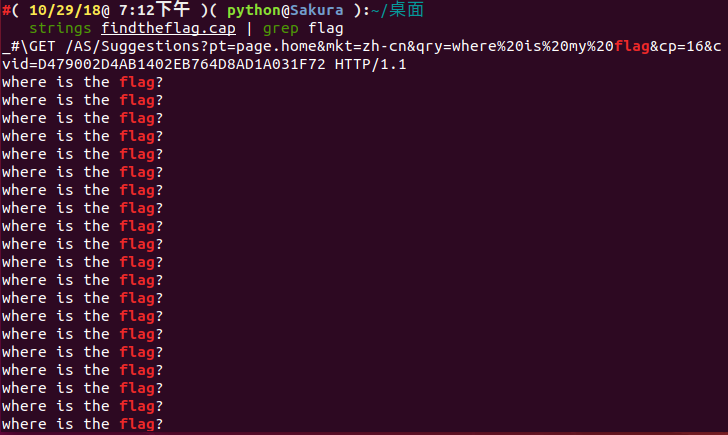
We found a large amount of results. We tried to filter for flag information through pipes, but didn't seem to find the answer we were looking for.
Step 2: Traffic packet repair
Let's open this traffic packet with wireshark.
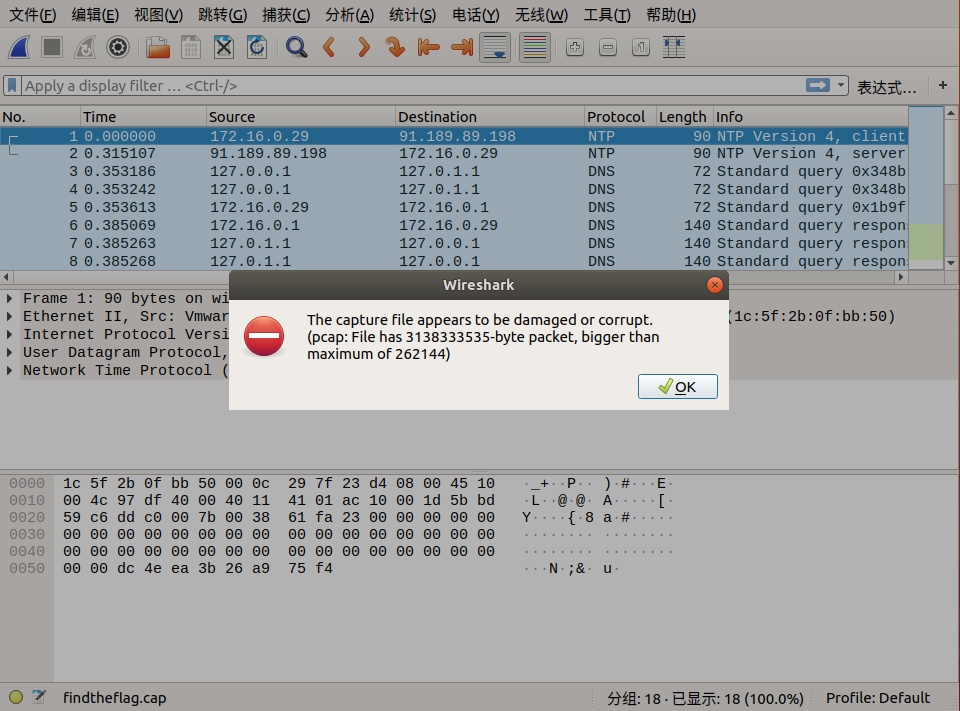
We notice that the traffic packet has anomalies. Let's repair this traffic packet.
Here we use an online tool: http://f00l.de/hacking/pcapfix.php
This tool can help us quickly repair the traffic packet into a pcap file.
Let's perform the online repair.
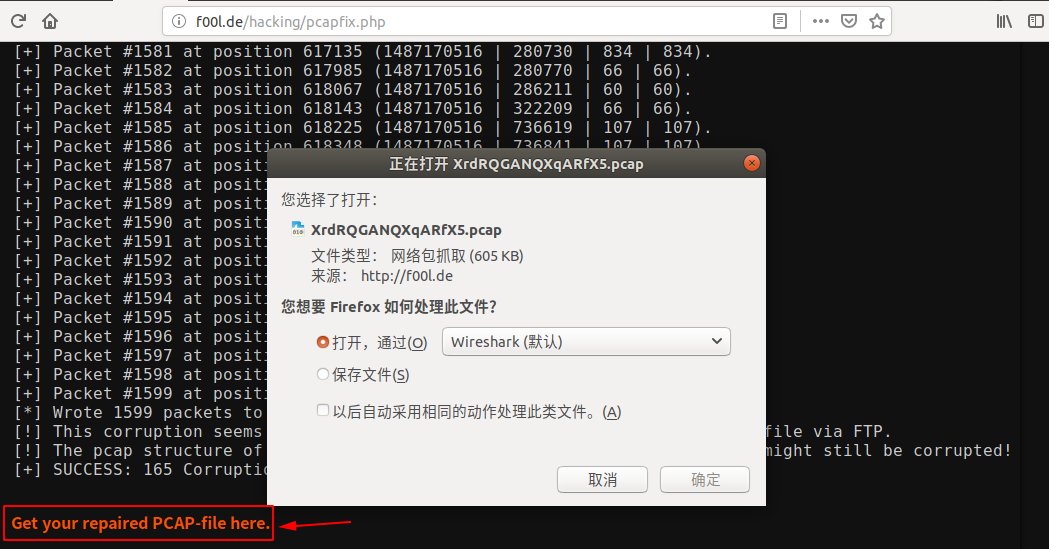
After repair is complete, click Get your repaired PCAP-file here. to download the traffic packet, then open it with wireshark.
Since we still need to find flag, let's first look at this traffic packet.
Step 3: Follow TCP Stream
Let's follow the TCP stream to see if there's any breakthrough.
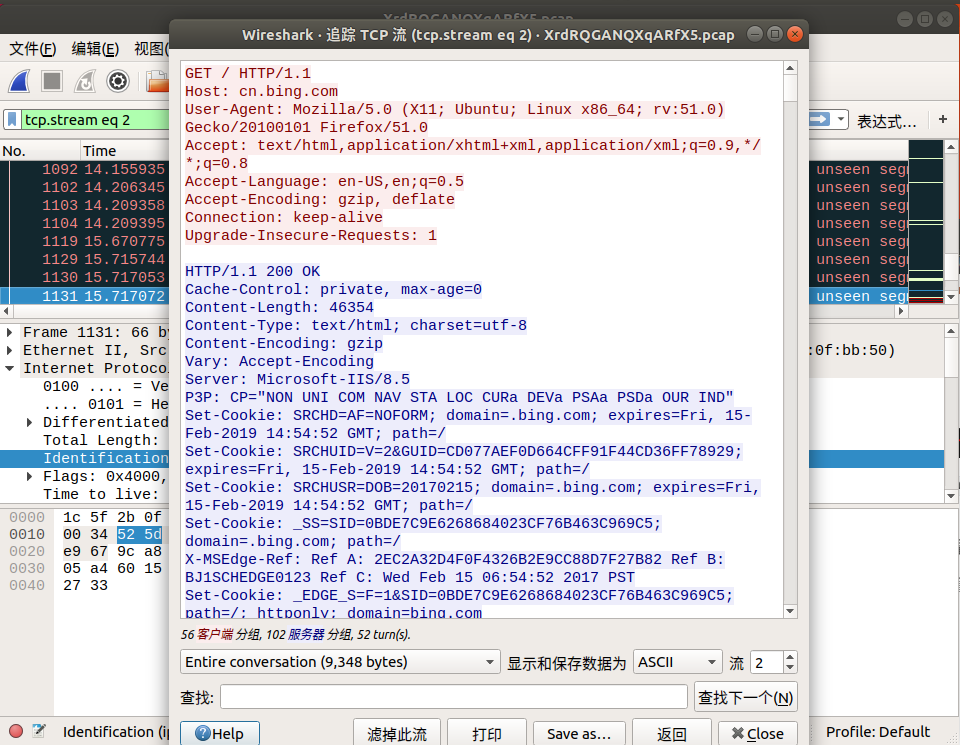
By following the TCP stream, we can see some version information, cookies, etc. We also notice some interesting things.
From tcp.stream eq 29 to tcp.stream eq 41, only where is the flag? is displayed. Could the challenge author be telling us that the flag is here?
Step 4: Search Packet Bytes
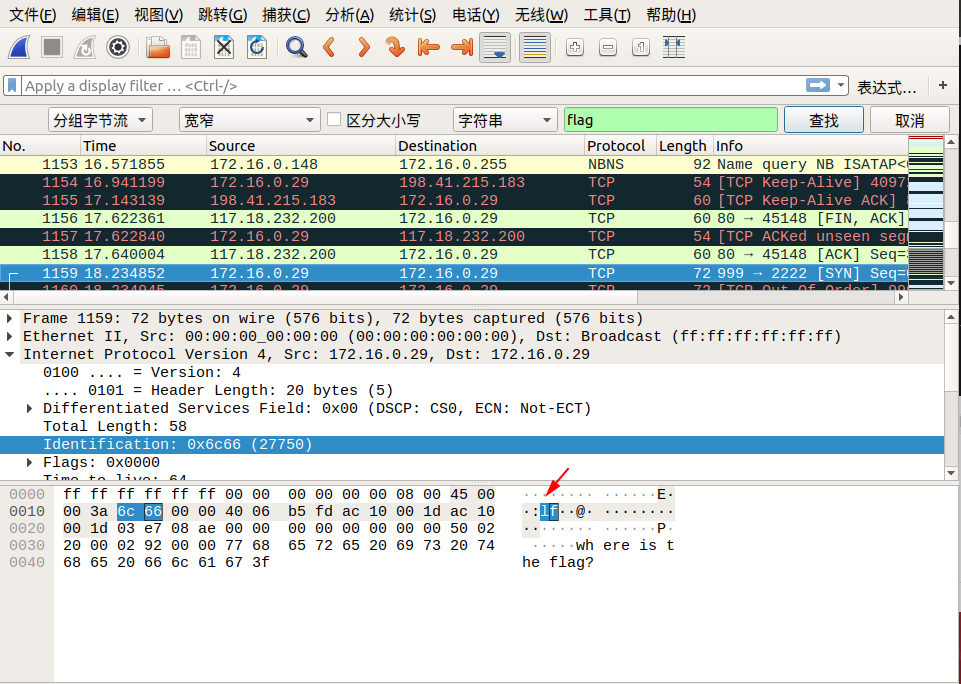
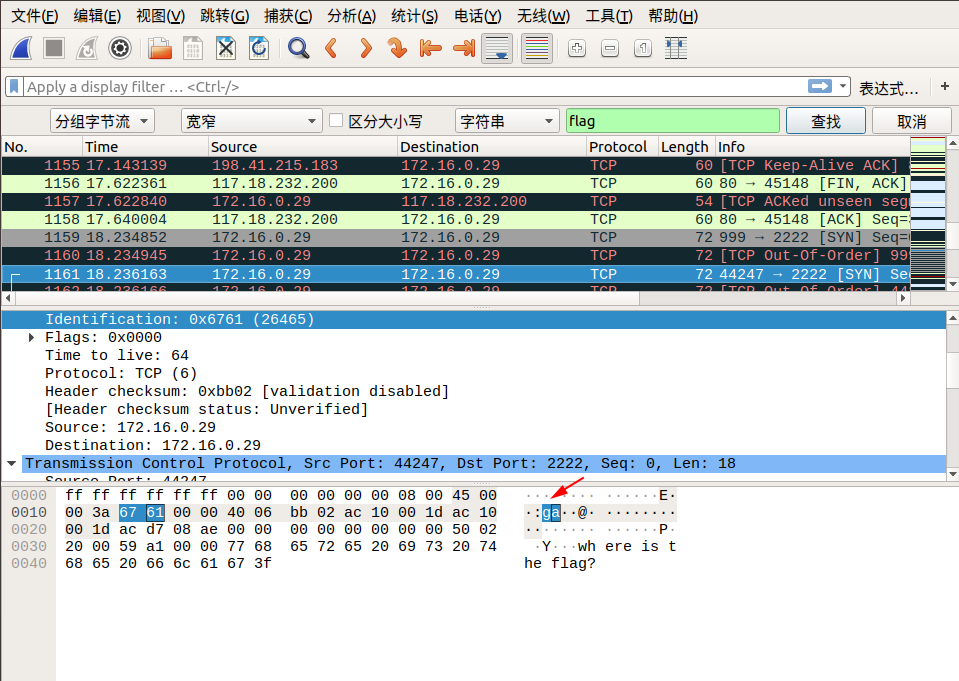
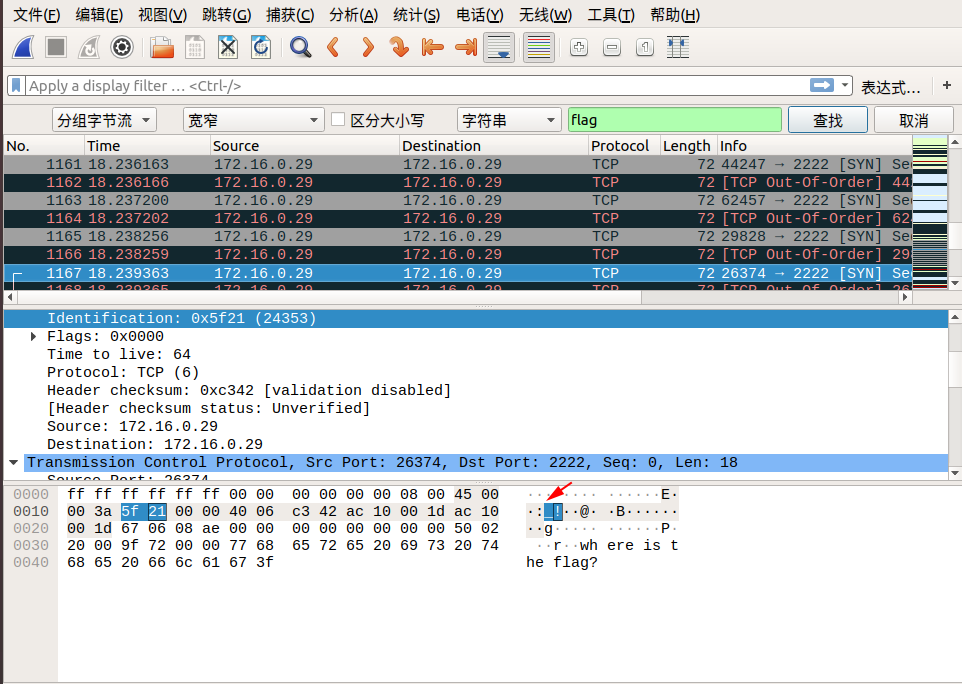
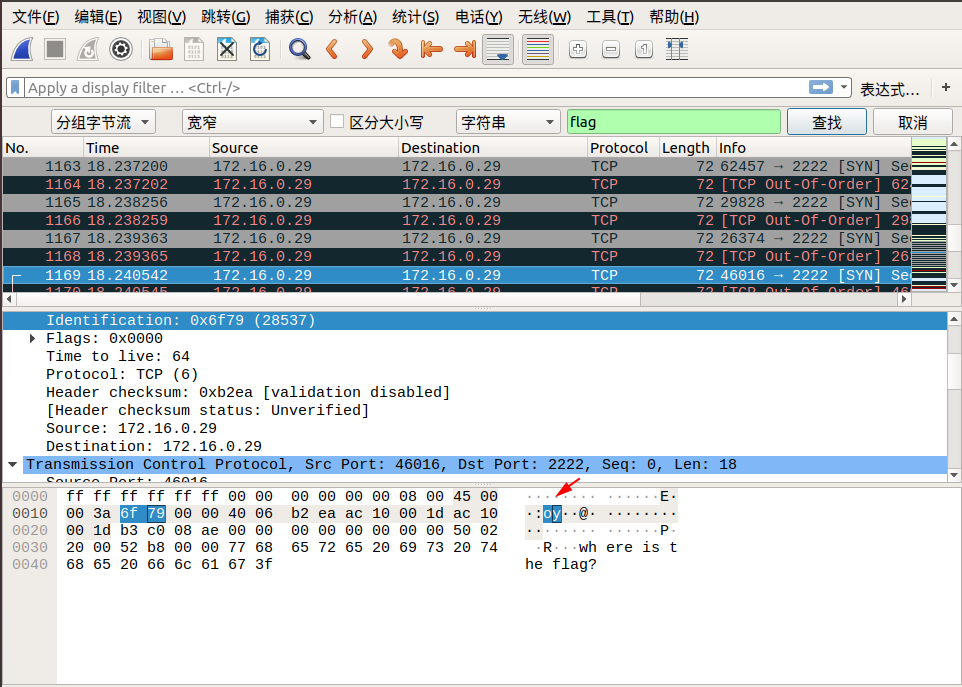
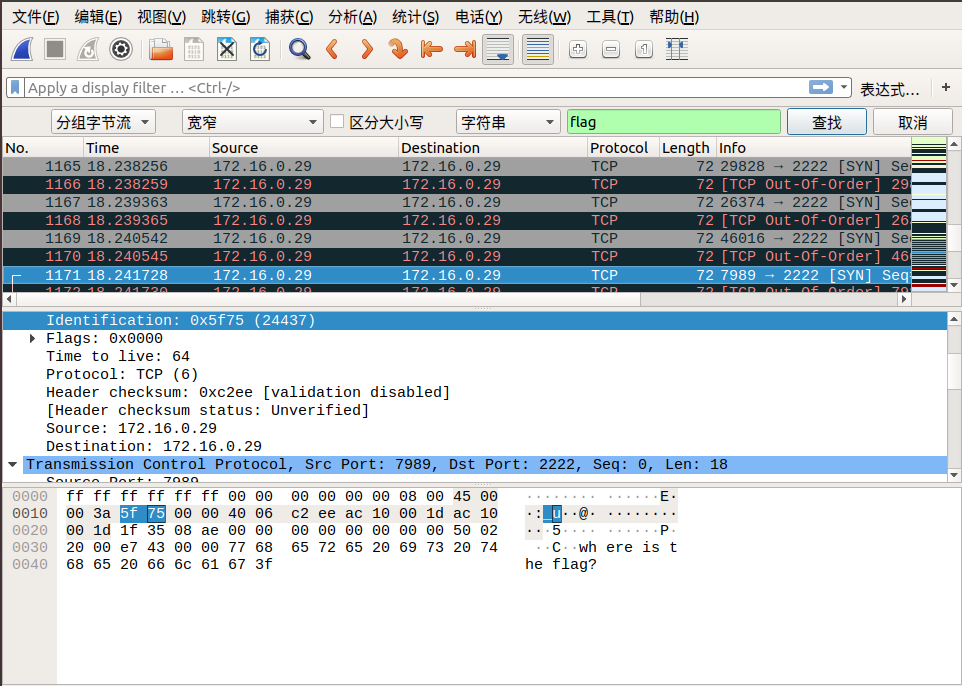
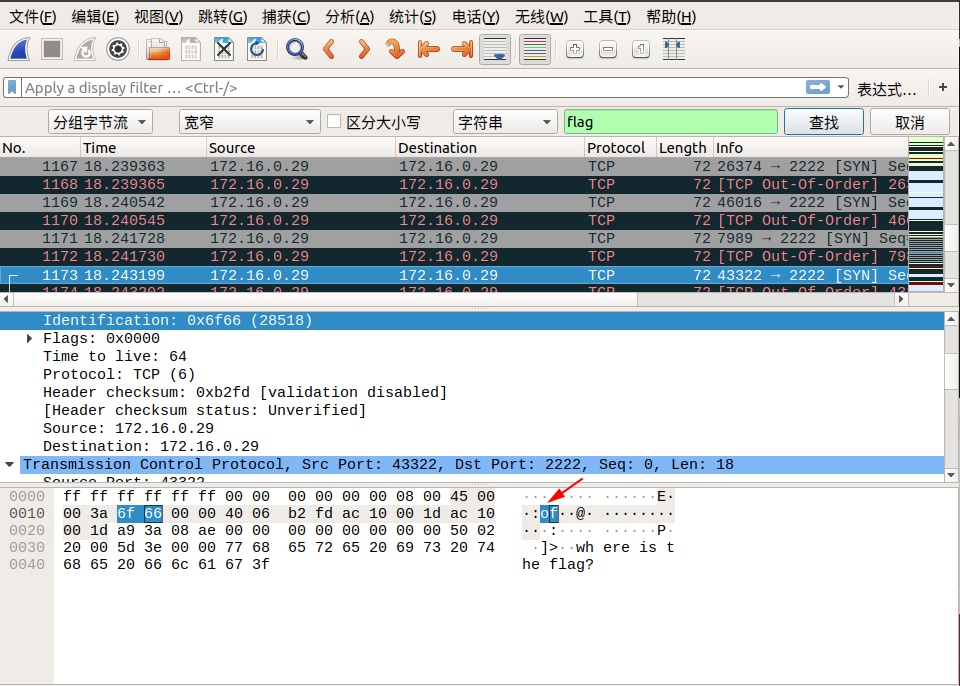
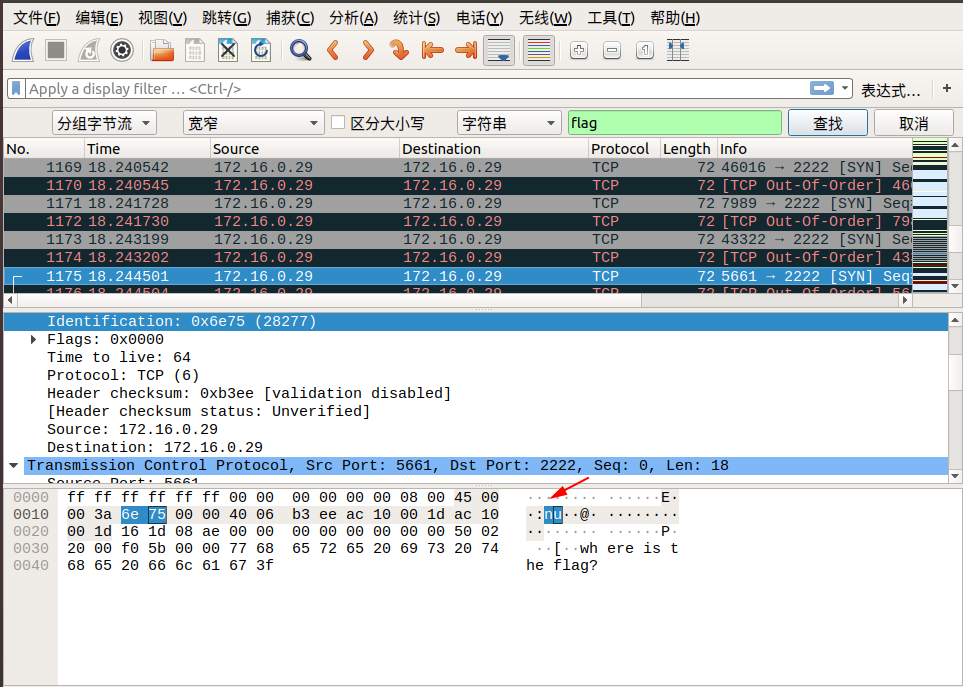
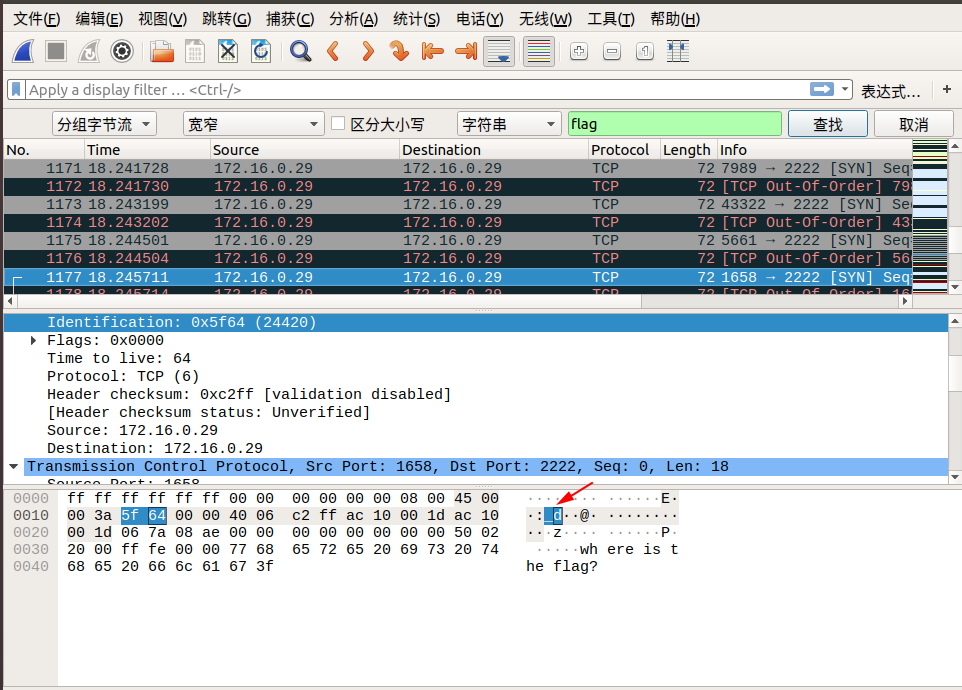
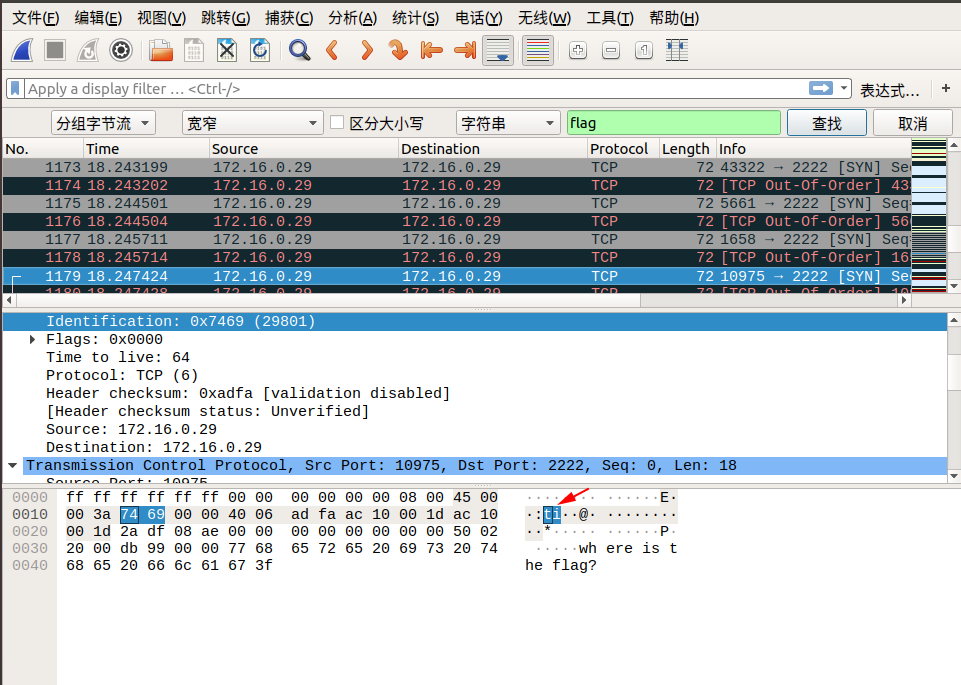
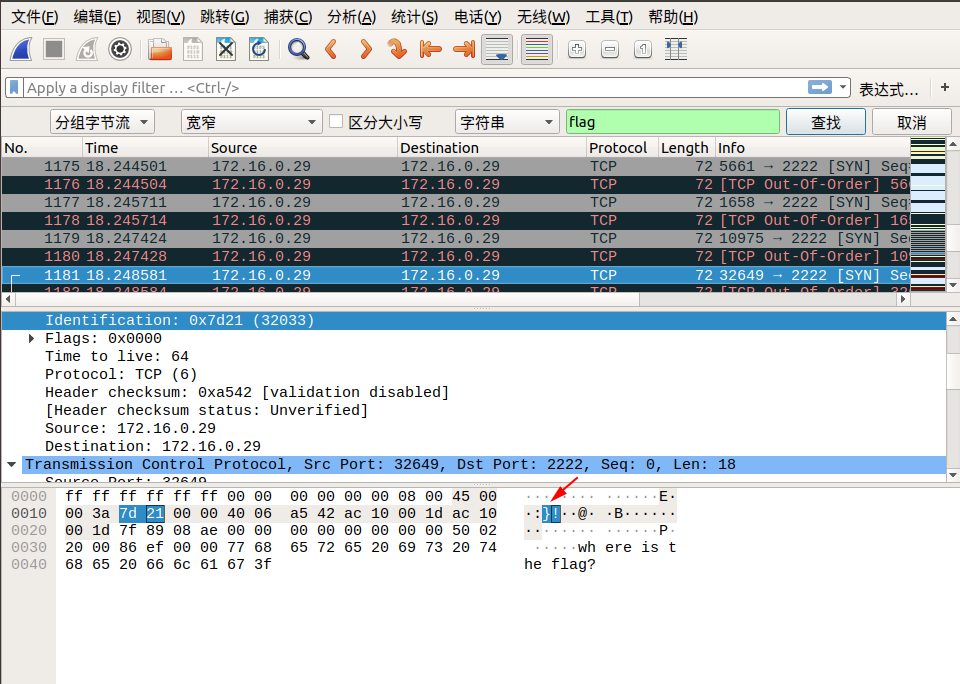
When we follow to tcp.stream eq 29, we see lf from flag in the Identification field. We can continue following the next stream, and in tcp.stream eq 30, we see ga from flag in the Identification field. We discover that combining the Identification fields from right to left across two packets gives us exactly flag! So we can boldly guess that the flag must be hidden in here.
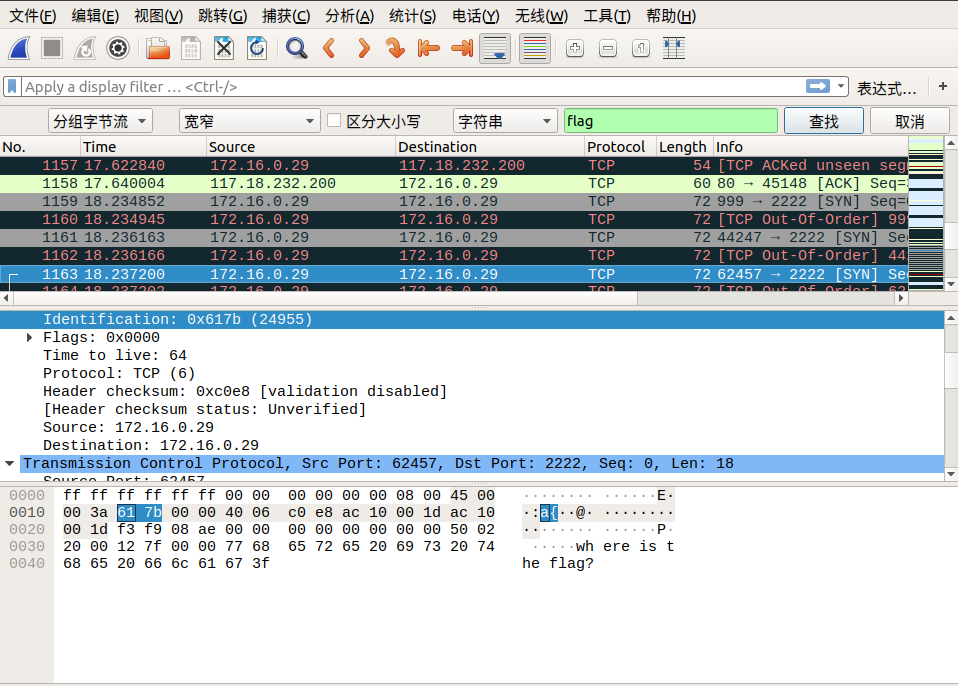
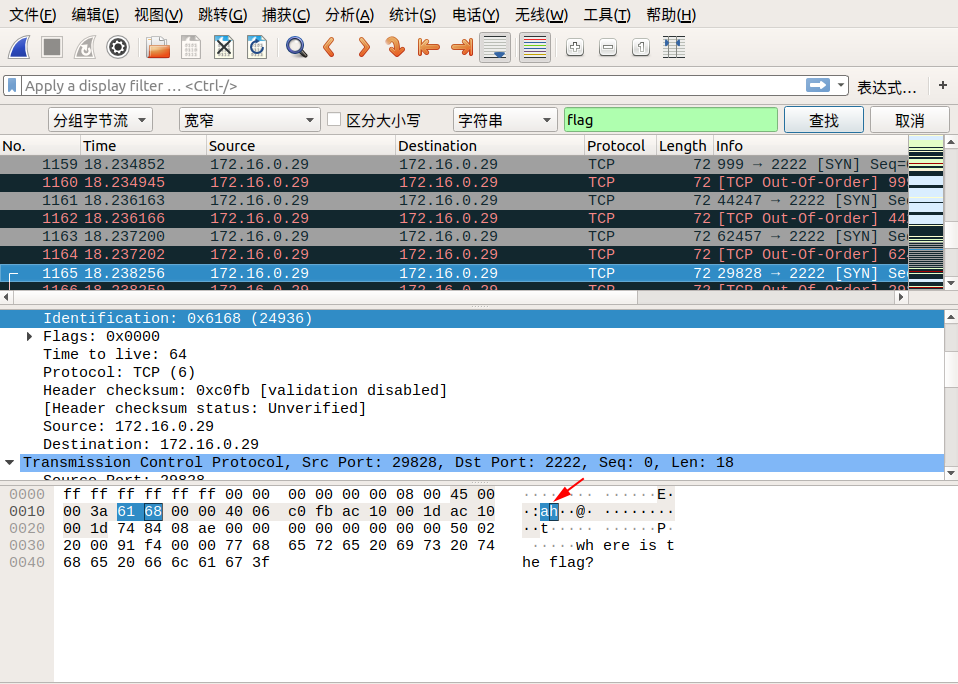
We can directly search via Search -> String Search -> Packet Bytes -> search keyword flag, and following the same method, connect the Identification fields of consecutive data packets to find the final flag!
Below are the search screenshots:
So the final flag is: flag{aha!_you_found_it!}