USB
Introduction
USB Specification: https://www.usb.org/sites/default/files/documents/hut1_12v2.pdf
- Mouse Protocol
Mouse movement is continuous, unlike the discrete nature of keyboard keystrokes. However, the data packets generated by mouse actions are also discrete, since continuous information displayed by computers is composed of a large amount of discrete information.
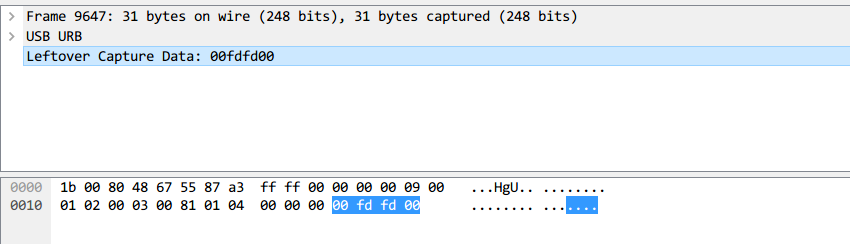
Each data packet has four bytes in its data area. The first byte represents the button state: when it is 0x00, no button is pressed; when it is 0x01, the left button is pressed; when it is 0x02, the right button is currently pressed. The second byte can be considered a signed byte type, with the most significant bit being the sign bit. When this value is positive, it represents how many pixels the mouse has moved horizontally to the right; when negative, it represents how many pixels it has moved horizontally to the left. The third byte is similar to the second byte, representing the vertical up/down movement offset.
After obtaining the information of these points, the mouse movement trajectory can be reconstructed.
- Tools
- UsbMiceDataHacker
- Keyboard Protocol
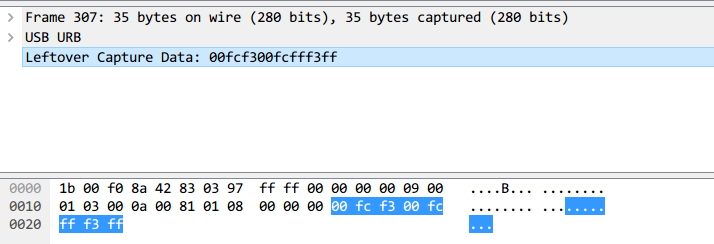
The data length of a keyboard data packet is 8 bytes, with keystroke information concentrated in the 3rd byte.
Based on the mapping between data values and specific key positions:
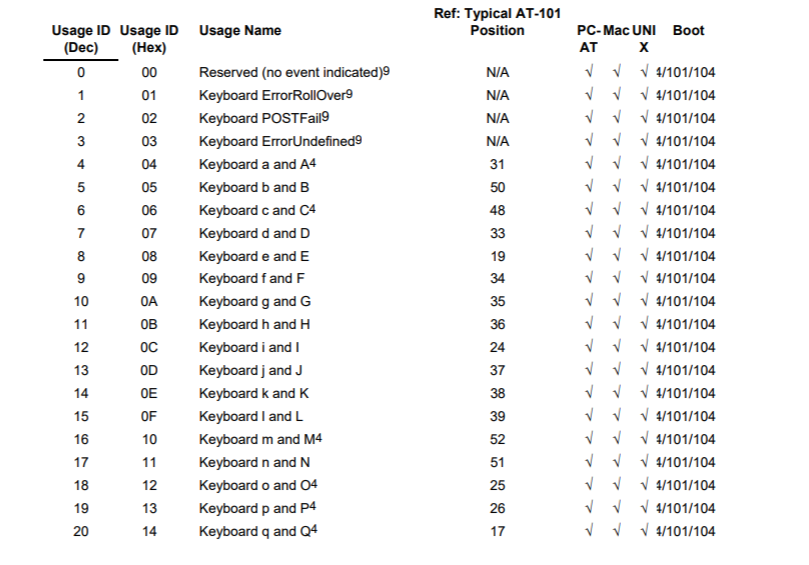
Keystroke information can be recovered from the data packets.
- Tools
- UsbKeyboardDataHacker
References
Example
XmanSeason 3 Summer Camp Ranking Practice Challenge:AutoKeyWP: https://www.cnblogs.com/ECJTUACM-873284962/p/9473808.html
Problem description:
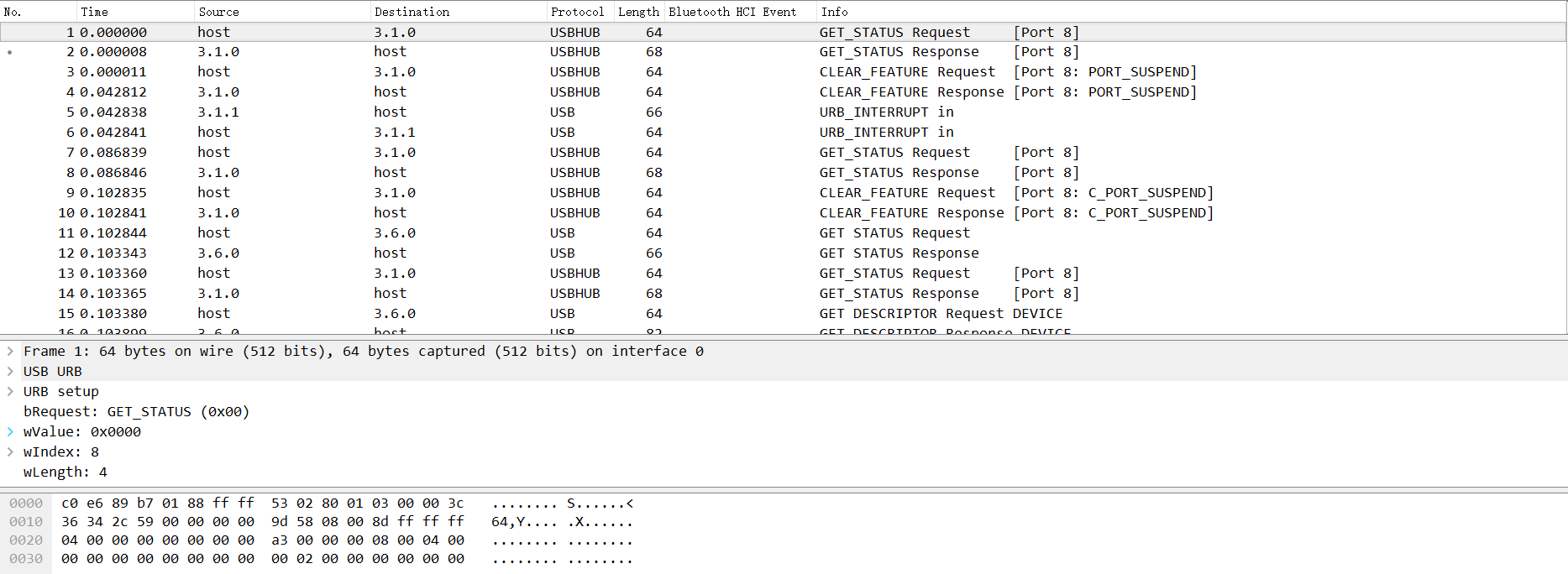
This challenge was created by me for the Xman Season 3 Summer Camp selection competition. How do we analyze it?
How Was the Traffic Capture Obtained?
First, from the packet analysis above, we can tell that this is a USB traffic capture. Let's first try to analyze how USB data packets are captured.
Before we begin, let's introduce some basic USB knowledge. USB has different specifications. Here are the three ways USB is used:
l USB UART
l USB HID
l USB Memory
UART or Universal Asynchronous Receiver/Transmitter. In this mode, the device simply uses USB for receiving and transmitting data, and has no other communication functions beyond that.
HID stands for Human Interface Device. This type of communication is suitable for interactive devices, including: keyboards, mice, game controllers, and digital display devices.
Finally, there is USB Memory, which refers to data storage. External HDD, thumb drive/flash drive, etc. all fall into this category.
Among these, the most widely used are USB HID and USB Memory.
Every USB device (especially HID or Memory) has a Vendor ID and a Product ID. The Vendor ID identifies which manufacturer produced the USB device. The Product ID identifies different products; it is not a unique number, but ideally should be different. See the figure below:

The above figure shows the list of USB devices connected to my computer in a virtual machine environment, viewed using the lsusb command.
For example, I have a wireless mouse under VMware. It is an HID device. This device operates normally and can be viewed using the lsusb command to list all USB devices. Can you find which entry corresponds to this mouse? That's right, it's the fourth one, specifically this line:
Bus 002 Device 002: ID 0e0f:0003 VMware, Inc. Virtual Mouse
Here, ID 0e0f:0003 is the Vendor-Product ID pair, where the Vendor ID value is 0e0f and the Product ID value is 0003. Bus 002 Device 002 indicates that the usb device is properly connected — make note of this.
We run Wireshark with root privileges to capture USB data streams. However, this is generally not recommended. We need to give users sufficient permissions to capture usb data streams in Linux. We can use udev to achieve this. We need to create a user group usbmon and then add our account to this group.
addgroup usbmon
gpasswd -a $USER usbmon
echo 'SUBSYSTEM=="usbmon", GROUP="usbmon", MODE="640"' > /etc/udev/rules.d/99-usbmon.rules
Next, we need the usbmon kernel module. If the module is not loaded, we can load it with the following command:
modprobe usbmon
Open wireshark and you will see usbmonX where X represents a number. The figure below shows our results (I am using root):
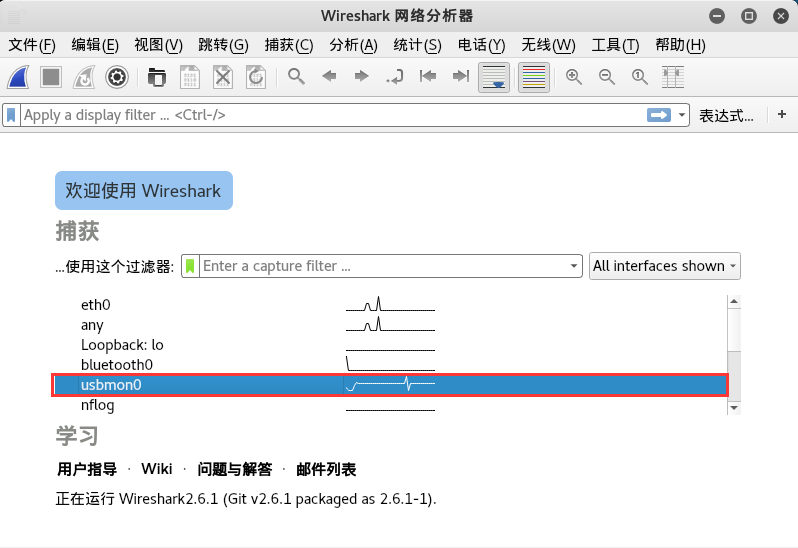
If the interface is active or data is flowing through it, wireshark will display it as a waveform. So which one should we choose? That's right, it's the one I asked you to remember earlier — the X number corresponds to the USB Bus. In this article, it is usbmon0. Open it to observe the data packets.
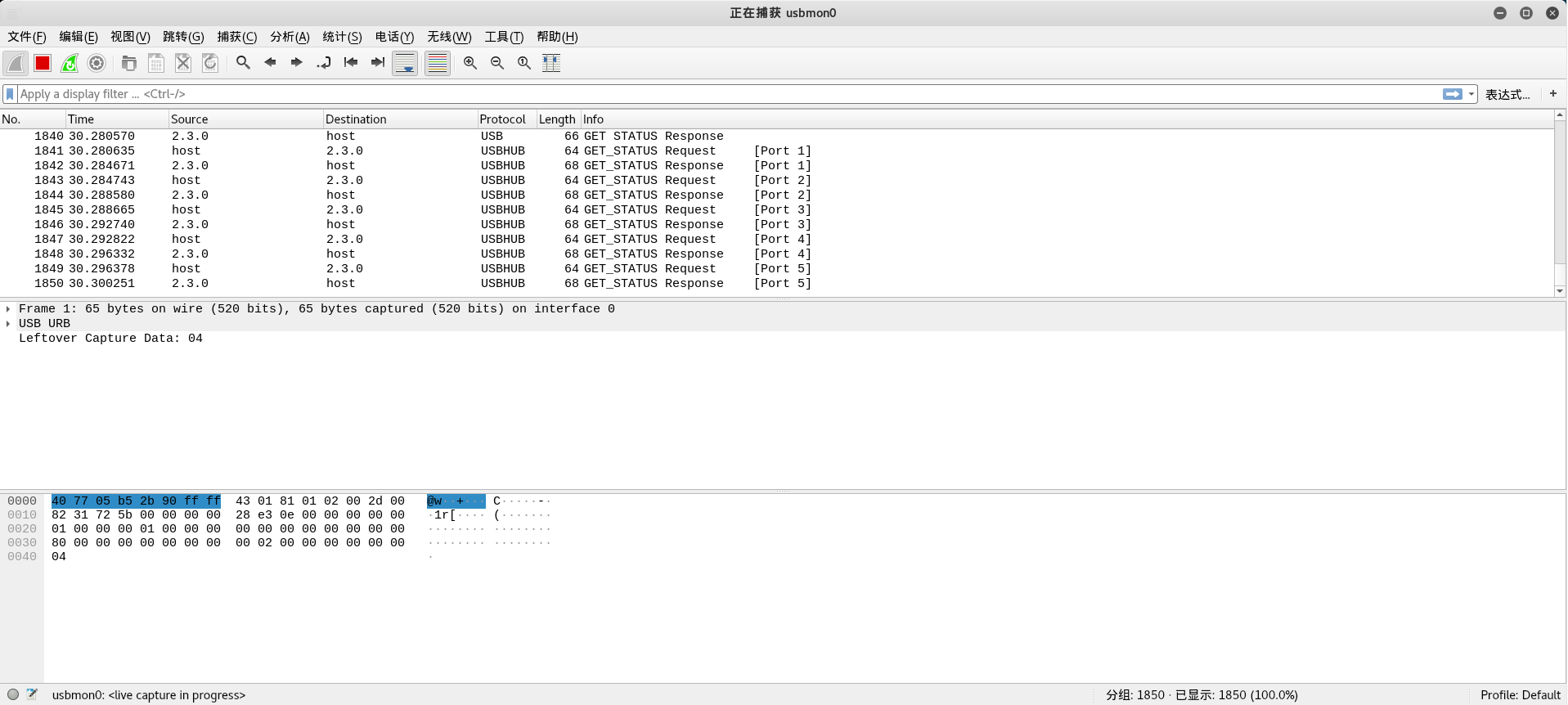
Through this, we can understand the communication process and working principles between usb devices and the host, and we can begin analyzing the traffic capture.
How to Analyze a USB Traffic Capture?
Based on the background knowledge above, we now have a general understanding of how USB traffic captures are obtained. Next, we'll introduce how to analyze a USB traffic capture.
For details on the USB protocol, refer to the wireshark wiki: https://wiki.wireshark.org/USB
Let's start with a simple example from GitHub:
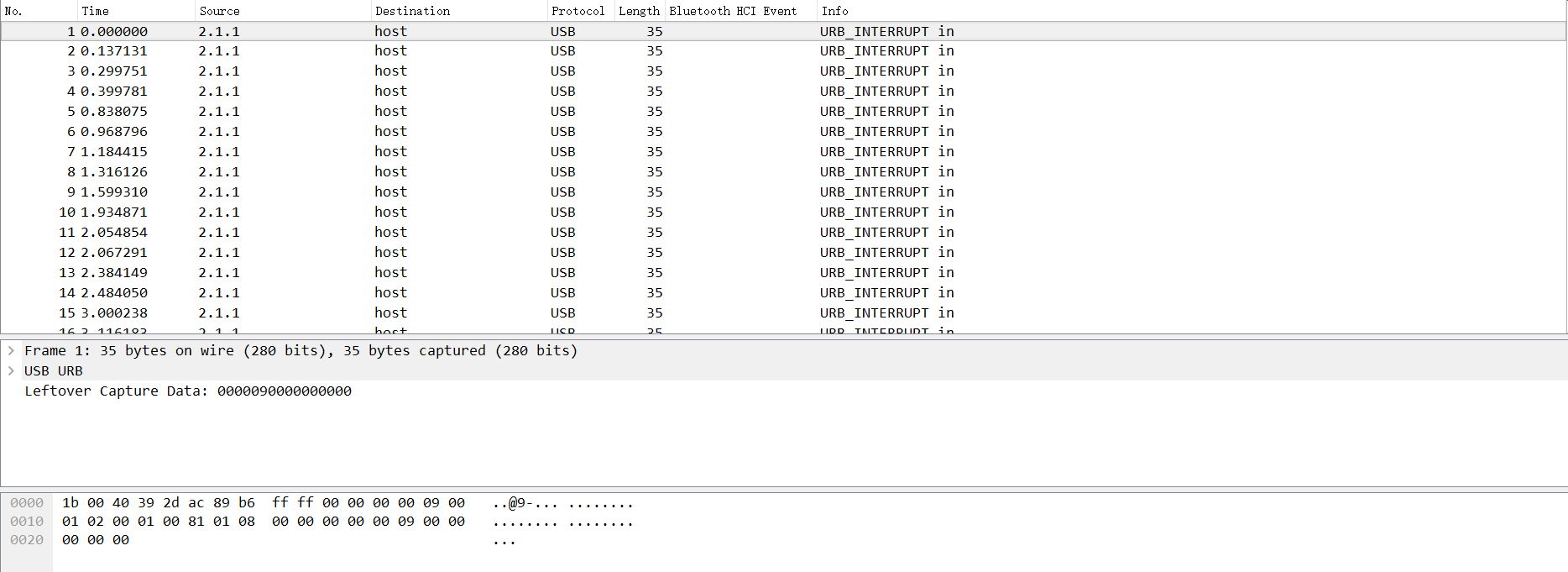
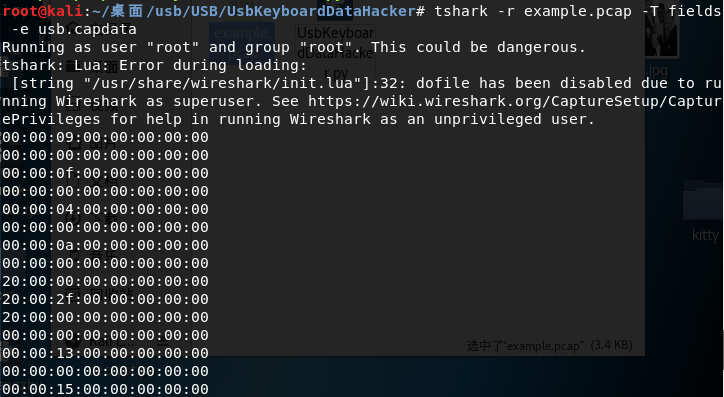
Through analysis, we can see that the data portion of the USB protocol is in the Leftover Capture Data field. On Mac and Linux, the tshark command can be used to extract the leftover capture data separately, with the following command:
tshark -r example.pcap -T fields -e usb.capdata //如果想导入usbdata.txt文件中,后面加上参数:>usbdata.txt
On Windows with wireshark installed, there is a tshark.exe in the wireshark directory. For example, mine is at D:\Program Files\Wireshark\tshark.exe
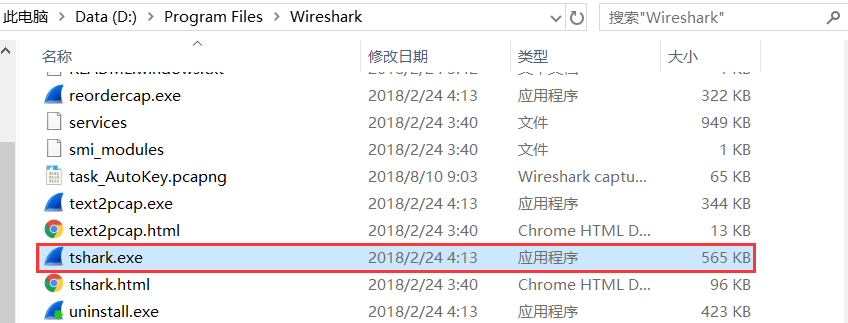
Open cmd, navigate to the current directory, and enter the following command:
tshark.exe -r example.pcap -T fields -e usb.capdata //如果想导入usbdata.txt文件中,后面加上参数:>usbdata.txt
For detailed usage of the tshark command, refer to the wireshark official documentation: https://www.wireshark.org/docs/man-pages/tshark.html
Run the command and view usbdata.txt to find that the data packet length is eight bytes.
Regarding the characteristic applications of USB, I found a diagram that clearly illustrates the issue:
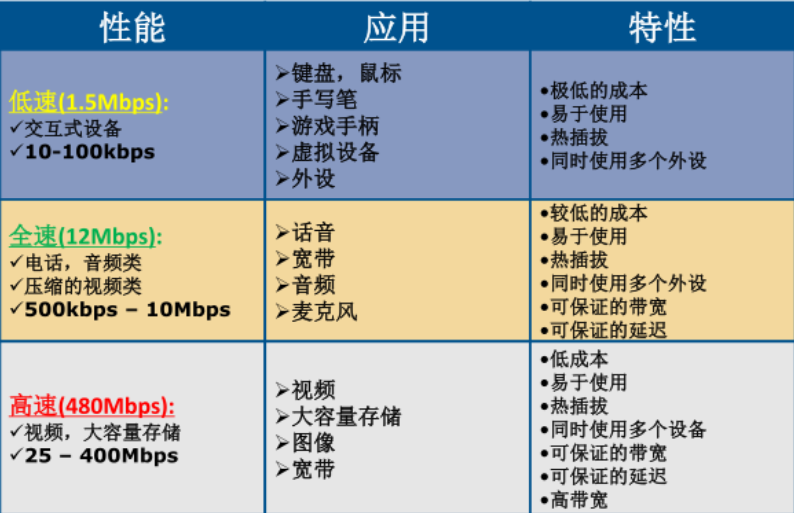
Here we only focus on keyboard traffic and mouse traffic within USB traffic.
Keyboard data packets have a data length of 8 bytes, with keystroke information concentrated in the 3rd byte. Each key stroke generates a keyboard event usb packet.
Mouse data packets have a data length of 4 bytes. The first byte represents the button state: when it is 0x00, no button is pressed; when it is 0x01, the left button is pressed; when it is 0x02, the right button is currently pressed. The second byte can be considered a signed byte type, with the most significant bit being the sign bit. When this value is positive, it represents how many pixels the mouse has moved horizontally to the right; when negative, it represents how many pixels it has moved horizontally to the left. The third byte is similar to the second byte, representing the vertical up/down movement offset.
After reviewing extensive USB protocol documentation, the mapping between values and specific key positions can be found here: https://www.usb.org/sites/default/files/documents/hut1_12v2.pdf
usb keyboard mapping table — by extracting the third byte and matching it against the lookup table, we can decode it:
We write the following script:
mappings = { 0x04:"A",  0x05:"B",  0x06:"C", 0x07:"D", 0x08:"E", 0x09:"F", 0x0A:"G",  0x0B:"H", 0x0C:"I",  0x0D:"J", 0x0E:"K", 0x0F:"L", 0x10:"M", 0x11:"N",0x12:"O",  0x13:"P", 0x14:"Q", 0x15:"R", 0x16:"S", 0x17:"T", 0x18:"U",0x19:"V", 0x1A:"W", 0x1B:"X", 0x1C:"Y", 0x1D:"Z", 0x1E:"1", 0x1F:"2", 0x20:"3", 0x21:"4", 0x22:"5",  0x23:"6", 0x24:"7", 0x25:"8", 0x26:"9", 0x27:"0", 0x28:"n", 0x2a:"[DEL]",  0X2B:"    ", 0x2C:" ",  0x2D:"-", 0x2E:"=", 0x2F:"[",  0x30:"]",  0x31:"\\", 0x32:"~", 0x33:";",  0x34:"'", 0x36:",",  0x37:"." }
nums = []
keys = open('usbdata.txt')
for line in keys:
    if line[0]!='0' or line[1]!='0' or line[3]!='0' or line[4]!='0' or line[9]!='0' or line[10]!='0' or line[12]!='0' or line[13]!='0' or line[15]!='0' or line[16]!='0' or line[18]!='0' or line[19]!='0' or line[21]!='0' or line[22]!='0':
         continue
    nums.append(int(line[6:8],16))
    # 00:00:xx:....
keys.close()
output = ""
for n in nums:
    if n == 0 :
        continue
    if n in mappings:
        output += mappings[n]
    else:
        output += '[unknown]'
print('output :n' + output)
The result is as follows:

Let's integrate the above into a script:
#!/usr/bin/env python

import sys
import os

DataFileName = "usb.dat"

presses = []

normalKeys = {"04":"a", "05":"b", "06":"c", "07":"d", "08":"e", "09":"f", "0a":"g", "0b":"h", "0c":"i", "0d":"j", "0e":"k", "0f":"l", "10":"m", "11":"n", "12":"o", "13":"p", "14":"q", "15":"r", "16":"s", "17":"t", "18":"u", "19":"v", "1a":"w", "1b":"x", "1c":"y", "1d":"z","1e":"1", "1f":"2", "20":"3", "21":"4", "22":"5", "23":"6","24":"7","25":"8","26":"9","27":"0","28":"<RET>","29":"<ESC>","2a":"<DEL>", "2b":"\t","2c":"<SPACE>","2d":"-","2e":"=","2f":"[","30":"]","31":"\\","32":"<NON>","33":";","34":"'","35":"<GA>","36":",","37":".","38":"/","39":"<CAP>","3a":"<F1>","3b":"<F2>", "3c":"<F3>","3d":"<F4>","3e":"<F5>","3f":"<F6>","40":"<F7>","41":"<F8>","42":"<F9>","43":"<F10>","44":"<F11>","45":"<F12>"}

shiftKeys = {"04":"A", "05":"B", "06":"C", "07":"D", "08":"E", "09":"F", "0a":"G", "0b":"H", "0c":"I", "0d":"J", "0e":"K", "0f":"L", "10":"M", "11":"N", "12":"O", "13":"P", "14":"Q", "15":"R", "16":"S", "17":"T", "18":"U", "19":"V", "1a":"W", "1b":"X", "1c":"Y", "1d":"Z","1e":"!", "1f":"@", "20":"#", "21":"$", "22":"%", "23":"^","24":"&","25":"*","26":"(","27":")","28":"<RET>","29":"<ESC>","2a":"<DEL>", "2b":"\t","2c":"<SPACE>","2d":"_","2e":"+","2f":"{","30":"}","31":"|","32":"<NON>","33":"\"","34":":","35":"<GA>","36":"<","37":">","38":"?","39":"<CAP>","3a":"<F1>","3b":"<F2>", "3c":"<F3>","3d":"<F4>","3e":"<F5>","3f":"<F6>","40":"<F7>","41":"<F8>","42":"<F9>","43":"<F10>","44":"<F11>","45":"<F12>"}

def main():
    # check argv
    if len(sys.argv) != 2:
        print "Usage : "
        print "        python UsbKeyboardHacker.py data.pcap"
        print "Tips : "
        print "        To use this python script , you must install the tshark first."
        print "        You can use `sudo apt-get install tshark` to install it"
        print "        Thank you for using."
        exit(1)

    # get argv
    pcapFilePath = sys.argv[1]

    # get data of pcap
    os.system("tshark -r %s -T fields -e usb.capdata > %s" % (pcapFilePath, DataFileName))

    # read data
    with open(DataFileName, "r") as f:
        for line in f:
            presses.append(line[0:-1])
    # handle
    result = ""
    for press in presses:
        Bytes = press.split(":")
        if Bytes[0] == "00":
            if Bytes[2] != "00":
                result += normalKeys[Bytes[2]]
        elif Bytes[0] == "20": # shift key is pressed.
            if Bytes[2] != "00":
                result += shiftKeys[Bytes[2]]
        else:
            print "[-] Unknow Key : %s" % (Bytes[0])
    print "[+] Found : %s" % (result)

    # clean the temp data
    os.system("rm ./%s" % (DataFileName))


if __name__ == "__main__":
    main()
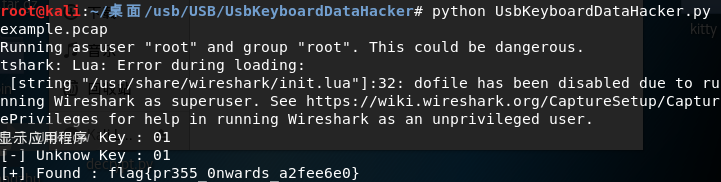
The result is as follows:
Additionally, here is a script for converting mouse traffic data packets:
nums = []
keys = open('usbdata.txt','r')
posx = 0
posy = 0
for line in keys:
if len(line) != 12 :
     continue
x = int(line[3:5],16)
y = int(line[6:8],16)
if x > 127 :
    x -= 256
if y > 127 :
    y -= 256
posx += x
posy += y
btn_flag = int(line[0:2],16)  # 1 for left , 2 for right , 0 for nothing
if btn_flag == 1 :
    print posx , posy
keys.close()
The keyboard traffic data packet conversion script is as follows:
nums=[0x66,0x30,0x39,0x65,0x35,0x34,0x63,0x31,0x62,0x61,0x64,0x32,0x78,0x33,0x38,0x6d,0x76,0x79,0x67,0x37,0x77,0x7a,0x6c,0x73,0x75,0x68,0x6b,0x69,0x6a,0x6e,0x6f,0x70]
s=''
for x in nums:
    s+=chr(x)
print s
mappings = { 0x41:"A",  0x42:"B",  0x43:"C", 0x44:"D", 0x45:"E", 0x46:"F", 0x47:"G",  0x48:"H", 0x49:"I",  0x4a:"J", 0x4b:"K", 0x4c:"L", 0x4d:"M", 0x4e:"N",0x4f:"O",  0x50:"P", 0x51:"Q", 0x52:"R", 0x53:"S", 0x54:"T", 0x55:"U",0x56:"V", 0x57:"W", 0x58:"X", 0x59:"Y", 0x5a:"Z", 0x60:"0", 0x61:"1", 0x62:"2", 0x63:"3", 0x64:"4",  0x65:"5", 0x66:"6", 0x67:"7", 0x68:"8", 0x69:"9", 0x6a:"*", 0x6b:"+",  0X6c:"separator", 0x6d:"-",  0x6e:".", 0x6f:"/" }
output = ""
for n in nums:
    if n == 0 :
        continue
    if n in mappings:
        output += mappings[n]
    else:
        output += '[unknown]'
print 'output :\n' + output
Now for the Xman Season 3 Summer Camp ranking challenge, we can follow the approach from the example above:
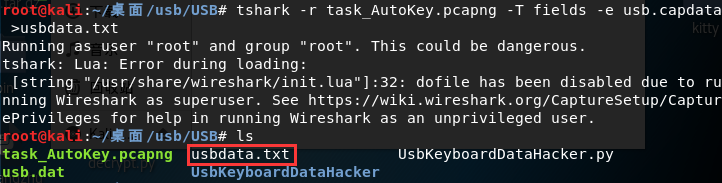
First, we export all usb.capdata using tshark:
tshark -r task_AutoKey.pcapng -T fields -e usb.capdata //如果想导入usbdata.txt文件中,后面加上参数:>usbdata.txt
The result is as follows:
We use the python script above to extract the third byte and match it against the lookup table for decoding:
mappings = { 0x04:"A",  0x05:"B",  0x06:"C", 0x07:"D", 0x08:"E", 0x09:"F", 0x0A:"G",  0x0B:"H", 0x0C:"I",  0x0D:"J", 0x0E:"K", 0x0F:"L", 0x10:"M", 0x11:"N",0x12:"O",  0x13:"P", 0x14:"Q", 0x15:"R", 0x16:"S", 0x17:"T", 0x18:"U",0x19:"V", 0x1A:"W", 0x1B:"X", 0x1C:"Y", 0x1D:"Z", 0x1E:"1", 0x1F:"2", 0x20:"3", 0x21:"4", 0x22:"5",  0x23:"6", 0x24:"7", 0x25:"8", 0x26:"9", 0x27:"0", 0x28:"n", 0x2a:"[DEL]",  0X2B:"    ", 0x2C:" ",  0x2D:"-", 0x2E:"=", 0x2F:"[",  0x30:"]",  0x31:"\\", 0x32:"~", 0x33:";",  0x34:"'", 0x36:",",  0x37:"." }
nums = []
keys = open('usbdata.txt')
for line in keys:
    if line[0]!='0' or line[1]!='0' or line[3]!='0' or line[4]!='0' or line[9]!='0' or line[10]!='0' or line[12]!='0' or line[13]!='0' or line[15]!='0' or line[16]!='0' or line[18]!='0' or line[19]!='0' or line[21]!='0' or line[22]!='0':
         continue
    nums.append(int(line[6:8],16))
    # 00:00:xx:....
keys.close()
output = ""
for n in nums:
    if n == 0 :
        continue
    if n in mappings:
        output += mappings[n]
    else:
        output += '[unknown]'
print('output :n' + output)
The result is as follows:

output :n[unknown]A[unknown]UTOKEY''.DECIPHER'[unknown]MPLRVFFCZEYOUJFJKYBXGZVDGQAURKXZOLKOLVTUFBLRNJESQITWAHXNSIJXPNMPLSHCJBTYHZEALOGVIAAISSPLFHLFSWFEHJNCRWHTINSMAMBVEXO[DEL]PZE[DEL]IZ'
We can see that this is an Autokey cipher. The question now is: how do we decode it without knowing the key?
I found the following article on how to brute-force the key: http://www.practicalcryptography.com/cryptanalysis/stochastic-searching/cryptanalysis-autokey-cipher/
The brute-force script is as follows:
from ngram_score import ngram_score
from pycipher import Autokey
import re
from itertools import permutations

qgram = ngram_score('quadgrams.txt')
trigram = ngram_score('trigrams.txt')

ctext = 'MPLRVFFCZEYOUJFJKYBXGZVDGQAURKXZOLKOLVTUFBLRNJESQITWAHXNSIJXPNMPLSHCJBTYHZEALOGVIAAISSPLFHLFSWFEHJNCRWHTINSMAMBVEXPZIZ'

ctext = re.sub(r'[^A-Z]','',ctext.upper())
# keep a list of the N best things we have seen, discard anything else

class nbest(object):
    def __init__(self,N=1000):
        self.store = []
        self.N = N

    def add(self,item):
        self.store.append(item)
        self.store.sort(reverse=True)
        self.store = self.store[:self.N]

    def __getitem__(self,k):
        return self.store[k]

    def __len__(self):
        return len(self.store)

#init
N=100
for KLEN in range(3,20):
    rec = nbest(N)
    for i in permutations('ABCDEFGHIJKLMNOPQRSTUVWXYZ',3):
        key = ''.join(i) + 'A'*(KLEN-len(i))
        pt = Autokey(key).decipher(ctext)
        score = 0
        for j in range(0,len(ctext),KLEN):
            score += trigram.score(pt[j:j+3])
        rec.add((score,''.join(i),pt[:30]))

    next_rec = nbest(N)
    for i in range(0,KLEN-3):
        for k in xrange(N):
            for c in 'ABCDEFGHIJKLMNOPQRSTUVWXYZ':
                key = rec[k][1] + c
                fullkey = key + 'A'*(KLEN-len(key))
                pt = Autokey(fullkey).decipher(ctext)
                score = 0
                for j in range(0,len(ctext),KLEN):
                    score += qgram.score(pt[j:j+len(key)])
                next_rec.add((score,key,pt[:30]))
        rec = next_rec
        next_rec = nbest(N)
    bestkey = rec[0][1]
    pt = Autokey(bestkey).decipher(ctext)
    bestscore = qgram.score(pt)
    for i in range(N):
        pt = Autokey(rec[i][1]).decipher(ctext)
        score = qgram.score(pt)
        if score > bestscore:
            bestkey = rec[i][1]
            bestscore = score
    print bestscore,'autokey, klen',KLEN,':"'+bestkey+'",',Autokey(bestkey).decipher(ctext)
The result is as follows:
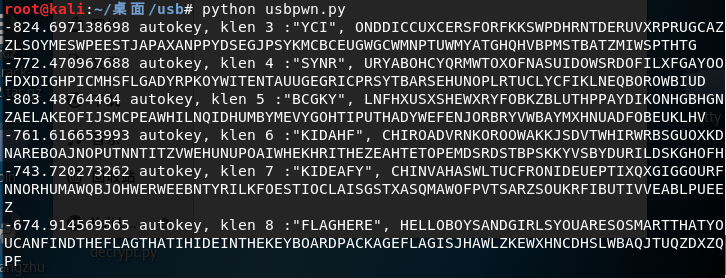
We can see the word flag. After organizing, we get:
-674.914569565 autokey, klen 8 :"FLAGHERE", HELLOBOYSANDGIRLSYOUARESOSMARTTHATYOUCANFINDTHEFLAGTHATIHIDEINTHEKEYBOARDPACKAGEFLAGISJHAWLZKEWXHNCDHSLWBAQJTUQZDXZQPF
Let's split the text into segments:
HELLO
BOYS
AND
GIRLS
YOU
ARE
SO
SMART
THAT
YOU
CAN
FIND
THE
FLAG
THAT
IH
IDE
IN
THE
KEY
BOARD
PACKAGE
FLAG
IS
JHAWLZKEWXHNCDHSLWBAQJTUQZDXZQPF
The final flag is flag{JHAWLZKEWXHNCDHSLWBAQJTUQZDXZQPF}
References
- https://www.cnblogs.com/ECJTUACM-873284962/p/9473808.html
- https://blog.csdn.net/songze_lee/article/details/77658094
- https://wiki.wireshark.org/USB
- https://www.usb.org/sites/default/files/documents/hut1_12v2.pdf
- https://www.wireshark.org/docs/man-pages/tshark.html
- http://www.practicalcryptography.com/cryptanalysis/stochastic-searching/cryptanalysis-autokey-cipher/
- https://hackfun.org/2017/02/22/CTF%E4%B8%AD%E9%82%A3%E4%BA%9B%E8%84%91%E6%B4%9E%E5%A4%A7%E5%BC%80%E7%9A%84%E7%BC%96%E7%A0%81%E5%92%8C%E5%8A%A0%E5%AF%86/