Writing a Loadable Kernel Module
This section mainly covers how to develop a simple Loadable Kernel Module (LKM), including how to interact with user space.
Basic Kernel Module
We first write a basic kernel module. The source file structure is organized as follows:
$ tree .
.
├── Makefile
└── src
    ├── Kbuild
    └── main.c

2 directories, 3 files
The content of main.c is as follows. It defines an initialization function a3kmod_init() that is called when the module is loaded, and an exit function a3kmod_exit() that is called when the module is unloaded:
/**
 * Copyright (c) 2025 arttnba3 <arttnba@gmail.com>
 *
 * This work is licensed under the terms of the GNU GPL, version 2 or later.
**/

#include <linux/kernel.h>
#include <linux/module.h>
#include <linux/init.h>

static __init int a3kmod_init(void)
{
    printk(KERN_INFO "[a3kmod:] Hello kernel world!\n");
    return 0;
}

static __exit void a3kmod_exit(void)
{
    printk(KERN_INFO "[a3kmod:] Goodbye kernel world!\n");
}

module_init(a3kmod_init);
module_exit(a3kmod_exit);
MODULE_AUTHOR("arttnba3");
MODULE_LICENSE("GPL v2");
Kbuild Build System
Kbuild is part of the Linux kernel build system. In short, once we write a Kbuild file in the source directory, the Linux kernel build infrastructure will automatically compile our kernel module according to the Kbuild file during compilation. If no Kbuild file is found, it will look for a Makefile.
Below is an example of a most basic Kbuild file, with syntax somewhat similar to Makefile:
# module name
MODULE_NAME ?= a3kmod
obj-m += $(MODULE_NAME).o

# compiler flags
ccflags-y += -I$(src)/include

# entry point
$(MODULE_NAME)-y += main.o
Explanation of each symbol:
-
MODULE_NAME: A simple custom variable that we use to define our module name. -
obj-m: This symbol specifies the list of kernel modules to be compiled.+=means adding our kernel module, and$(MODULE_NAME).ois the intermediate product of our kernel module compilation, which is usually formed by merging one or more object files and is ultimately linked into a$(MODULE_NAME).kofile — the LKM ELF we are familiar with. If the module is to be compiled into the kernel ELF file (vmlinux),obj-yshould be used. -
ccflags-y:ccflagsmeans compilation options, and-ymeans enabled compilation options. Here we added the-Ioption to include our own header file directory (just for demonstration; this section does not actually involve complex code structures). For more compilation options, refer to GCC documentation. -
$(MODULE_NAME)-y: The object files needed by$(MODULE_NAME).o.-ymeans this file is needed during compilation. Here we addedmain.o, which means there should be amain.cin our source directory.
Correspondingly, since we have already specified the module build behavior in Kbuild, we only need to write generic content in the Makefile in the source root directory. Here our Makefile contains the following:
# SPDX-License-Identifier: GPL-2.0
# Copyright (c) 2025 arttnba3 <arttnba@gmail.com>

A3KMOD_ROOT_DIR=$(shell pwd)
A3KMOD_SRC_DIR=$(A3KMOD_ROOT_DIR)/src
LINUX_KERNEL_SRC=/lib/modules/$(shell uname -r)/build

all:
    @$(MAKE) -C $(LINUX_KERNEL_SRC) M=$(A3KMOD_SRC_DIR) modules

clean:
    @$(MAKE) -C $(LINUX_KERNEL_SRC) M=$(A3KMOD_SRC_DIR) clean

.PHONY: clean
A brief explanation (for a deeper understanding, study Makefile syntax on your own):
A3KMOD_ROOT_DIR,A3KMOD_SRC_DIR: These variables specify the source directory as thesrcfolder under the current directory.$(shell pwd)means its value is the result of thepwdcommand.LINUX_KERNEL_SRC: This variable specifies the Linux kernel source directory. For most Linux distributions, after installing the corresponding package (e.g.,linux-headers), the source code and build system files for the currently used kernel are stored in the/lib/modules/$(shell uname -r)/builddirectory, where$(shell uname -r)means its value is the result ofuname -r.all:: A label namedall. Runningmake allexecutes the commands under this label. Since this is the first command in the Makefile, runningmakeby default executes this command.@$(MAKE):@$(MAKE)specifies using theMAKEcommand in the current environment (this means we can specifyMAKE=to change its path when runningmake; the default value ismake).-C $(LINUX_KERNEL_SRC): The make command enters the kernel source directory.modules: Executes themodulestarget in the kernel source Makefile, which triggers the kernel module compilation.M=$(A3KMOD_SRC_DIR): Specifies the value of theMparameter. For themodulestarget, this represents the source path of the kernel module to compile.
clean:: Basically the same as thealllabel, except the final action isclean, meaning to clean up build artifacts..PHONY: "Phony targets" — prioritize finding the label definition in the Makefile over files with the same name. Here thecleanlabel is declared as a phony target.
Compiling the Kernel Module
After completing these steps, we can start compiling the kernel module. We just need to run the following command:
$ make -j$(nproc) all
If you are using kernel source code that you downloaded and compiled yourself, you also need to run the following command in the kernel source directory before compiling the kernel module:
$ make -j$(nproc) modules
Loading and Unloading Kernel Modules
We can load a kernel module directly using the insmod command:
$ sudo insmod a3kmod.ko
Similarly, we can unload a kernel module using the rmmod command:
$ sudo rmmod a3kmod
Providing User-Space Interfaces
Next, we add methods for our kernel module to interact with user-space applications. A common approach is for our kernel module to create a virtual file node after loading, and user-space applications open this node and interact through system calls like read(), write(), and ioctl().
In this section, we briefly introduce how to create a procfs (Process file system) file node that allows user-space interaction.
File Node Interaction
Our file node supports interaction through system calls like read(), write(), and ioctl(), which actually requires us to define the corresponding operation functions in kernel space. For procfs, the supported operations are defined through the struct proc_ops function table:
struct proc_ops {
    unsigned int proc_flags;
    int (*proc_open)(struct inode *, struct file *);
    ssize_t (*proc_read)(struct file *, char __user *, size_t, loff_t *);
    ssize_t (*proc_read_iter)(struct kiocb *, struct iov_iter *);
    ssize_t (*proc_write)(struct file *, const char __user *, size_t, loff_t *);
    /* mandatory unless nonseekable_open() or equivalent is used */
    loff_t  (*proc_lseek)(struct file *, loff_t, int);
    int (*proc_release)(struct inode *, struct file *);
    __poll_t (*proc_poll)(struct file *, struct poll_table_struct *);
    long    (*proc_ioctl)(struct file *, unsigned int, unsigned long);
#ifdef CONFIG_COMPAT
    long    (*proc_compat_ioctl)(struct file *, unsigned int, unsigned long);
#endif
    int (*proc_mmap)(struct file *, struct vm_area_struct *);
    unsigned long (*proc_get_unmapped_area)(struct file *, unsigned long, unsigned long, unsigned long, unsigned long);
} __randomize_layout;
Here we simply implement function prototypes for proc_read() and proc_write(). Their functions are to copy data to the user process and read data from the user process, and we place the function pointers in our proc_ops:
#include <linux/proc_fs.h>

#define A3KMOD_BUF_SZ 0x1000
static char a3kmod_buf[A3KMOD_BUF_SZ] = { 0 };

static ssize_t a3kmod_proc_read
(struct file *file, char __user *ubuf, size_t size, loff_t *ppos)
{
    ssize_t err;
    size_t end_loc, copied;

    end_loc = size + (*ppos);
    if (end_loc < size || (*ppos) > A3KMOD_BUF_SZ) {
        return -EINVAL;
    }

    if (end_loc > A3KMOD_BUF_SZ) {
        end_loc = A3KMOD_BUF_SZ;
    }

    copied = end_loc - (*ppos);
    if (copied == 0) {
        return 0;   // EOF
    }

    err = copy_to_user(ubuf, &a3kmod_buf[*ppos], copied);
    if (err != 0) {
        return err;
    }

    *ppos = end_loc;

    return copied;
}

static ssize_t a3kmod_proc_write
(struct file *file, const char __user *ubuf, size_t size, loff_t *ppos)
{
    ssize_t err;
    size_t end_loc, copied;

    end_loc = size + (*ppos);
    if (end_loc < size || (*ppos) > A3KMOD_BUF_SZ) {
        return -EINVAL;
    }

    if (end_loc > A3KMOD_BUF_SZ) {
        end_loc = A3KMOD_BUF_SZ;
    }

    copied = end_loc - (*ppos);
    if (copied == 0) {
        return 0;   // EOF
    }

    err = copy_from_user(&a3kmod_buf[*ppos], ubuf, copied);
    if (err != 0) {
        return err;
    }

    *ppos = end_loc;

    return copied;
}

static struct proc_ops a3kmod_proc_ops = {
    .proc_read = a3kmod_proc_read,
    .proc_write = a3kmod_proc_write,
};
Creating the File Node
In the module initialization function, we call proc_create() to create our procfs file node. The parameters specify the node name, permissions, parent node (NULL to attach to the procfs root node), and the function table. The node is destroyed when the module is unloaded:
static struct proc_dir_entry *a3kmod_proc_dir_entry;

static __init int a3kmod_init(void)
{
    printk(KERN_INFO "[a3kmod:] Hello kernel world!\n");
    a3kmod_proc_dir_entry = proc_create("a3kmod", 0666, NULL, &a3kmod_proc_ops);
    if (IS_ERR(a3kmod_proc_dir_entry)) {
        return PTR_ERR(a3kmod_proc_dir_entry);
    }

    return 0;
}

static __exit void a3kmod_exit(void)
{
    printk(KERN_INFO "[a3kmod:] Goodbye kernel world!\n");
    proc_remove(a3kmod_proc_dir_entry);
}
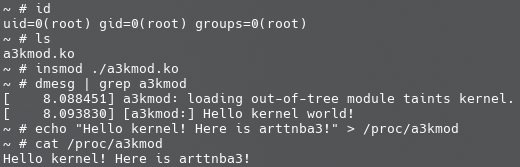
Finally, compile and load as usual. The effect when running in our QEMU environment is shown in the figure below: