Downloading and Compiling the Kernel Source Code
To perform Linux kernel vulnerability exploitation and debugging, we first need to set up a usable Linux runtime environment. This section mainly covers how to obtain the kernel source code and compile it to generate the kernel image file (bzImage). We will cover how to use bzImage and BusyBox to set up a simple runtime environment in the next section.
Downloading the Kernel Source Code
The Linux Kernel Archives provides us with the original mainline kernel source code in different versions. We can download the kernel source code for the version we need from this website, or obtain it from various mirror sites. For example, the Tsinghua University Open Source Software Mirror provides kernel source code for different versions.
According to Archive kernel releases, we can identify the following kernel release categories:
- Prepatch (RC): Pre-release versions of the mainline kernel, containing the latest kernel features to be tested, maintained by Linus Torvalds.
- Mainline: The mainline kernel version. After the new features in RC versions pass testing, they are merged into the mainline. A new version is released every 9-10 weeks, maintained by Linus Torvalds.
- Stable: After a mainline kernel release, it becomes Stable. It only receives backported bug fixes from the mainline tree by the stable kernel maintainer until the next kernel version is released. Stable kernels are updated as needed, typically once a week.
- Longterm: Some kernel versions are selected as long-term support (LTS) versions. Compared to Stable kernels, they have a longer support duration, typically only receiving backported critical bug fixes, with slower update cycles (especially for older versions).
Here we choose the most recent Longterm kernel version 6.12, maintained by Greg Kroah-Hartman & Sasha Levin, with a release date of 2024-11-17, planned to end support in Dec, 2026.
Here we can notice that the kernel team will stop support for a batch of LTS kernel versions at the same time, rather than each LTS version having the same lifespan.
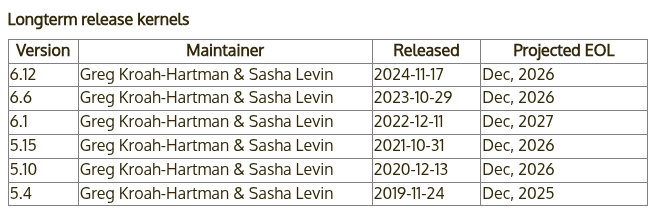
We choose to download and compile the latest LTS version 6.12.16, released on 2025-02-21. To speed up the download, we use the Tsinghua mirror site for downloading and extraction:
$ wget https://mirrors.tuna.tsinghua.edu.cn/kernel/v6.x/linux-6.12.16.tar.xz
--2025-02-27 12:39:53--  https://mirrors.tuna.tsinghua.edu.cn/kernel/v6.x/linux-6.12.16.tar.xz
Resolving mirrors.tuna.tsinghua.edu.cn... 2402:f000:1:400::2, 101.6.15.130
Connecting to mirrors.tuna.tsinghua.edu.cn|2402:f000:1:400::2|:443... connected.
HTTP request sent, awaiting response... 200 OK
Length: 147993844 (141M) [application/octet-stream]
Saving to: 'linux-6.12.16.tar.xz'

linux-6.12.16.tar.xz        100%[=========================================>] 141.14M  3.86MB/s    in 42s

2025-02-27 12:40:37 (3.33 MB/s) - 'linux-6.12.16.tar.xz' saved [147993844/147993844]

$ unxz ./linux-6.12.16.tar.xz
Verifying the Kernel Signature
To prevent the kernel from being maliciously modified, the kernel team provides signature verification. When releasing the kernel, the publisher signs the kernel. Therefore, to verify it, we first need to import the kernel maintainers' public keys. Here we choose to import the public keys of Linus Torvalds and Greg Kroah-Hartman:
$ gpg2 --locate-keys torvalds@kernel.org gregkh@kernel.org
pub   rsa4096 2011-09-23 [SC]
      647F28654894E3BD457199BE38DBBDC86092693E
uid           [ unknown] Greg Kroah-Hartman <gregkh@kernel.org>
sub   rsa4096 2011-09-23 [E]

pub   rsa2048 2011-09-20 [SC]
      ABAF11C65A2970B130ABE3C479BE3E4300411886
uid           [ unknown] Linus Torvalds <torvalds@kernel.org>
sub   rsa2048 2011-09-20 [E]
Next, we download the kernel signature from the Tsinghua University mirror site for verification:
$ wget https://mirrors.tuna.tsinghua.edu.cn/kernel/v6.x/linux-6.12.16.tar.sign
--2025-02-27 12:44:33--  https://mirrors.tuna.tsinghua.edu.cn/kernel/v6.x/linux-6.12.16.tar.sign
Resolving mirrors.tuna.tsinghua.edu.cn... 2402:f000:1:400::2, 101.6.15.130
Connecting to mirrors.tuna.tsinghua.edu.cn|2402:f000:1:400::2|:443... connected.
HTTP request sent, awaiting response... 200 OK
Length: 991 [application/octet-stream]
Saving to: 'linux-6.12.16.tar.sign'

linux-6.12.16.tar.sign      100%[=========================================>]     991  --.-KB/s    in 0s

2025-02-27 12:44:35 (2.36 GB/s) - 'linux-6.12.16.tar.sign' saved [991/991]

$ gpg2 --verify linux-6.12.16.tar.sign
gpg: assuming signed data in 'linux-6.12.16.tar'
gpg: Signature made Sat Feb 22 00:02:55 2025 AEDT
gpg:                using RSA key 647F28654894E3BD457199BE38DBBDC86092693E
gpg: Good signature from "Greg Kroah-Hartman <gregkh@kernel.org>" [unknown]
gpg: WARNING: This key is not certified with a trusted signature!
gpg:          There is no indication that the signature belongs to the owner.
Primary key fingerprint: 647F 2865 4894 E3BD 4571  99BE 38DB BDC8 6092 693E
Note that a WARNING is reported here because the imported public keys do not have trusted signatures, so it cannot be proven that they actually come from Linus Torvalds and Greg Kroah-Hartman. To resolve this, we can choose to use TOFU to trust the corresponding keys:
$ gpg2 --tofu-policy good 38DBBDC86092693E
gpg: Setting TOFU trust policy for new binding <key: 647F28654894E3BD457199BE38DBBDC86092693E, user id: Greg Kroah-Hartman <gregkh@kernel.org>> to good.
Now we verify the kernel signature again. We can see that there are no more errors, indicating that this kernel source code is trustworthy:
$ gpg2 --trust-model tofu --verify ./linux-6.12.16.tar.sign
gpg: assuming signed data in './linux-6.12.16.tar'
gpg: Signature made Sat Feb 22 00:02:55 2025 AEDT
gpg:                using RSA key 647F28654894E3BD457199BE38DBBDC86092693E
gpg: Good signature from "Greg Kroah-Hartman <gregkh@kernel.org>" [full]
gpg: gregkh@kernel.org: Verified 1 signatures in the past 0 seconds.  Encrypted
     0 messages.
After successful verification, we can extract the archive to get the kernel source code:
$ tar -xf linux-6.12.16.tar
Configuring Compilation Options
Before formally compiling the kernel source code, we also need to prepare a compilation configuration, which contains kernel compilation-related settings and is usually stored in the .config file in the source directory. However, we don't need to write it from scratch; we can dynamically generate it through the kernel's build configuration system.
Normally, we use the following command in the kernel source directory to enter the graphical kernel configuration panel. This is also the most commonly used kernel configuration method. It reads the .config file configuration and allows us to make changes in the graphical interface. If the file doesn't exist, it will call make defconfig first to generate a default configuration:
Note that the graphical configuration interface depends on the ncurses library, which can usually be installed from your distribution's repository.
$ make menuconfig
From this, we can see that the following command directly generates the default output of the above command — make defconfig generates a default kernel configuration. It reads the configuration files in the arch/<architecture>/configs directory as the base configuration, which includes a default set of enabled kernel features and driver compilation settings. It typically compiles most common drivers and makes adjustments based on the current system environment (e.g., some hardware platform-related configurations):
$ make defconfig
Alternatively, you can manually configure each kernel compilation option. The following command does not read the default configuration, but instead asks about each kernel configuration option one by one. Users need to respond with y (compile into the kernel), m (compile as a kernel module, some options provide this choice), or n (don't compile) on the command line. If you have plenty of free time and a fairly complete understanding of the kernel architecture, you can consider running this command for configuration:
$ make config
Additionally, you can use the following commands (pick one) to dynamically detect the kernel modules present in the current environment (those shown by the lsmod command) and compile only these modules during the kernel build. This is typically suitable for scenarios that require customized streamlining of the kernel, such as embedded development, but is often not suitable for general use cases:
$ make localyesconfig # Compile drivers into the kernel
$ make localmodconfig # Keep drivers as standalone kernel modules
Correspondingly, the following commands (pick one) enable as many available kernel options as possible, with the generated configuration including as many kernel features and drivers as possible:
$ make allyesconfig # Compile drivers into the kernel
$ make allmodconfig # Keep drivers as standalone kernel modules
Debugging-Related Options
Here we mainly focus on debugging options. Navigate to Kernel hacking -> Compile-time checks and compiler options, then check the Compile the kernel with debug info option to facilitate debugging. This is usually enabled by default.
If you want to use kgdb to debug the kernel, you need to select KGDB: kernel debugger and select all options under KGDB.
Compiling the Kernel
Next, we compile the kernel image. We typically want to obtain the compressed kernel image file bzImage, so we use the following command in the source directory:
$ make bzImage
Additionally, we can use multiple threads for compilation based on the current machine's configuration. The -j parameter specifies the number of concurrent compilation jobs, and the (nproc) variable typically represents the number of hardware threads on the machine you are using:
$ make -j(nproc) bzImage
Additionally, you can specify the compiler with
CC=, the linker withLD=, and the LLVM toolchain directory withLLVM=.
Finally, when the following message appears in the terminal, it means compilation is complete:
Kernel: arch/x86/boot/bzImage is ready (#1)
We mainly focus on two files among the build artifacts:
vmlinux: The raw kernel image file in ELF format generated by compilation, usually located in the source root directory.bzImage: The compressed kernel image file of the former, usually located atarch/<architecture>/boot/bzImage(note that for x86-64, it is still thex86directory).
Here we provide an introduction to common kernel file formats:
- bzImage: The currently mainstream kernel image format, i.e., big zImage (bz does not stand for bzip2), suitable for larger (over 512 KB) kernels. This image is loaded to high memory addresses, above 1MB. bzImage is compressed with gzip, and the beginning of the file contains the gzip decompression code, so we cannot decompress it with gunzip.
- zImage: An older kernel image format, suitable for smaller (no larger than 512KB) kernels. At boot time, this image is loaded to low memory addresses, i.e., the first 640 KB of memory. zImage also cannot be decompressed with gunzip.
- vmlinuz: vmlinuz contains not only the compressed vmlinux but also gzip decompression code. It is actually a zImage or bzImage file. This file is bootable, meaning it can load the kernel into memory. For Linux systems, this file is located in the /boot directory, which contains files needed to boot the system.
- vmlinux: A statically linked Linux kernel, existing as an executable file, not yet compressed. This file is often generated in the process of creating vmlinuz. It is suitable for debugging but is not bootable.
- vmlinux.bin: Also a statically linked Linux kernel, existing as a bootable binary file. All symbol information and relocation information have been removed. Generation command:
objcopy -O binary vmlinux vmlinux.bin. - uImage: uImage is an image file specific to U-boot. It is constructed by prepending a 0x40-byte tag to a zImage. This tag describes the type, load location, generation time, size, and other information of the image file.
References
- https://en.wikipedia.org/wiki/Linux_kernel_version_history
- https://www.kernel.org/category/releases.html
- https://www.kernel.org/signature.html
- http://www.linfo.org/vmlinuz.html
- https://arttnba3.cn/2021/02/21/OS-0X01-LINUX-KERNEL-PART-II/
- https://www.nullbyte.cat/post/linux-kernel-exploit-development-environment/#environment-setup
- https://unix.stackexchange.com/questions/5518/what-is-the-difference-between-the-following-kernel-makefile-terms-vmlinux-vml