NtGlobalFlag
About NtGlobalFlag
On 32-bit machines, the NtGlobalFlag field is located at offset 0x68 of the PEB (Process Environment Block). On 64-bit machines, it is at offset 0xBC. The default value of this field is 0. When a debugger is running, this field is set to a specific value. Although this value does not reliably indicate that a debugger is actually running, the field is commonly used for that purpose.
This field contains a series of flag bits. Processes created by a debugger will have the following flags set:
FLG_HEAP_ENABLE_TAIL_CHECK (0x10)
FLG_HEAP_ENABLE_FREE_CHECK (0x20)
FLG_HEAP_VALIDATE_PARAMETERS (0x40)
Detection Code
Therefore, we can check these flag bits to detect whether a debugger is present. For example, the following 32-bit code can be used to detect on a 32-bit machine:
mov eax, fs:[30h] ;Process Environment Block
mov al, [eax+68h] ;NtGlobalFlag
and al, 70h
cmp al, 70h
je being_debugged
The following is 64-bit detection code for a 64-bit machine:
push 60h
pop rsi
gs:lodsq                ;Process Environment Block
mov al, [rsi*2+rax-14h] ;NtGlobalFlag
and al, 70h
cmp al, 70h
je being_debugged
Note that if a 32-bit program is running on a 64-bit machine, there are actually two PEBs: one for the 32-bit part and another for the 64-bit part. The corresponding field in the 64-bit PEB will also change just like in the 32-bit one.
So we also have the following code, using 32-bit code to detect a 64-bit machine environment:
mov eax, fs:[30h] ; Process Environment Block
;64-bit Process Environment Block
;follows 32-bit Process Environment Block
mov al, [eax+10bch] ;NtGlobalFlag
and al, 70h
cmp al, 70h
je being_debugged
Remember not to compare directly without masking out the other bits, as that would fail to detect the debugger.
ExeCryptor uses NtGlobalFlag to detect debuggers. However, the three NtGlobalFlag flag bits are only set when the process is created by a debugger, not when a debugger is attached to an already running process.
Changing the NtGlobalFlag Default Value
Of course, bypassing this detection is quite simple — the debugger just needs to reset this field to 0. However, this default initial value can be changed using any of the following four methods:
-
The
GlobalFlagvalue in the registry atHKLM\System\CurrentControlSet\Control\SessionManagerwill replace theNtGlobalFlagfield. Although it can subsequently be changed by Windows (as described below), the registry key value affects all processes in the system and takes effect after a reboot.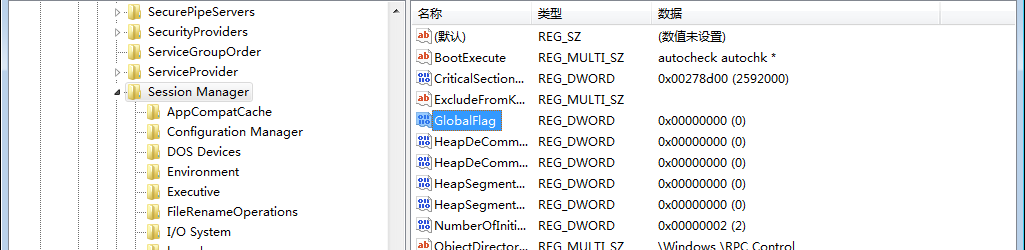
This also introduces another method of detecting a debugger: if a debugger copies the registry key value to the
NtGlobalFlagfield to hide itself, but the registry value has already been replaced and a reboot has not yet occurred, then the debugger has only copied a fake value rather than the real one. If the program knows the real value rather than the fake one in the registry, it can detect the debugger's presence.Of course, the debugger could also run another process and query its
NtGlobalFlagfield to obtain the real value. -
Also
GlobalFlag, but this time atHKLM\Software\Microsoft\Windows NT\CurrentVersion\Image File Execution Options\<filename>(Image File Execution Options). Here you need to replace<filename>with the filename of the executable to be modified (no path specification needed). OnceGlobalFlagis set, the system will overwrite theNtGlobalFlagfield with its value (only for the specified process individually). However, it can still be changed again by Windows (see below). -
Two fields in the Load Configuration Table:
GlobalFlagsClearandGlobalFlagsSet.GlobalFlagsClearlists the flags to be cleared, whileGlobalFlagsSetlists the flags to be set. These settings take effect afterGlobalFlagis applied, so they can override values specified byGlobalFlag. However, they cannot override flags that Windows is specifically configured to set. For example, settingFLG_USER_STACK_TRACE_DB (0x1000)causes Windows to set theFLG_HEAP_VALIDATE_PARAMETERS (0x40)flag. Even ifFLG_HEAP_VALIDATE_PARAMETERSis cleared in the Load Configuration Table, Windows will re-set it during the subsequent process loading. -
When a debugger creates a process, Windows makes certain changes. By setting the
_NO_DEBUG_HEAPenvironment variable,NtGlobalFlagwill not have its 3 heap flags set due to the debugger. Of course, they can still be set throughGlobalFlagorGlobalFlagsSetin the Load Configuration Table.
How to Bypass Detection?
There are 3 methods to bypass NtGlobalFlag detection:
- Manually modify the flag values (
FLG_HEAP_ENABLE_TAIL_CHECK,FLG_HEAP_ENABLE_FREE_CHECK,FLG_HEAP_VALIDATE_PARAMETERS) - Use the
hide-debugplugin in OllyDbg - Start the program in WinDbg with debug heap disabled (
windbg -hd program.exe)
Manual Bypass Example
The following is an example demonstrating how to manually bypass the detection:
.text:00403594     64 A1 30 00 00 00          mov     eax, large fs:30h   ; PEB struct loaded into EAX
.text:0040359A                                db      3Eh                 ; IDA Pro display error (the byte is actually used in the next instruction)
.text:0040359A     3E 8B 40 68                mov     eax, [eax+68h]      ; NtGlobalFlag (offset 0x68 relative to PEB) saved to EAX
.text:0040359E     83 E8 70                   sub     eax, 70h            ; Value 0x70 corresponds to all flags on (FLG_HEAP_ENABLE_TAIL_CHECK, FLG_HEAP_ENABLE_FREE_CHECK, FLG_HEAP_VALIDATE_PARAMETERS)
.text:004035A1     89 85 D8 E7 FF FF          mov     [ebp+var_1828], eax
.text:004035A7     83 BD D8 E7 FF FF 00       cmp     [ebp+var_1828], 0   ; Check whether 3 debug flags were on (result of substraction should be 0 if debugged)
.text:004035AE     75 05                      jnz     short loc_4035B5    ; No debugger, program continues...
.text:004035B0     E8 4B DA FF FF             call    s_selfDelete        ; ...else, malware deleted
In OllyDbg, set a breakpoint at offset 0x40359A and run the program to trigger the breakpoint. Then open the CommandLine plugin and use dump fs:[30]+0x68 to dump the contents of NtGlobalFlag.
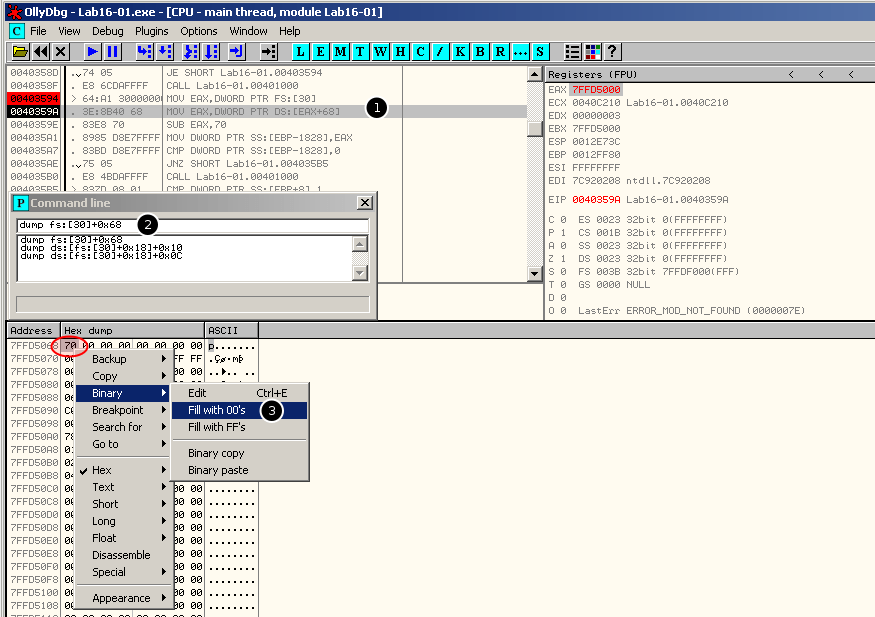
Right-click and select Binary->Fill with 00's to replace the value 0x70 with 0x00.