Memory Image Method
The Memory Image method works by using OD's Alt+M shortcut when a packed program is loaded to enter the program's virtual memory sections. Then, by setting memory one-shot breakpoints twice, you can reach the program's correct OEP location.
The principle of the Memory Image method is to set breakpoints on the program's resource section and code section. Generally, during self-decompression or self-decryption, the program will first access the resource section to obtain necessary resources, then after automatic unpacking is complete, it returns to the program's code section. At this point, setting a memory one-shot breakpoint will cause the program to stop at the OEP.
Key Points
- Select
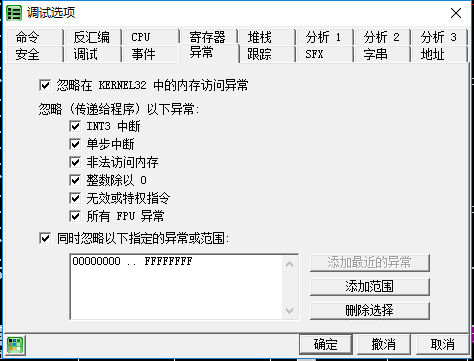
Options -> Debugging Options -> Exceptionsfrom the menu - Check all "Ignore exceptions" options
- Press
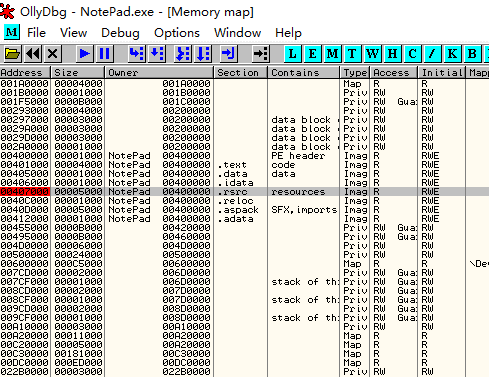
Alt+Mto open the memory image, find the program's first.rsrcsection, press F2 to set a breakpoint, then pressShift+F9to run to the breakpoint - Press
Alt+Magain to open the memory image, find the.textsection above the first.rsrc(at00401000in the example), press F2 to set a breakpoint, then pressShift+F9(or F9 if there are no exceptions)
Example
The sample program can be downloaded here: 4_memory.zip
Load the program in OD. In the menu Options -> Debugging Settings -> Exceptions tab, check all "Ignore exceptions" options.
Press Alt+M to open the memory image, find the resource section, which is the .rsrc section at Address=00407000, Size=00005000. Select it and press F2 to set a breakpoint.
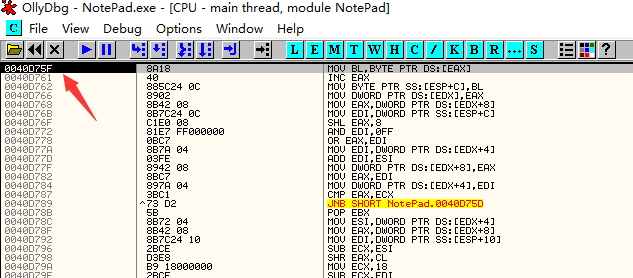
Return to the CPU window and press F9 to run. The program breaks at 0040D75F.
Press Alt+M again to open the memory image and set a breakpoint on the .text code section.
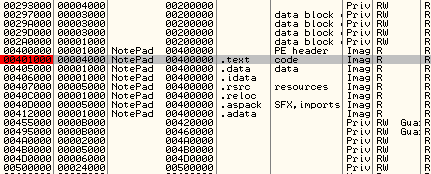
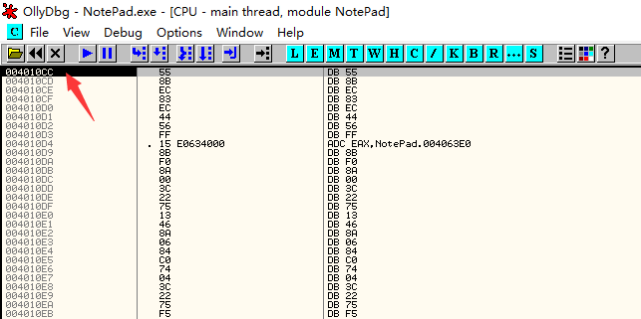
Continue running, and the program breaks at 004010CC, which is the OEP.