SFX Method
The "SFX" method utilizes OllyDbg's built-in OEP finding functionality. You can choose to have the program stop directly at the OEP found by OD, at which point the packer's decompression process has already finished, and you can directly dump the program.
Key Points
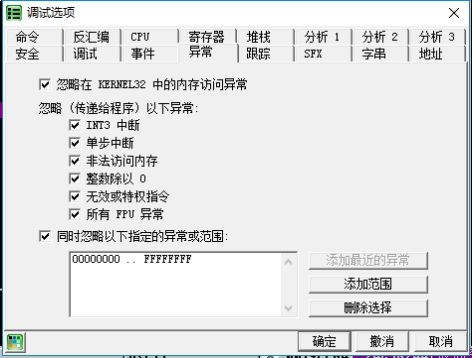
- Configure OD to ignore all exceptions — that is, check all boxes in the Exceptions tab
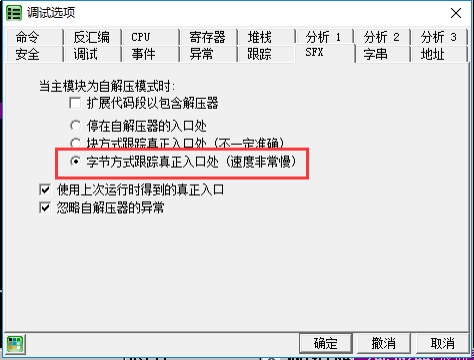
- Switch to the SFX tab and select "Trace real entry (very slow byte-level tracing)", then click OK
- Reload the program (if a prompt asks "Compressed code?", select "No", and OD will go directly to the OEP)
Example
The sample program can be downloaded here: 6_sfx.zip
First, in the menu Options -> Debugging Settings -> Exceptions tab, check all "Ignore exceptions" options.
Then switch to the SFX tab and select "Trace real entry (very slow byte-level tracing)".
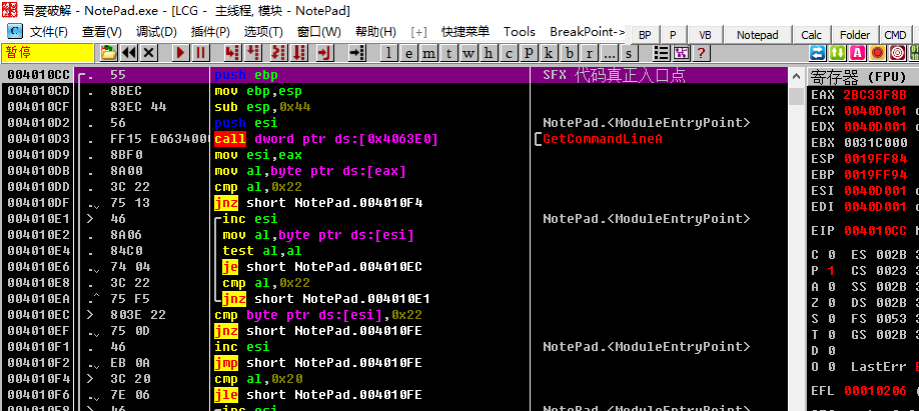
Reload the program. The program has already stopped at the code entry point, and there is no need to re-analyze the OEP.