Unpacking DLL Files
This section requires knowledge from the previous article: Manually Finding IAT and Rebuilding with ImportREC
The example file can be downloaded here: unpack_dll.zip
DLL unpacking requires this step. The most critical step in DLL unpacking is to modify the DLL flag using LordPE. Open UnpackMe.dll with LordPE, then click ... next to the Characteristics field, uncheck the DLL flag, and save. After this, the system will treat the file as an executable.
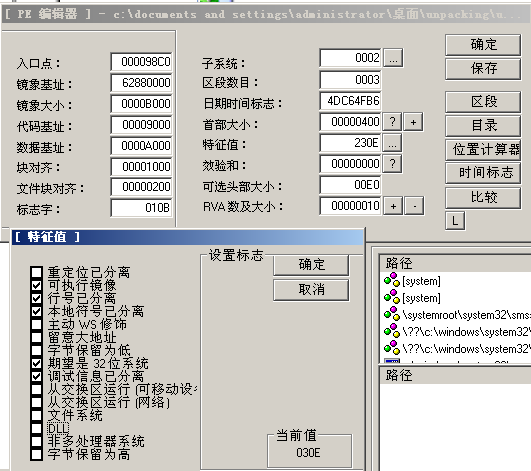
We change the UnpackMe.dll extension to UnpackMe.exe, then load it in OD.
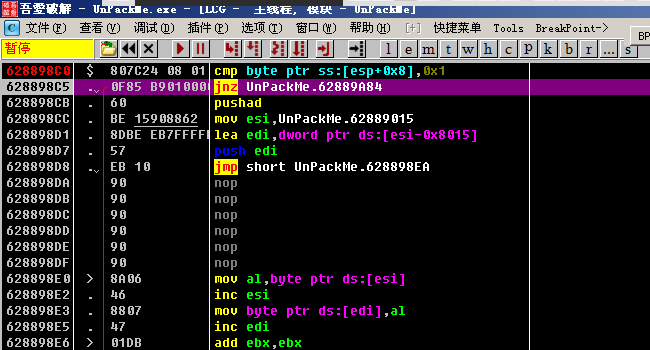
Generally at the entry point, the program saves some information. Here it is simple — only a cmp is performed. One thing to note is that the jnz jump here directly goes to the end of the unpacking process. Therefore, we need to modify the z flag in the registers to prevent the jump from being taken. At the same time, set a breakpoint at the end of the unpacking process to prevent the program from running directly after unpacking is complete. (The program will break at this breakpoint, but unpacking is already finished and the code is clear.)
The basic steps for DLL unpacking are the same as for EXE file unpacking. When rebuilding the IAT, you need to follow the previous article Manually Finding IAT and Rebuilding with ImportREC to manually find the IAT table and use ImportREC to rebuild it. Just note that after unpacking and dumping, remember to use LordPE to restore the DLL flag and change the file extension back to .dll.